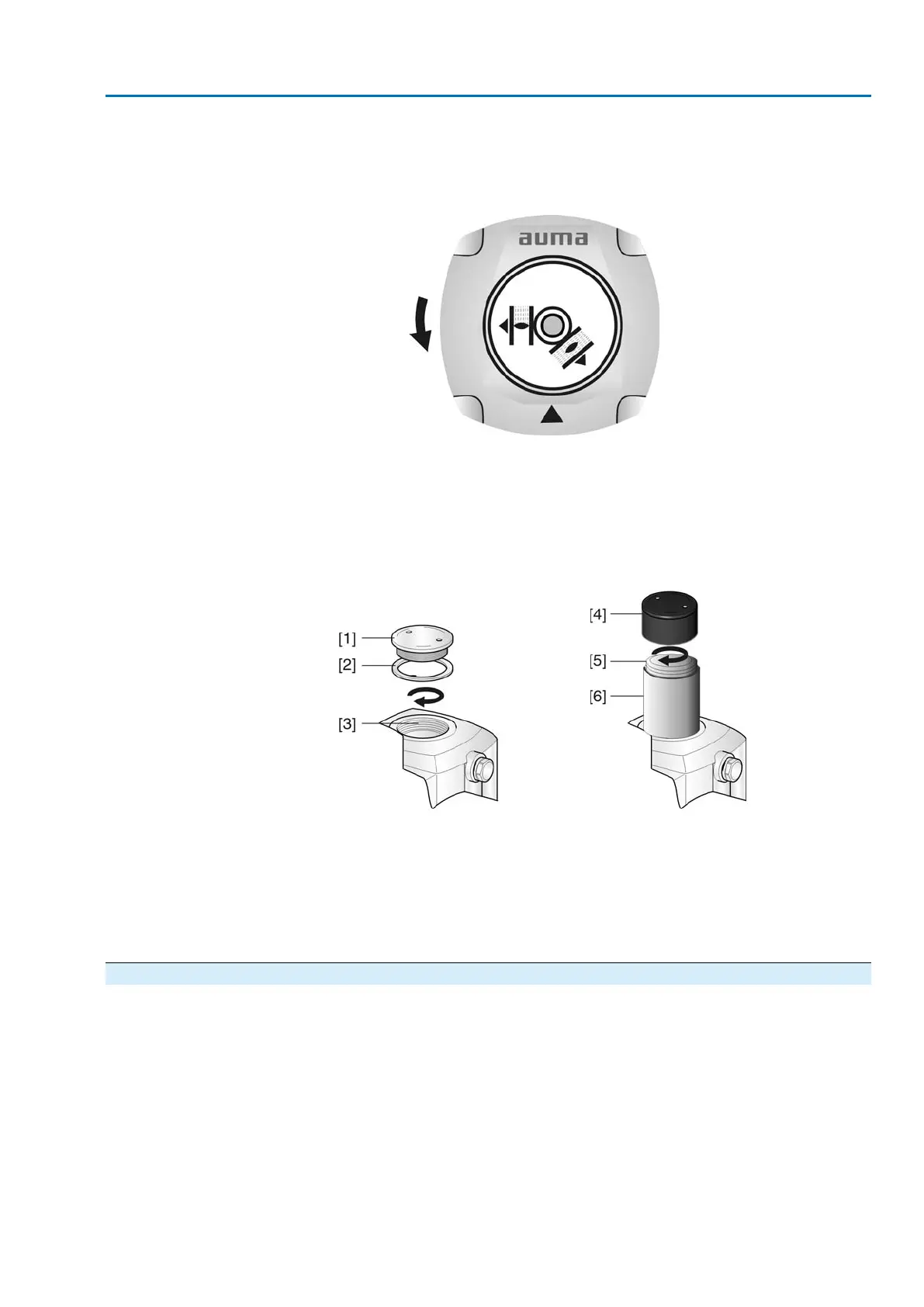
3. With indicator disc:
→
Observe direction of rotation.
➥
The direction of rotation is correct, if actuator runs in direction
CLOSE and indicator disc turns counterclockwise.
4. Without the indicator disc:
→
Unscrew threaded plug [1] and seal [2] or cap for stem protection tube [4]
and observe direction of rotation at hollow shaft [3] or the stem [5].
➥
The direction of rotation is correct, if actuator runs in direction CLOSE and
hollow shaft or stem turn clockwise.
Figure 30: Hollow shaft/stem
[1] Threaded plug
[2] Seal
[3] Hollow shaft
[4] Cap for stem protection tube
[5] Stem
[6] Stem protection tube
9.5.2 Limit switching: check
1. Move actuator manually into both end positions of the valve.
➥
The limit switching is set correctly if:
- LSC switch trips in end position CLOSED
- LSO switch trips in end position OPEN
- the switches release the contacts after turning back the handwheel
2. If the end position setting is incorrect: Reset limit switching.
3. If the end position setting is correct and no options (e.g. potentiometer, position
transmitter) are available: Close switch compartment.
29
SA 25.1 – SA 48.1/SAR 25.1 – SAR 30.1
Commissioning



 To Next Page