●
the push buttons on the local controls have not been operated within 10 minutes
●
or by briefly pressing C
Direct display via ID
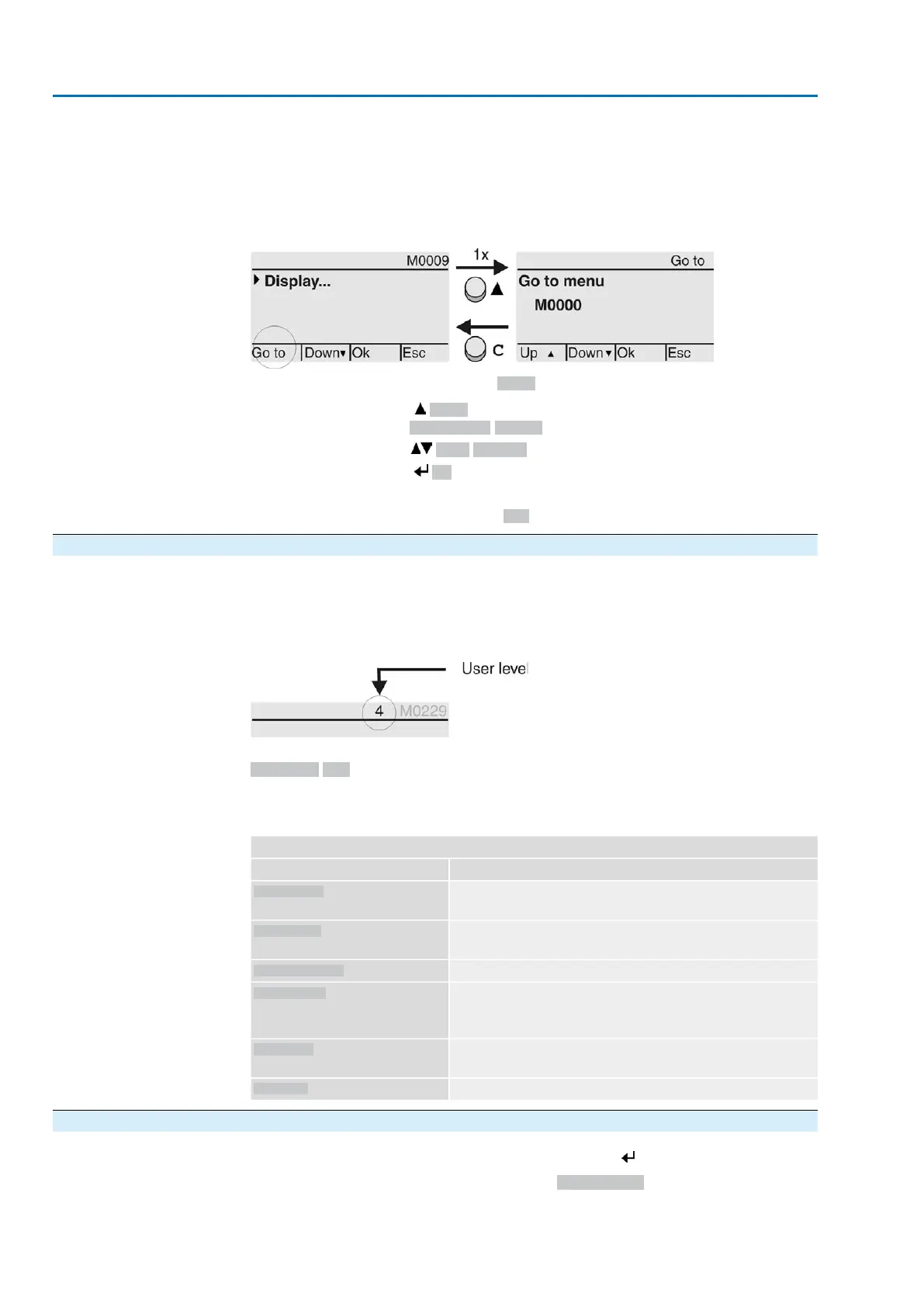
When entering the ID within the main menu, screens can be displayed directly (without
clicking through).
Figure 51: Direct display (example)
Display indicates in the bottom row: Go to
1.
Press push button Go to.
Display indicates: Go to menu M0000
2.
Use push buttons Up ▲ Down ▼ to select figures 0 to 9.
3.
Press push button Ok to confirm first digit.
4. Repeat steps 2 and 3 for all further digits.
5.
To cancel the process: Press C Esc.
6.4. User level, password
User level
The user level defines which menu items or parameters can be displayed or modified
by the active user.
There are 6 different user levels. The user level is indicated in the top row:
Figure 52: User level display (example)
Password
A password must be entered to allow parameter modification.The display indicates:
Password 0***
A specific password is assigned to each user level and permits different actions.
Table 22:
User levels and authorisations
Authorisation/passwordDesignation (user level)
Verify settings
No password required
Observer (1)
Change settings
Default factory password: 0000
Operator (2)
Reserved for future extensions
Maintenance (3)
Change device configuration
e.g. type of seating, assignment of output contacts
Default factory password: 0000
Specialist (4)
Service staff
Change configuration settings
Service (5)
AUMA administrator
AUMA (6)
6.4.1. Password entry
1.
Select desired menu and hold down push button for approx. 3 seconds.
➥
Display indicates the set user level, e.g Observer (1)
50
SAVEx 07.2 – SAVEx 16.2 / SARVEx 07.2 – SARVEx 16.2 Control unit: electronic (MWG)
Operation ACVExC 01.2 Non-Intrusive Modbus RTU



 To Next Page