6.5 Language change in the display
Via the menu to parameter:
MAIN MENU (M0)
LANGUAGE/CONTRAS (M00)
VIEW (M00)
EDIT (M01)
LANGUAGE (M010)
Default value: ENGLISH
Setting range: ENGLISH, GERMAN, MAGYAR, POLSKI, TUERKCE,
PORTUGUESE, ITALIAN, SPANISH, FRENCH
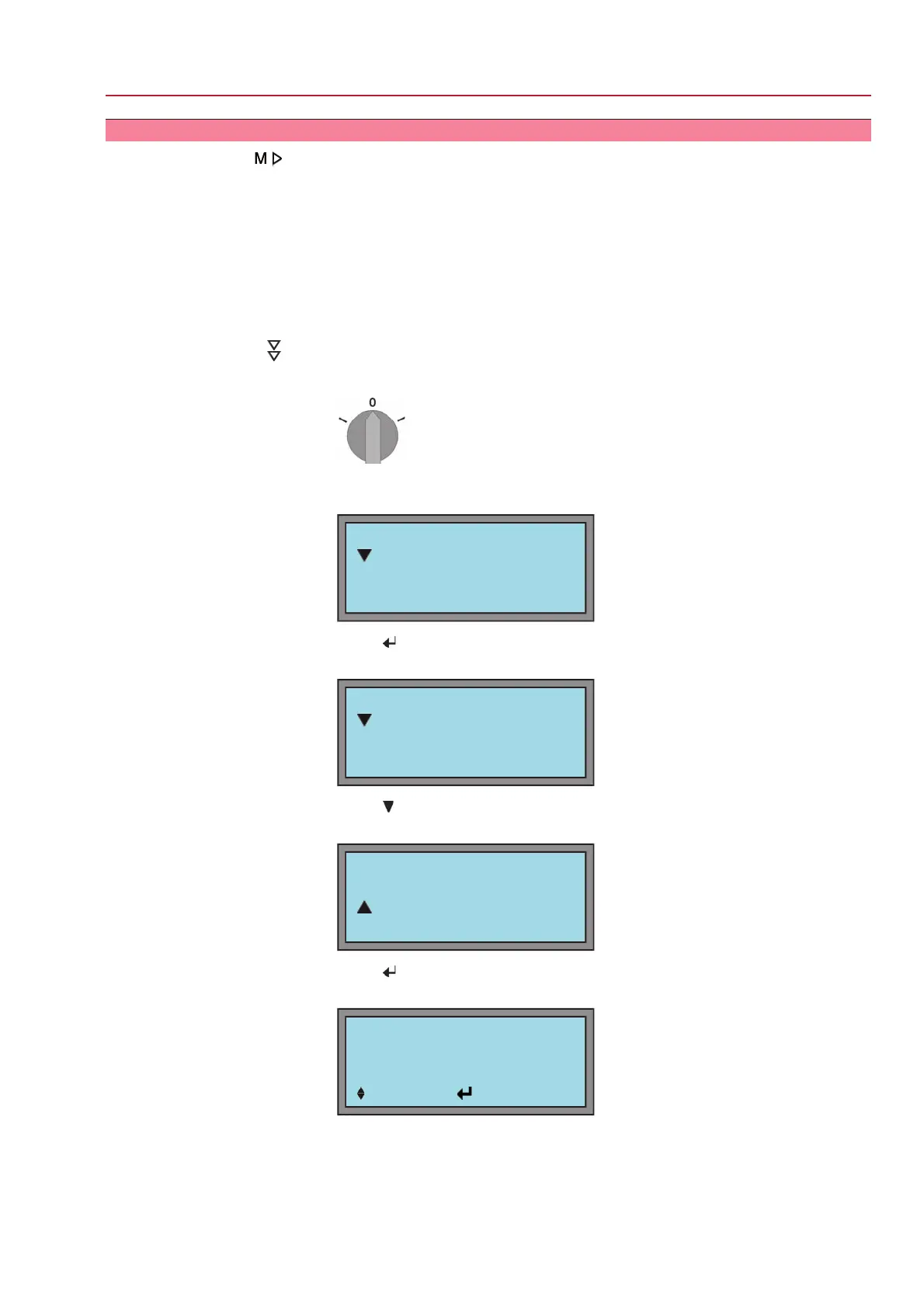
Step by step:
1. Set selector switch to position 0 (OFF).
2. Press C and hold it down for approx. 3 seconds.
➥
Display indicates:
MAIN MENU M0
LANGUAGE/CONTRAST
SETTINGS
OPERATIONAL DATA
3.
Press .
➥
Display indicates:
LANGUAGE/CONTRAS M00
VIEW
EDIT
4.
Press
.
➥
Display indicates:
LANGUAGE/CONTRAS M01
VIEW
EDIT
5.
Press .
➥
Display indicates:
ENTER PASSWORD
0 * * *
:EDIT :OK C:ESC
31
SG 05.1 – SG 12.1/SGR 05.1 – SGR 12.1 Control unit: electromechanic
AC 01.1 Intrusive Modbus RTU Operation



 To Next Page
 Loading...