Clou Pellet / Clou Compact Pellet User instruction 13 English
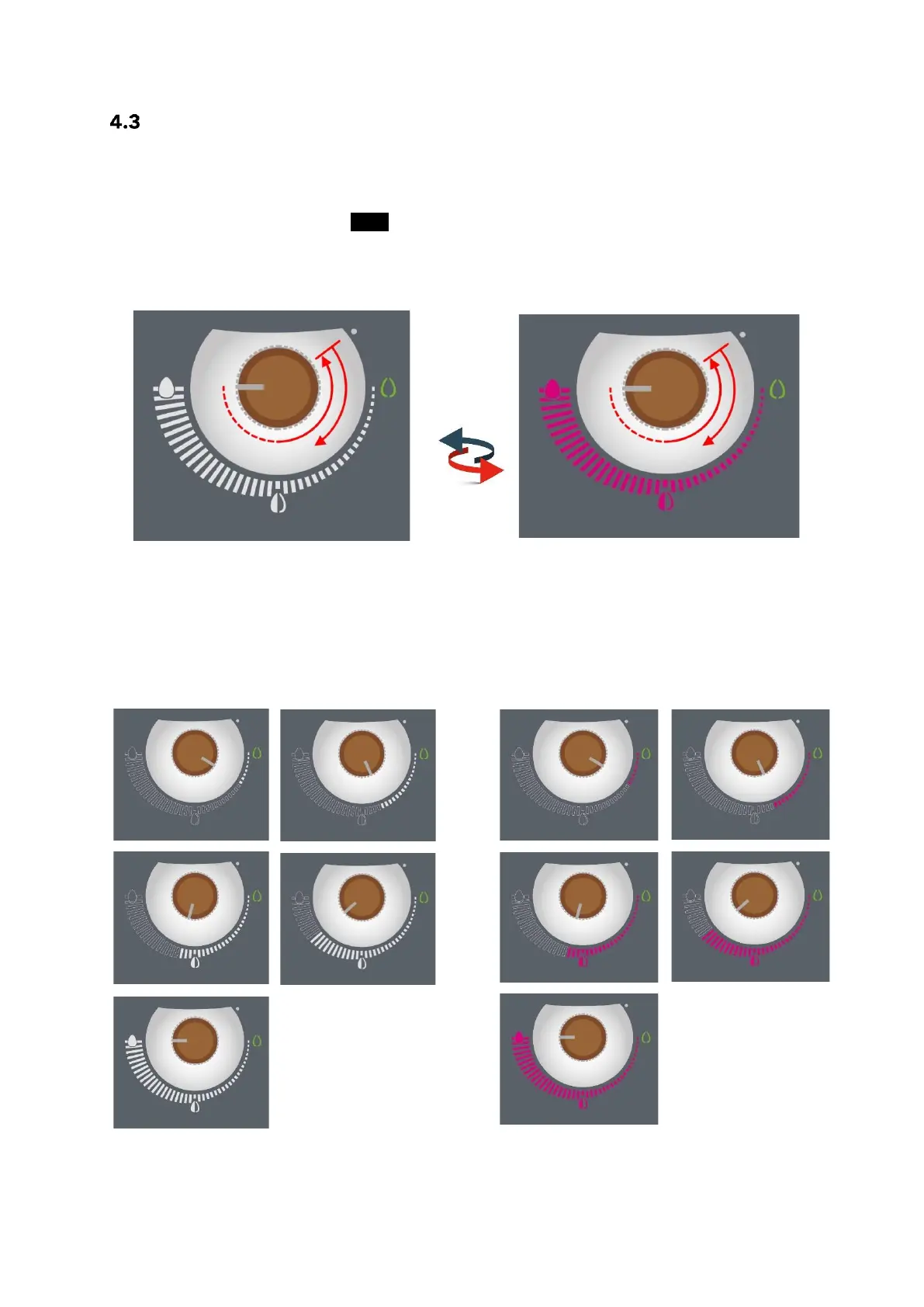
Setting the desired heat output or room temperature
To switch between the setting for "heat output" and "room temperature", turn the dialing knob
anticlockwise to the "OFF" position while the stove is in operation, then immediately turn it
clockwise again to the desired position.
The display changes colour from “white“ – heat output display to “magenta“ – room setpoint tempera-
ture display.
CAUTION: Thess functions are only possible while the stove is in operation.
4.3.1 Heat output – 5 levels
The heat output can be set from 30 % to 100 %
of the nominal heat output in 5 levels.
Simply turn the dialing knob to the desired
power level. The illuminated field shows the set
power level. After setting the power level, your
selection will be confirmed after approx. 5 sec-
onds with a short flash.
4.3.2 Setting the room temperature
The room temperature can be set in the range
of +5 °C (frost protection) to +40 °C. After set-
ting the desired room temperature, your selec-
tion will be confirmed with a short flash after
approx. 5 seconds.
It is impossible to display an exact temperature
on the stove. Set the temperature as you see
best.


 To Next Page