ATS Series Instruction Manual10
12. Safety Testing
Test the Close Cycle
a. Press the OPEN button or transmitter button to open the door
(If the door starts closing, press the transmitter button to stop the
door, then press transmitter again to open).
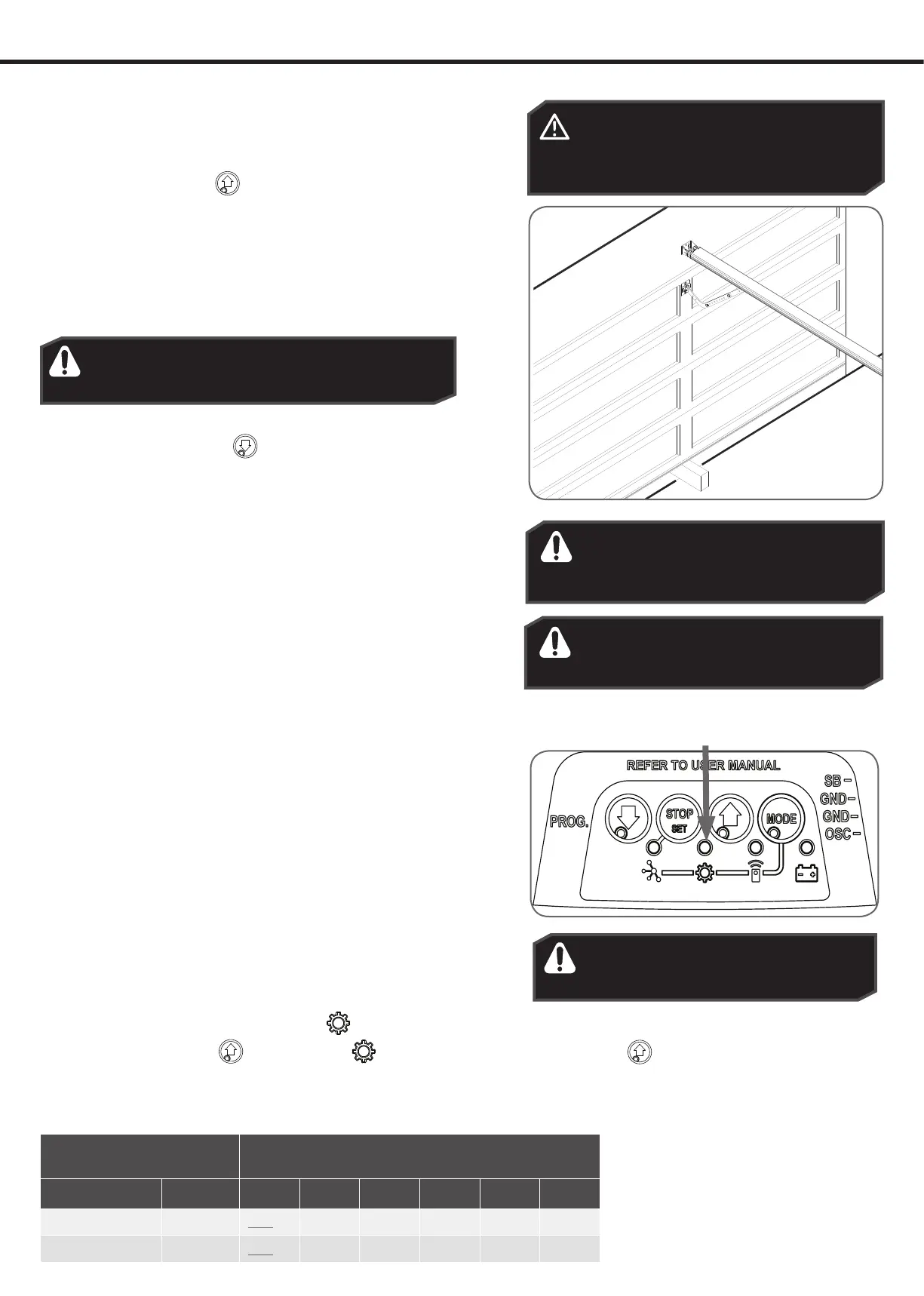
b. Place a piece of timber 40mm high on the floor directly under the
door.
c. Press the transmitter button to close door.
d. The door should strike the object and re-open.
e. Remove the timber.
Testing the Open Cycle
a. Press the CLOSE button or transmitter button to close the
door.
b. Press the transmitter button again to open the door.
c. When the door reaches approximately half way, firmly grab the
door’s bottom rail - the door should stop.
If the door does not reverse readily when closing, or stop when
opening, put the door into manual by pulling down on the manual
release string to disengage the motor and contact 13 62 63 for
support.
Test the Manual Door Operation
Periodically disengage the opener and manually operate the door.
The door must be smooth to operate by hand. The force required on
the bottom rail should not exceed 20kg.
CAUTION: Take care when completing a
safety test. Failure to follow this warning
can result in serious personal injury and/or
property damage.
WARNING! If the door is closing and is unable
to re-open when obstructed, discontinue use.
Do not use a door with faulty obstruction sensing.
Wood 40mm high
WARNING! If the door fails these tests,
put the opener into manual mode, only
operate the door by hand and call for
service.
13. Auto-Close
WARNING! It is compulsory to have
Safety Beams installed when using
Auto-Close mode.
Auto-Close mode is a function that automatically closes the door after
a pre-set time. Safety beams must be installed in order to run the Auto-
Close function. There are two types of Auto-Close available:
i. Standard auto-close - the door will Auto-Close after a
programmed time. In this mode the timer starts to countdown
as soon as the door is fully open. This function is useful in case
the safety beam does not get triggered.
ii. Safety Beam triggered auto-close - the door will auto-close
after a programmed time. In this mode the timer starts counting
down only when the safety beam is triggered. ie car leaving the
garage.
To enable the Auto-Close function:
a. Press the MODE button until the GEAR
LED starts flashing.
b. Press the OPEN button
until the GEAR LED flashes:
i. two (2) times to get to PE auto-close or
ii. three (3) times to get to standard auto-close.
c. Press STOP / SET button to enter parameter.
d. The default setting for Auto-Close is OFF. Press the
OPEN button
to move through options and the
light’s brightness will change accordingly.
e. Press STOP / SET button to save the parameter’s new
value or press MODE to leave the value unchanged.
Parameter Value options = Indicated by brightness of
main light (DEFAULT parameter underlined)
Name Flashes 1 2 3 4 5 6
PE AUTO-CLOSE 2 OFF 15sec 30sec 60sec 90sec -
AUTO-CLOSE 3
OFF 15sec 30sec 60sec 90sec 120sec
WARNING! Safety beams must be
installed if the closing force at the bottom
edge of the door exceeds 400N (40kg).








 To Next Page