ATS Series Instruction Manual14
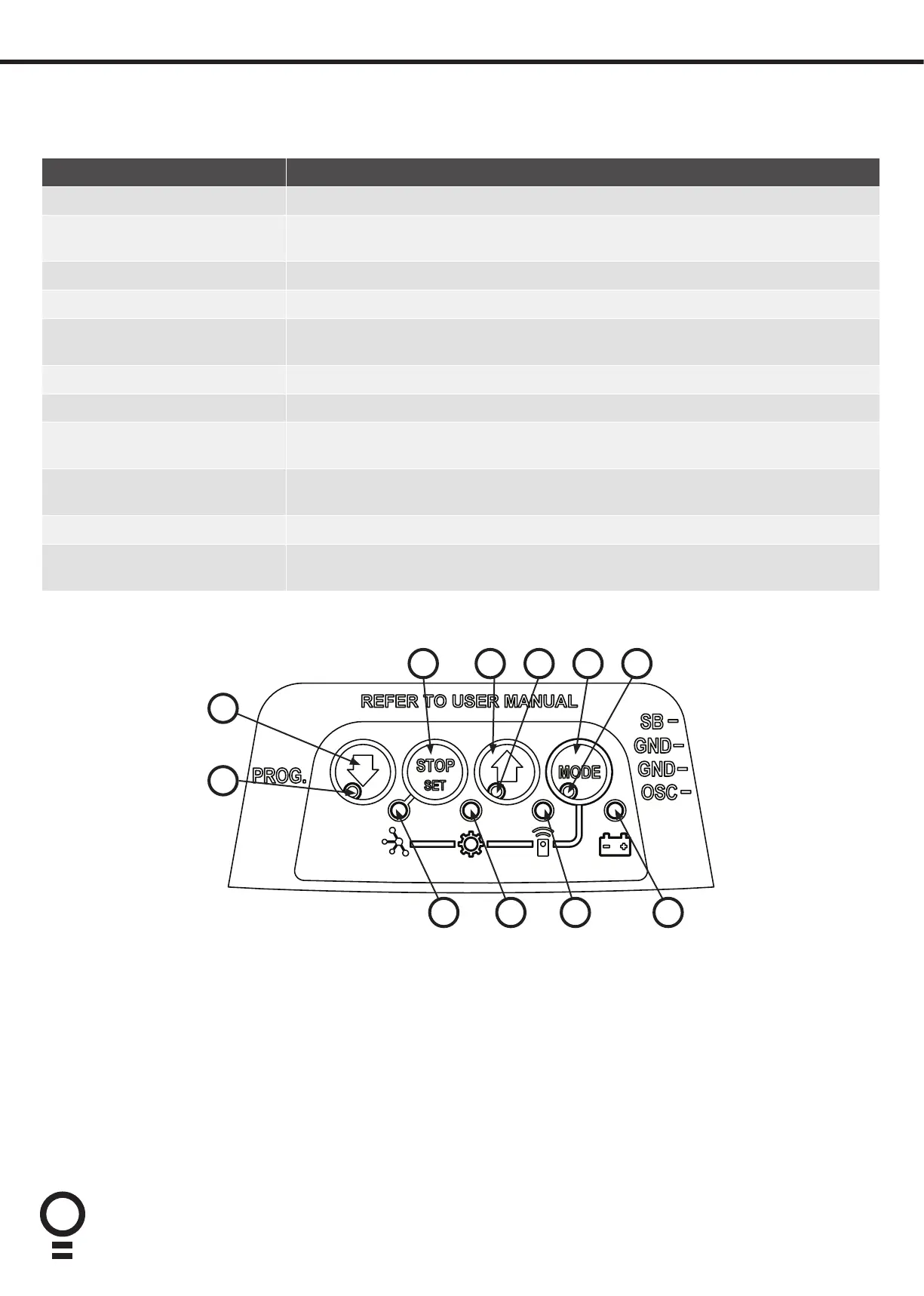
18. User Operating Controls
05 06 07
01
02
03 04
Button Function
1. DOWN ARROW (Blue) Closes the door
2. DOWN ARROW LED (Blue) Illuminates when the door is closed and flashes when the door is obstructed on close
or stopped.
3. STOP (Red) Stops the door
4. UP ARROW (Green) Opens the door
5. UP ARROW LED (Green) Illuminates when the door is open and flashes when the door is open with the auto-
close timer running, obstructed on opening or stopped.
6. MODE (Yellow) Enables Load Diagnostics Mode
7. MODE STATUS LED (Yellow) Illuminates when in Diagnostics Mode
8. BATTERY STATUS LED (Yellow) Illuminates when battery is charged and flashes when battery is charging, in use or
battery failed. Battery function not available with ATS-2 model.
9. REMOTE CONTROL
STATUS LED (Red)
Flashes on remote lockout and flickers on remote control activity
10. ADJUSTMENT LED (Yellow) Flashes a certain number of times depending on the parameter being changed.
11. NETWORK LED
(Not Available with ATS-2)
08091011








 To Next Page