ATS Series Installation Manual11
12. Setting Limits
tip
CAUTION! Limit setup is not available when
running on battery backup
Refer to Appendix F for setting limits via a
transmitter. NOTE - Speed of the opener can
not be adjusted when using this method.
tip
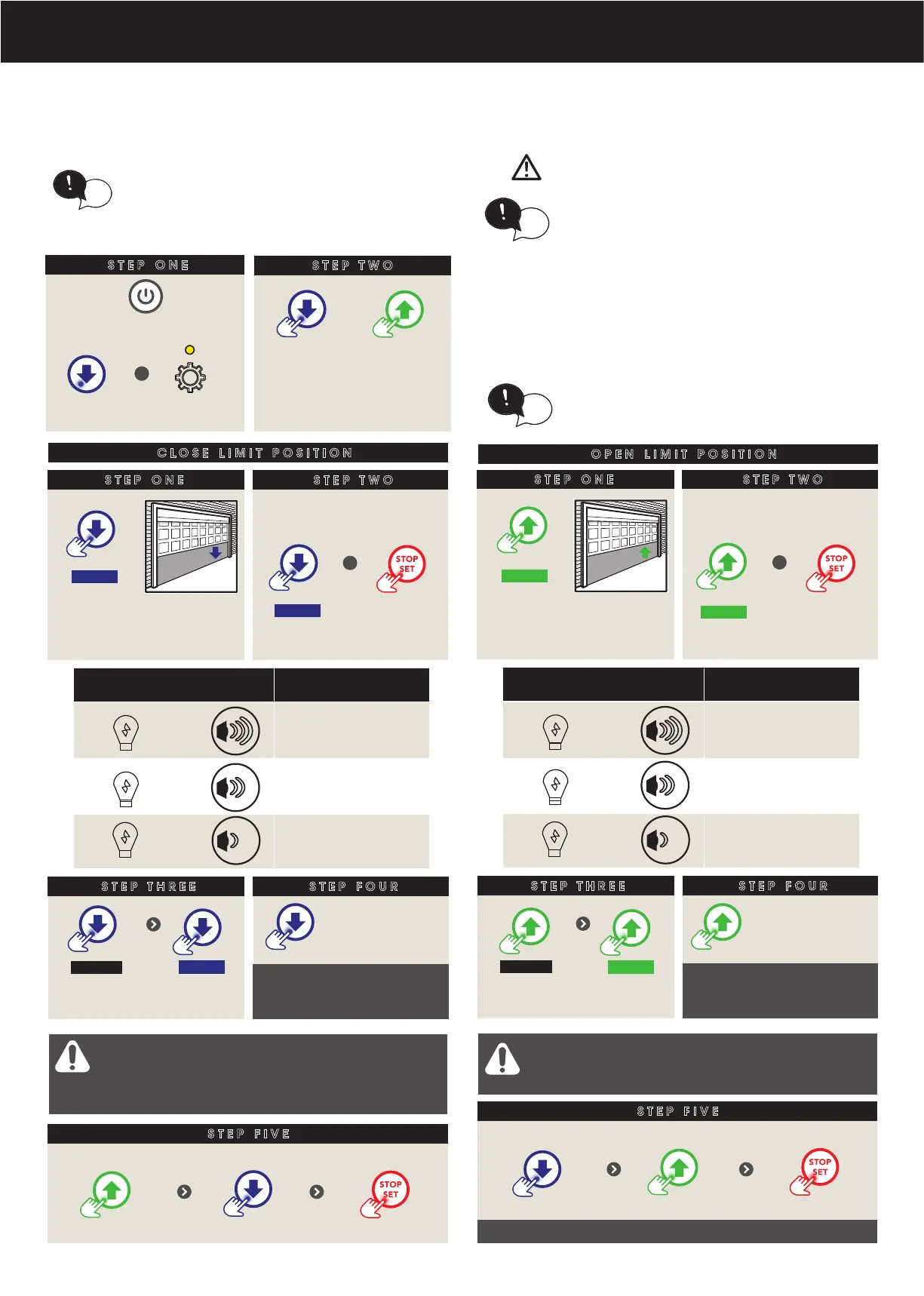
12.1 Set the Limit Positions and adjust drive speed:
STEP ONE
When setting the Close limit, ensure the position
is when the door makes rst contact with the
ground. Alternatively for the Open limit the
position should be at the height of the garage
opening.
STEP TWO
Switch power on
To move the door to the
halfway point.
tip
+
BLUE LED will ash
& gear LED lit
OR
NOTE: The drive speed is set to the fastest setting by
default. This may not be suitable for larger doors or for
single piece doors. For tilt doors (J-Type only), please refer
to Appendix G for initial setup.
STEP FOUR
STEP ONE
CLOSE LIMIT POSITION
STEP TWO
HOLD
Take note of the speed as
door moves
STEP THREE
If Close speed not suitable,
release button, THEN
HOLD
+
Each press
changes speed
as per table
MAIN LIGHT & BEEPER SPEED MODE
x 3 + 3 x FAST (Default)
x 2 + 2 x MEDIUM
x 1 + 1 x SLOW
RELEASE
When at
desired speed
STEP FIVE
When door near
close, single
presses inch door
Press to
close door
HOLD
CLOSE limit should be
when rubber strip touches
the ground
WARNING! In setting the close limit position,
do not force the door into the oor with
excessive force, as this can interfere with the
ease of operation of the manual release
mechanism.
If door overshoots
Press
Press to position Press to set
STEP FOUR
STEP ONE
OPEN LIMIT POSITION
STEP TWO
HOLD
Take note of the speed as
door moves
STEP THREE
If Open speed not suitable,
RELEASE button, THEN
+
Each press
changes speed
as per table
MAIN LIGHT & BEEPER SPEED MODE
x 3 + 3 x FAST (Default)
x 2 + 2 x MEDIUM
x 1 + 1 x SLOW
RELEASE
When at
desired speed
STEP FIVE
When door near
open, single
presses inch door
Press to
open door
OPEN limit should be the
height of the garage
opening
WARNING! The door will automatically close.
open and close again after the next step.
Ensure that nothing is in the door’s path.
If door overshoots
Press
Press to position Press to set
HOLD
HOLD
Door will open & close to calculate safety obstruction settings
Refer to Appendix B & C for adjustments
to margins and Appendix E to set the PET
Mode position



 To Next Page