ATS Series Installation Manual15
14.2 Terminal Block
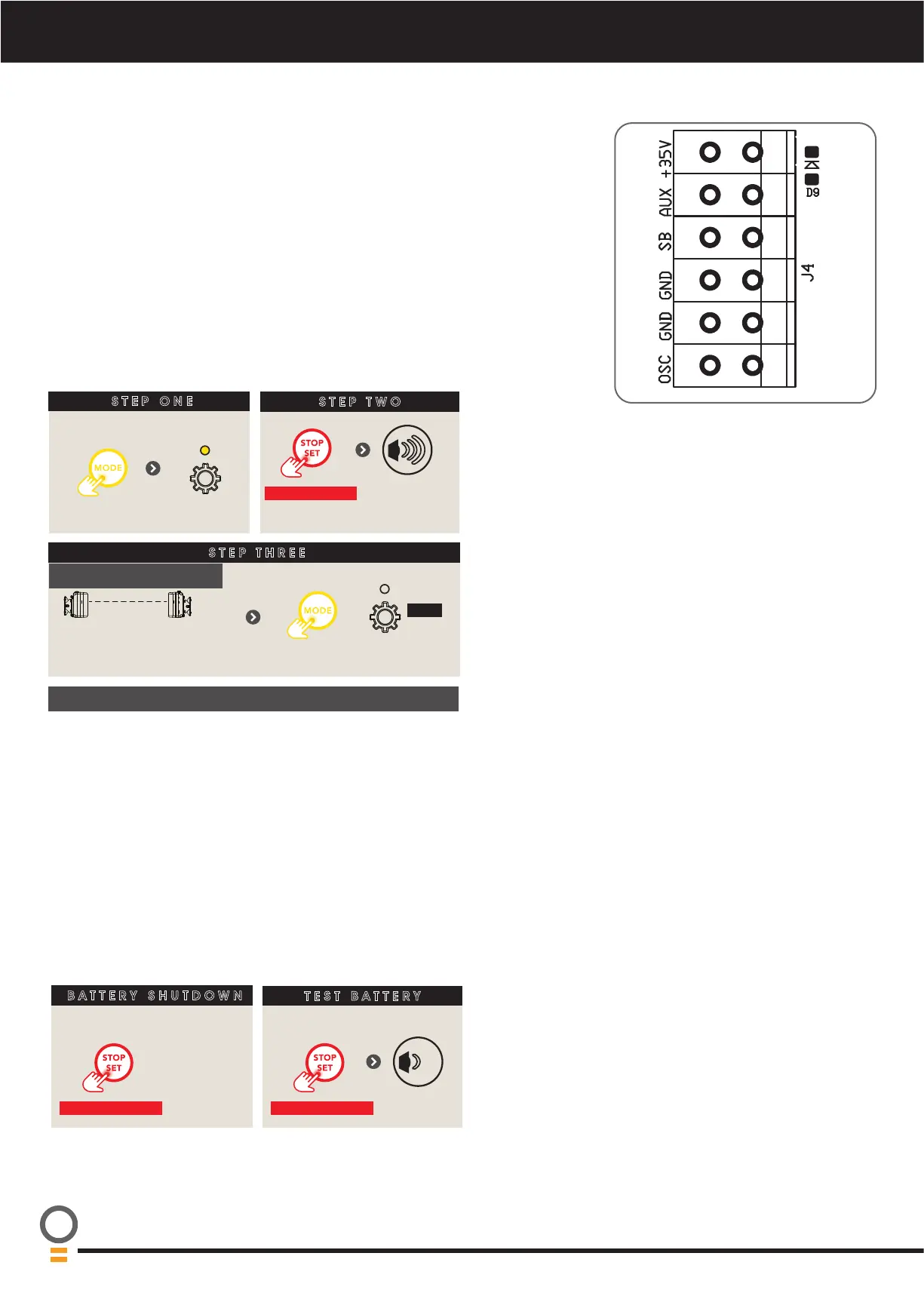
Wired accessory items can be connected to the terminal block J4.
Terminal connections from top down are as follows:
a. +35V (Auxillary)
b. AUX (Auxillary)
c. SB (Safety Beam input, mandatory);
d. GND (Common ground for accessories and Safety Beam);
e. GND (Common ground)
f. OSC (Open/Stop/Close trigger)
14.3 Connecting or Disconnecting Accessories
The opener can hold up to 4 accessories. For example Tempo;
• Wireless PE Beams
• Smart Hub
STEP ONE
STEP TWO
STEP THREE
Remove controls cover
till gear
LED lit
Press
repeatedly
CONNECT OR DISCONNECT ACCESSORIES
Alignment Mode is
entered.
Ensure Alignment.
For PE Beams
HOLD for 2 secs
till
3 beeps
are heard
OFF
Then replace controls cover
Re-registering is required every time an accessory is removed.
14.4 Battery Backup (Optional)
When installed, Battery backup keeps the opener functional when
mains power is turned off, however note the following;
i. Phone app (if installed) operation will depend on the availability
of Wi-Fi connectivity
ii. Limit setup is not available when running from batteries.
iii. Battery backup will not be activated if the PG3 has connected
to the opener 60 secs prior to mains power being turned
off. This is to allow a reboot to take place without having to
shutdown battery backup.
iv. Battery backup will not be activasted if a fault is active prior to
mains power being tunred off. This allows opener power to be
cycled to reset fault.
BATTERY SHUTDOWN
TEST BATTERY
When under battery power
HOLD for 10 secs
To manually
shutdown
opener
When under mains power
HOLD for 4 secs
till
beep



 To Next Page