EasyManua.ls Logo

Automatic Technology TEMPO ATS-2V3 - Erasing Transmitter Codes; Vacation Mode Operation; Install Wall Mounted Transmitter

Automatic Technology TEMPO ATS-2V3
29 pages
Print Icon
To Next Page IconTo Next Page
To Previous Page IconTo Previous Page
Loading...
ATS Series Installation Manual17
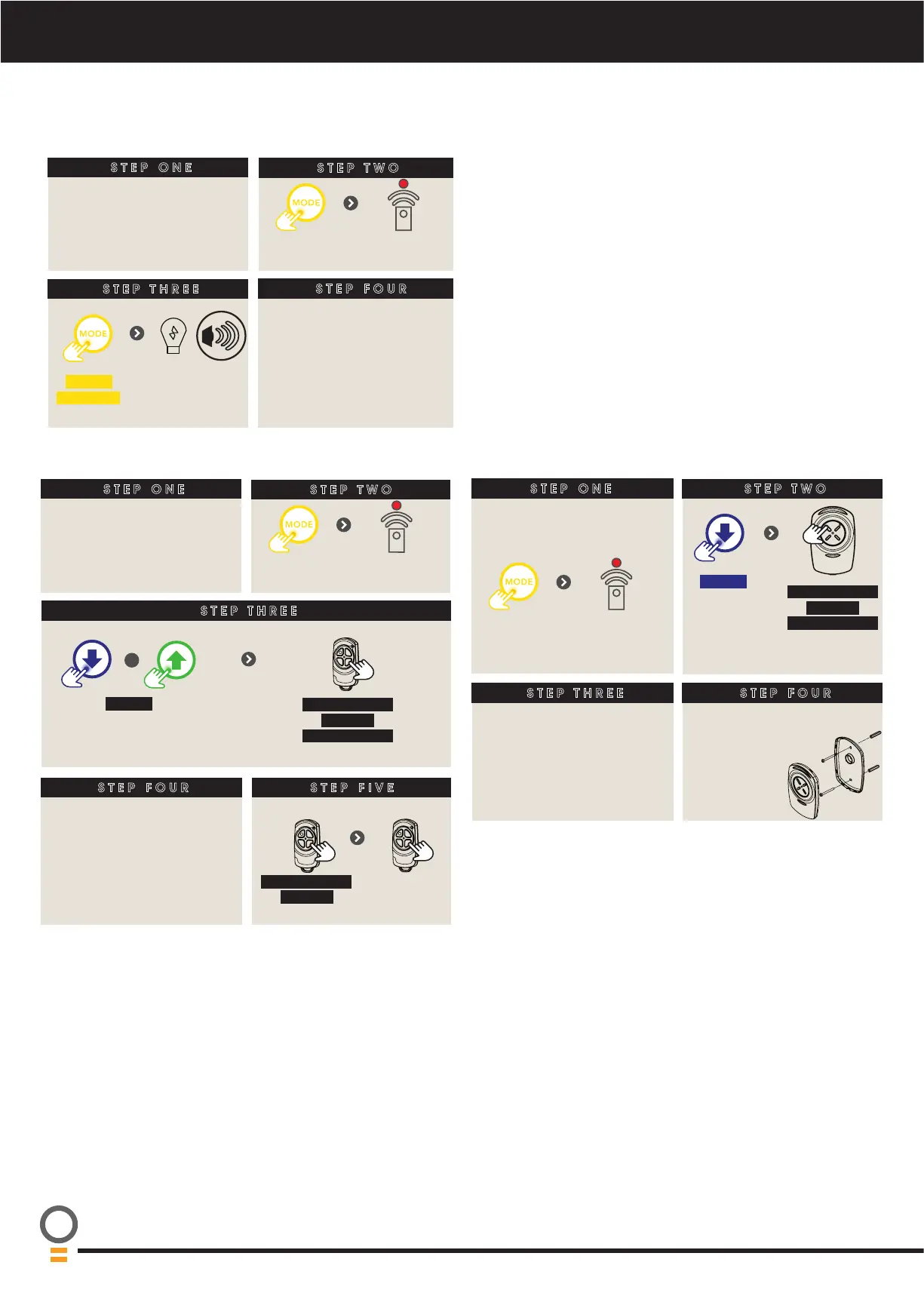
15.3 Erasing All Transmitter Codes
STEP ONE
STEP TWO
STEP THREE
Remove controls cover
till remote
LED lit
Press
repeatedly
HOLD
for 10 sec
Release when
ashing and
beeping stops
STEP FOUR
Follow Section 15.1 to store
new transmitter codes
ERASING ALL TRANSMITTER CODES
15.5 Installing the Wall Mounted Transmitter
15.4 Vacation Mode
STEP FOUR
STEP ONE
Remove controls cover
till remote
LED lit
Press
repeatedly
STEP TWO
HOLD
Opener
ashes &
beeps
HOLD for 3 sec
HOLD for 3 sec
RELEASE
Release both
buttons
STEP THREE
Then ret
controls cover
Mount in view
of door, away
from children &
at least 1.5m
above oor.
VACATION MODE
STEP THREE
HOLD
Opener ashes &
beeps
HOLD for 3 sec
HOLD for 3 sec
RELEASE
Release all buttons
STEP FOUR
Then ret
controls cover
STEP ONE
STEP TWO
Remove controls cover
till remote
LED lit
Press
repeatedly
+
STEP FIVE
Turn on
HOLD for 4 sec
RELEASE
Turn off
Press, then
try another
remote

Related product manuals