Page 42 - CCFP Options Menus
Page 42 DECT - Installation Manual
Preferences 38HBKD0001SAH – Issue 14 (27th October 2003)
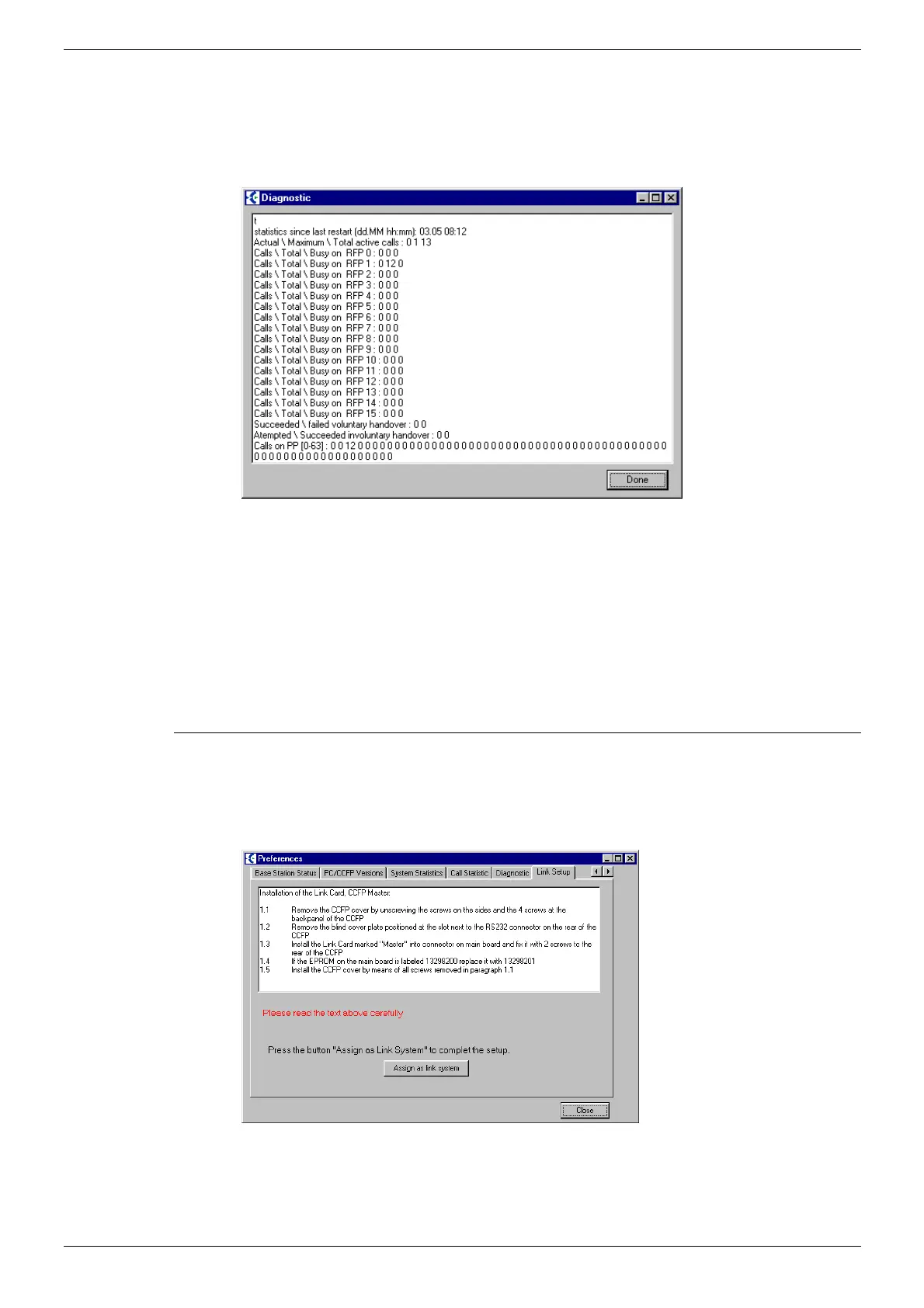
Diagnostics.
The CCFP Administration Program V5 has the ability to show as a real
time ‘snap-shot’ of the Base Station Activity. Statistics are built from the
last power up or DCU restart. The DCU. requires the input of the time and
date when first fitting on company premises to ensure correct time scales
are seen in the event of investigating any problems on site.
The activity log will be seen in three parts –
• Calls: A ‘snap-shot’ of the real amount of calls associated against
the Base Station number.
• Total: A ‘snap-shot’ of the amount of calls that have been received
against that Base Station. This will increment by one for
every new call AND every Hand-over to that Base Station
from another Base Station.
• Busy on: A ‘snap-shot’ if any Base Station has had all Four
Channels Busy.
Link Set up
The CCFP Administration Program V5 will automatically assign the set up
for a correct default Master/Slave link system. This will not be applicable to
a ‘Solo’ system as there will not be a ‘Master’ daughter board located
within the DCU.



 To Next Page