10
Initial Setup
Connect the power cord to the power socket after you have completed all the
physical connections. At this stage, the TV will enter Standby Mode and the red LED
indicator will illuminate.
In Standby Mode, press the
button on the main unit or on the remote control to
turn the TV on.
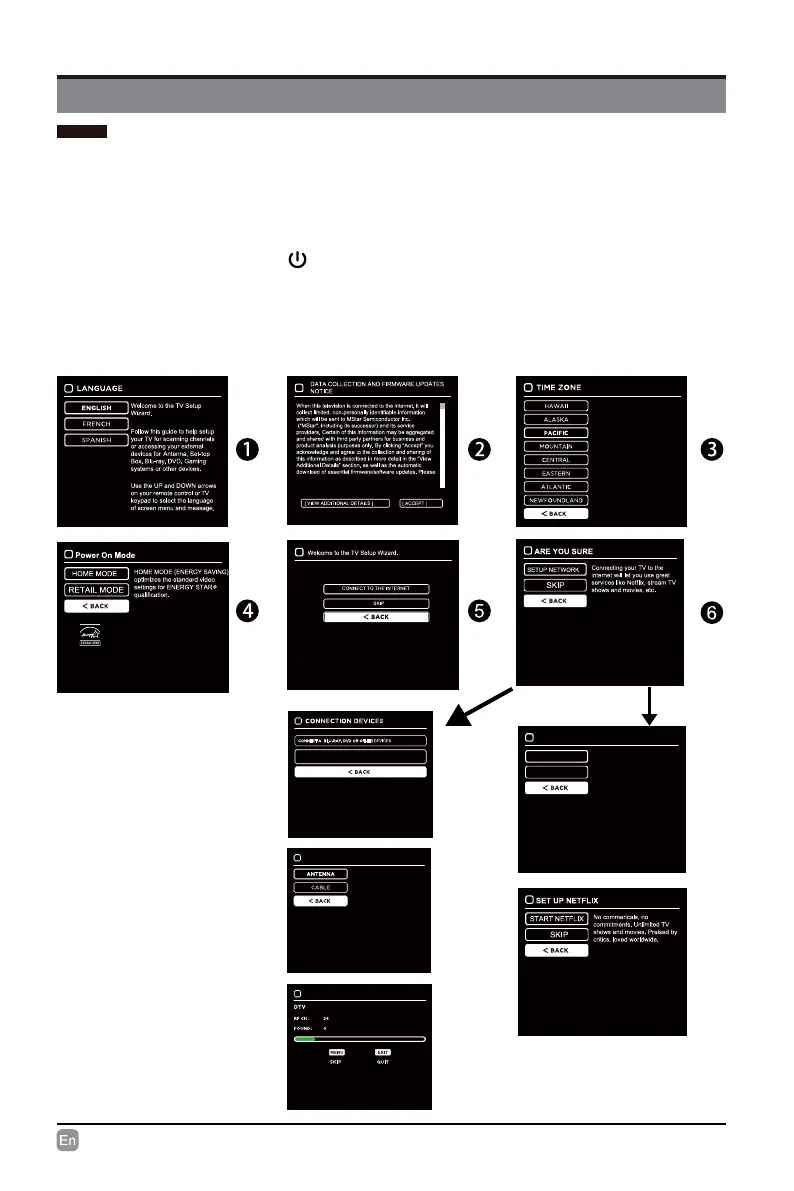
The rst time you turn the TV on, it will go into the Setup Wizard. Press the Arrow
buttons to highlight and select your desired mode and press OK to conrm.
CUSTOMIZING TV SETTINGS
• If channels cannot be found,
this frame will be displayed
automatically.
Use the UP and DOWN arrows
on your remote control or TV
keypad to select your local time
zone.
NETWORK
Use the UP and DOWN arrows
on your remote control or TV
keypad to select the network
scan type.
WIRELESS
WIRED
SCAN CHANNELS FROM THE ANTENNA OR COAXIAL CABLE INPUT
SCANNING CHANNELS
Use the UP and DOWN arrows
on your remote control or TV
keypad to select the channel
scan type.
SCANNING CHANNELS


 To Next Page