21
CUSTOMIZING TV SETTINGS
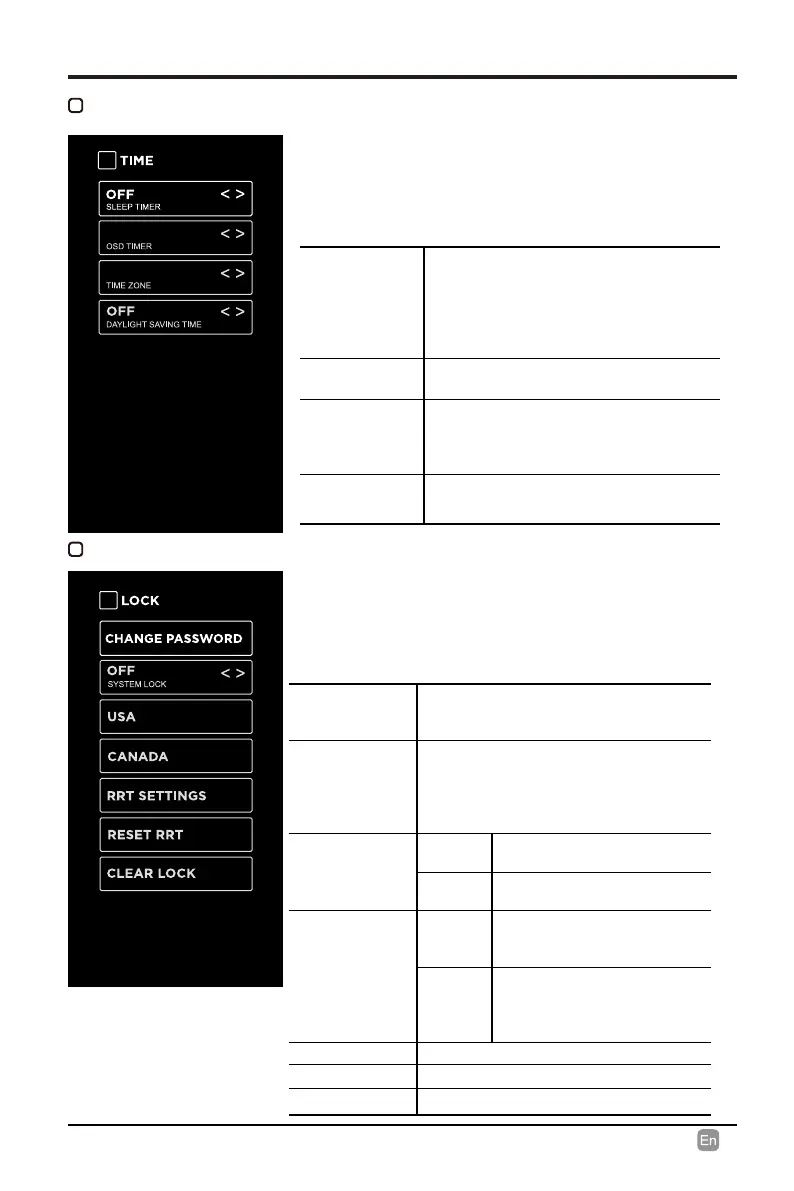
SLEEP TIMER
Select a period of time after which the TV
automatically switches to standby mode:
O/5/10/…/180/240 min.
Alternative: You may press the SLEEP
button repeatedly to select the number of
minutes directly.
OSD TIMER
Set the OSD timer:
O/15s/30s/60s/120s/240s.
TIME ZONE
Select a Time Zone:
PACIFIC/ALASKA/HAWAII/
NEWFOUNDLAND/ATLANTIC/
EASTERN/CENTRAL/MOUNTAIN.
DAYLIGHT
SAVING TIME
Select to turn daylight saving time On/O.
TIME
• Press MENU to display the main interface, use
the Arrow buttons to highlight TV SETTINGS and
press OK to conrm. Then use the Arrow buttons
to select TIME to enter and adjust each option
setting.
LOCK
Note: the default password is “0000”.
CHANGE
PASSWORD
Use 0-9 buttons to input the old password
and then input the new 4-digit password.
Re-enter new password for conrmation.
SYSTEM LOCK
Select to turn On/O system lock. The
following options (USA, Canada, RRT
Setting and Reset RRT) will only be
accessible when you turn the system lock
on.
USA
TV
TV RATING: Press OK button
to lock or unlock TV rating.
MPAA
Select MPAA rating : N/A,G,
PG, PG-13, R, NC-17,or X.
CANADA
Canada
English
Select MPAA rating for
English-speaking Canada : E,
C, C8+, G, PG, 14+, 18+.
Canada
French
Select MPAA rating for
Quebec Canada : E, G, 8
ans+, 13 ans+, 16 ans+, 18
ans+.
RRT SETTING Set Rating Region Table.
RESET RRT Select to reset the RRT setting.
CLEAR LOCK Clear all lock settings.
• Press MENU to display the main interface, use
the Arrow buttons to highlight TV SETTINGS and
press OK to conrm. Then use the Arrow buttons
to select LOCK to enter and adjust each option
setting.
30S
PACIFIC


 To Next Page