19
CUSTOMIZING TV SETTINGS
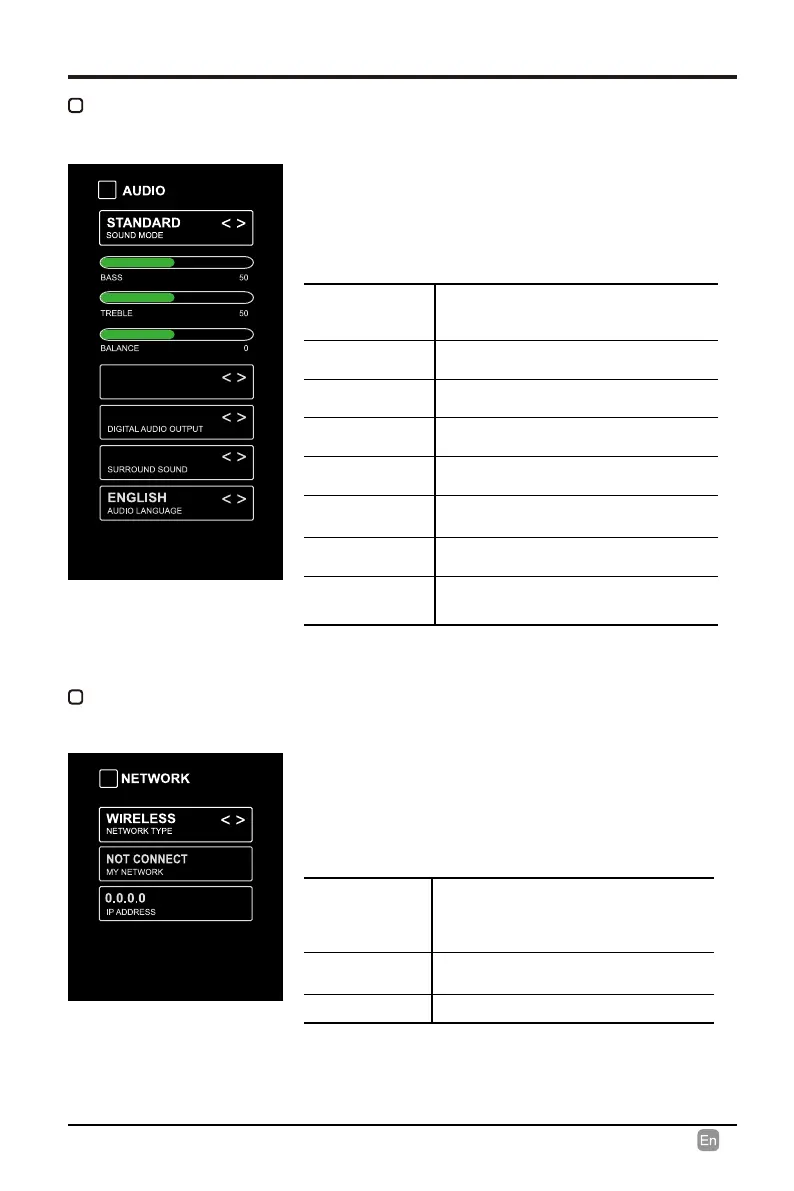
AUDIO
SOUND MODE
Allow the selection of an audio-
enhancement technique: Standard/
Music/Movie/User.
BASS
Control the relative intensity of lower-
pitched sounds.
TREBLE
Control the relative intensity of higher-
pitched sounds.
BALANCE
Adjust the relative volume of the
speaker in a multiple speaker system.
AUTO VOLUME
Turn On/O to automatically control
volume levels.
DIGITAL AUDIO
OUTPUT
Select the digital audio output mode
between PCM/RAW.
SURROUND
SOUND
Turn On/O to provide an enhanced
listening experience.
AUDIO
LANGUAGE
Select audio language among: English,
French, Spanish.
NETWORK
TYPE
Select Wired and Wireless network,
then connect the TV to the wired
network or search the wireless network
through searching available Wi.
MY NETWORK
Display the current network which you
connect to.
IP ADDRESS
Display the current IP information.
NETWORK
• Press MENU to display the main interface, use
the Arrow buttons to highlight TV SETTINGS and
press OK to conrm. Then use the Arrow buttons
to select AUDIO to enter and adjust each option
setting.
• Press MENU to display the main interface, use
the Arrow buttons to highlight TV SETTINGS and
press OK to conrm. Then use the Arrow buttons
to select NETWORK to enter and adjust each
option setting.
OFF
AUTO VOLUME
PCM
ON
PICTURE MODE
Cycle among picture modes:
Energy Saving/Dynamic/Standard/
Movie/User.
Alternative: Press P.MODE button on
remote control to set the picture mode
directly.
BRIGHTNESS
Increase or decrease the amount of
white in the picture.
CONTRAST
Adjust the dierence between light
and dark levels in the pictures.
COLOR Control the color intensity.
SHARPNESS
Adjust crispness level in edges
between light and dark areas of the
picture.
TINT
Adjust the balance between red and
green levels.
COLOR
TEMPERATURE
Cycle among color temperatures:
Normal/Warm/COOL.
ADVANCED
OPTION
Set the following options:
Noise Reduction: Reduce the noise
level of the connected device: OFF/
WEAK/MEDIUM/STRONG.
White Balance: To set the dierent
options of white balance.
Red Gain/Green Gain/Blue Gain/Red
Oset/Green Oset/Blue Oset.
Backlight: To set the value of
backlight.
OPEN HDR
Cycle among picture modes:
OFF/AUTO/LOW/MIDDLE/HIGH .



 To Next Page