14
CUSTOMIZING TV SETTINGS
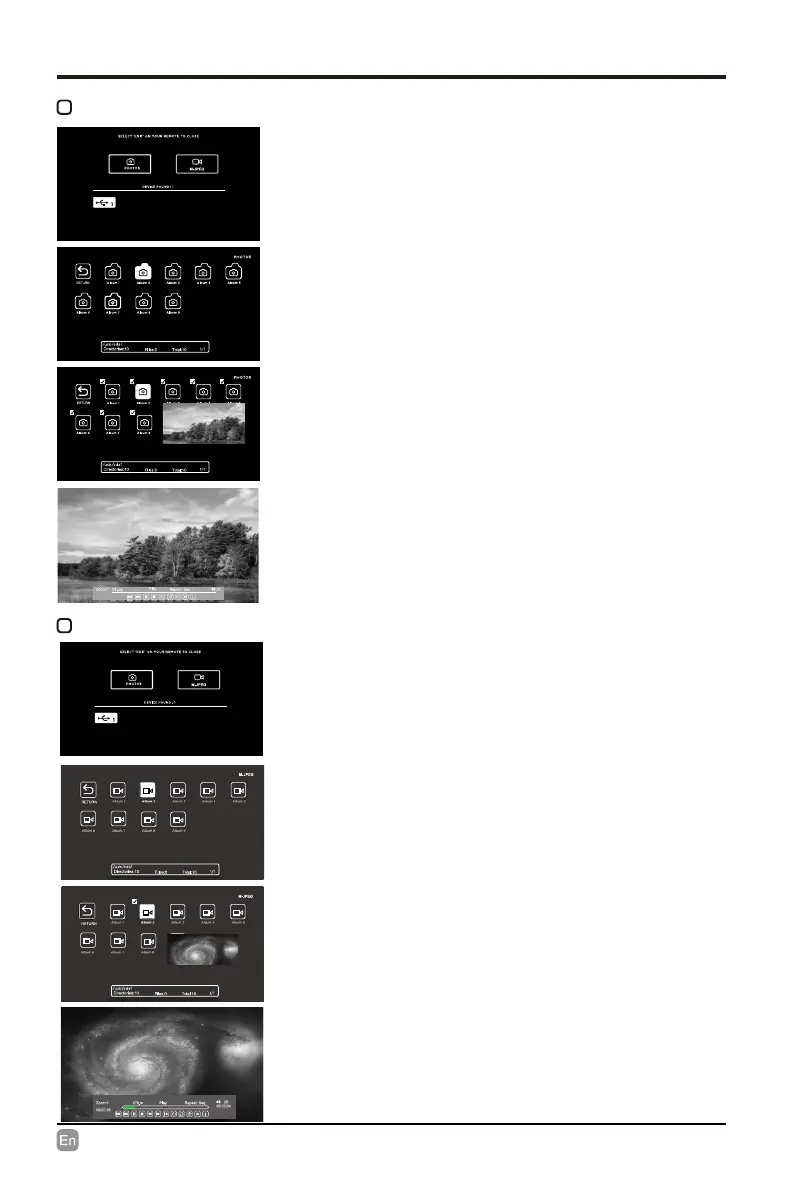
• Use the Arrow buttons to highlight the
PHOTOS option and press OK, then it will
jump to conrm the inserted drive, press OK
to enter.
• After entering PHOTOS, use the Arrow
buttons to select the picture file and press
OK to enter.
• After entering the picture le, use the Arrow
buttons to select the desired picture, then
press the playing button to display.
• When the picture is playing, the picture
Function Bar will be displayed. Use the
Arrow buttons to select the desired function
available on the bar.
VIEWING PHOTOS
• Use the Arrow buttons to highlight the
M-JPEG
option and press OK, then it will
jump to conrm the inserted drive, press OK
to enter.
• After entering
M-JPEG
, use the Arrow
buttons to select the picture file and press
OK to enter.
• After entering the video le, use the Arrow
buttons to select the desired video, then
press the playing button to display.
• When the video is playing, the video
Function Bar will be displayed. Use the
Arrow buttons to select the desired function
available on the bar.
Watching M-JPEG


 To Next Page