6
PREPARATION
Rear View
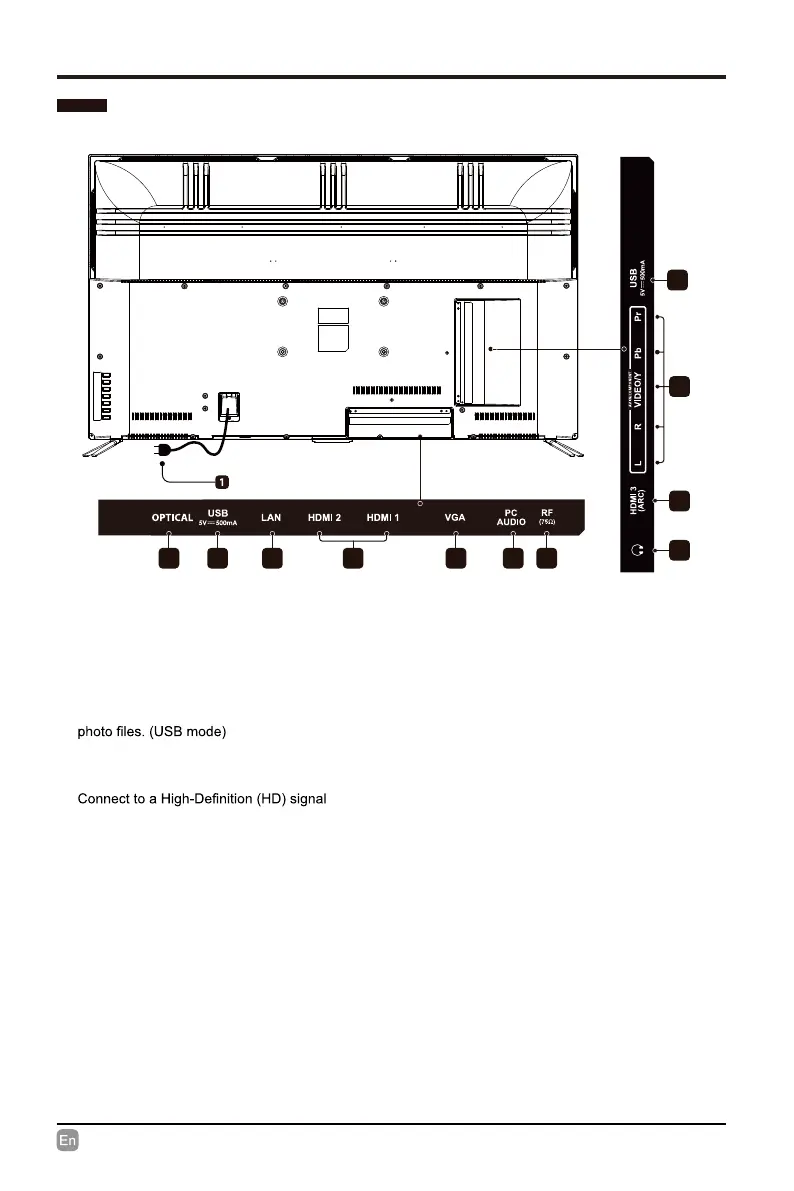
1.Power Cord
Connect to AC power outlet.
2.Optical Output
Connect a digital sound system to this
jack.
3.USB Input
Connect to a USB storage device to play
4.LAN
Network connection port.
5. HDMI Inputs
input device.
6. VGA Input
Connect to a computer or other devices
with a VGA interface.
7. PC Audio Input
Connect to a computer audio output.
8.Antenna Input (75Ω VHF/UHF)
Connect to the antenna (75Ω VHF/UHF)
socket with the RF coaxial cable.
9. Headphone output
Connect to the Headphones.
10. COMPONENT/AV Input
Connect to AV devices with composite/
9
5
10
2 3 4 6 7 85
3
component (Y/Pb/Pr) video and audio output
sockets. COMPOSITE VIDEO and COMPONENT
(Y/Pb/Pr) share with AUDIO IN(L/R).


 To Next Page