EN 28
D - BEGINNING OPERATION
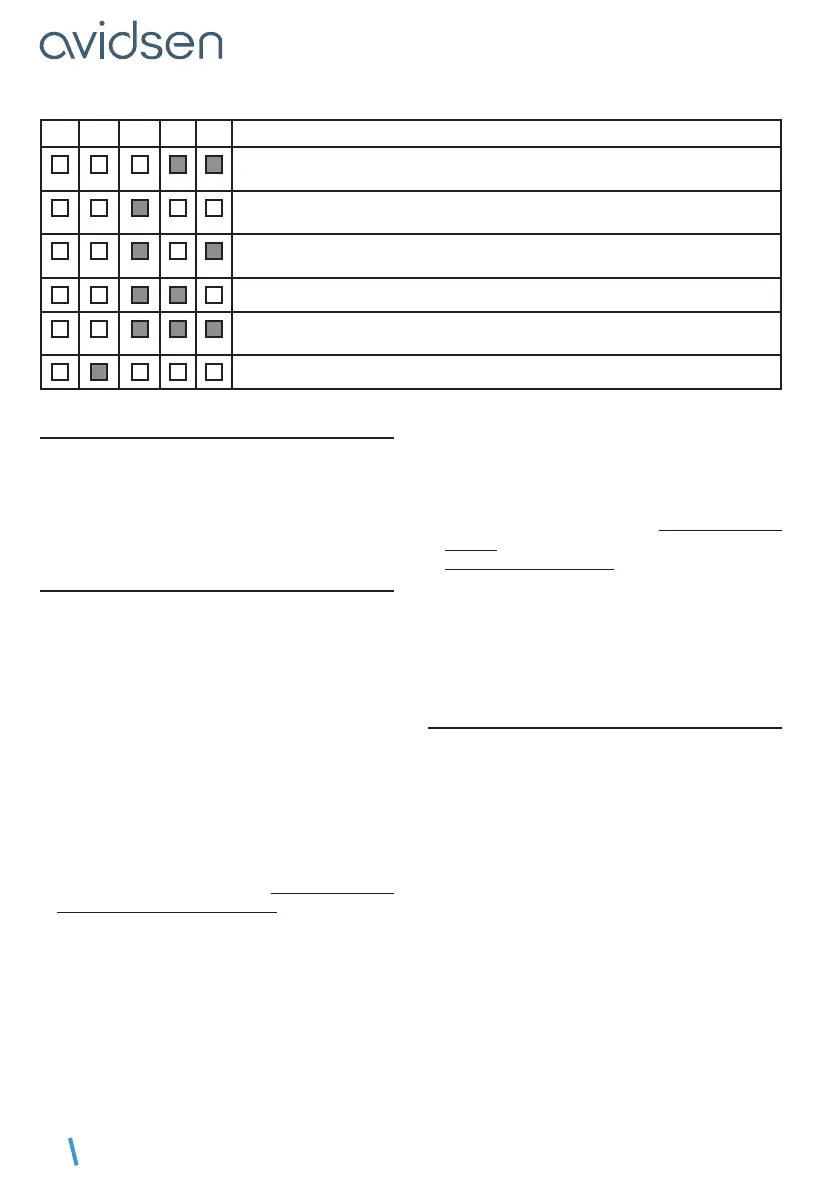
L1 L2 L3 L4 L5 Meaning
The motor has run for 60 seconds on closing without the gate finding a stop;
this is not normal.
The motor has run for less than 3 seconds to open the gate; this is not normal.
Can the gate open and close freely?
The motor has run for less than 3 seconds to close the gate; this is not normal.
Can the gate open and close freely?
The motor is idling - check that the motor is engaged.
The gate has not covered the same distance in opening and closing (at least
12mm difference).
Self-learning was interrupted by the user.
2.4 - PROGRAMMING REMOTE CONTROLS
You can control the complete or partial (pedestrian)
opening of the gate.
On a remote control, it is possible to decide which
button will be used as the gate command and which
button will be used as the pedestrian command.
2.4.1 - PROGRAMMING WITH THE CARD
Note:
It is possible to programme a remote control once,
then use the “copy” function that allows you to
programme additional remote controls without
using the electronic card, via a remote control
that has already been programmed. (This is useful
when additional remote controls are available for
programming without having to open the geared
motor).
Programming a button for the COMPLETE
OPENING command
• Press “–” for 3 seconds and L1 will switch on.
• Press SET and L1 andL5 will switch on alternately.
• Within the next 10 seconds, press the remote
control button for memorisation.
• If the red LEDs all turn on for 1 second, this
means that memorisation is successful.
• If the red LEDs all flash 3 times, this means that
the system has waited for more than 10 seconds
without receiving valid information. Restart the
programming.
Programming a button for the PARTIAL
OPENING command
• Press “–” for 3 seconds and L1 will switch on.
• Press “+” and L1 will switch off and L2 will switch
on.
• Press SET and L1 andL5 will switch on alternately.
• Within the next 10 seconds, press the remote
control
button for memorisation.
• If the red LEDs all turn on for 1 second, this
means that memorisation is successful.
• If the red LEDs all flash 3 times, this means that
the system has waited for more than 10 seconds
without receiving valid information. Restart the
programming.
2.4.2 - COPY PROGRAMMING
From a remote control that has already been
memorised, you can memorise other remote
controls (“copy” function).
For each new remote control to be memorised,
follow the procedure below
• Stand near the gate motor drive.
• Press simultaneously on both buttons at the
bottom of the remote control already in the
memory until the flashing light switches on
(around 6 seconds).
• Press any button on the new
remote control › the flashing light will flash 3 times
and then turn off.
The new remote control is now memorised (the
buttons will have the same function as the original
remote control).
CONNECTED MOTOR DRIVE KIT



 To Next Page