EN 40
CONNECTED MOTOR DRIVE KIT
D - BEGINNING OPERATION
1
Go back
2
Save automation
3
Change the automation name
4
You can change the background image if
you wish
5
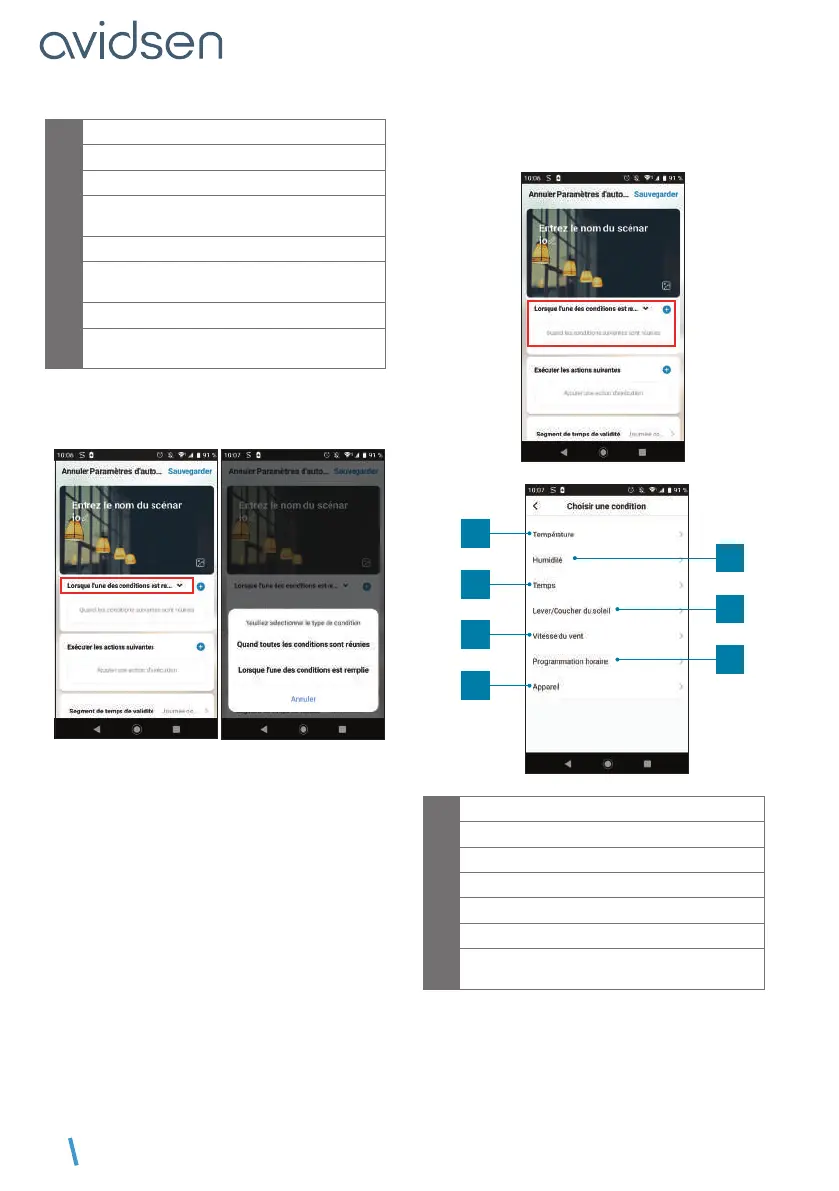
Selection of condition type
6
Selection of conditions to be met for
actions to be executed
7
Selection of actions to be executed
8
Selection of the automation validity time
slot (e.g. only at night)
One of the most important settings is the selection of
the type de condition (condition type). This allows
automation to deal with multiple conditions.
• Quand toutes les conditions sont réunies
(When all the conditions are met) corresponds
to an “ET” (“AND”) function:
- If Temperature = x ET (AND) time = y ET (AND)
device = n then…
• Lorsque l’une des conditions est remplie (When
one of the conditions is met) corresponds to a
“OU” (“OR”) function:
- If Temperature = x OU (OR) time = y OU (OR)
device = n then…
After selecting the condition type, choose the
conditions themselves:
1
3
5
7
2
4
6
1
Set a temperature weather condition*
2
Set a humidity weather condition*
3
Set a weather condition*
4
Set a sunrise or sunset condition*
5
Set a wind condition*
6
Set a time condition
7
Set a condition from a device already linked
to the application
*These conditions take into account the geolocation
of your smartphone to access weather data.



 To Next Page