Need help?
Do you have a question about the Avigilon 2.0C-H6X-B and is the answer not in the manual?
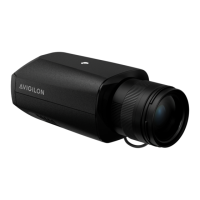
The Avigilon H6X Box Camera is a versatile surveillance device designed for various security applications. It offers a range of features for installation, operation, and maintenance, ensuring reliable performance in diverse environments.
The Avigilon H6X Box Camera is primarily used for video surveillance, capturing and transmitting image data over a network. It supports both Power over Ethernet (PoE) and external power sources, providing flexibility in deployment. The camera is equipped with an Ethernet port for network connectivity, enabling server communication and image data transmission. It also features a USB-C port for connecting a USB Wi-Fi Adapter, which allows access to the camera's mobile web interface for convenient configuration from a mobile device.
For enhanced functionality, the camera includes an I/O connector block, allowing connections to external input/output devices such as door contacts and relays. It also supports iCS or CS lenses, which connect to a dedicated 5-pin connector on the side of the camera. The camera is capable of seamless failover, meaning it can transition between PoE and auxiliary power sources without interrupting operation or video recording, providing redundant power for continuous surveillance.
Onboard storage is available through microSD card slots, allowing for local recording of footage. The camera's operation is indicated by LED indicators, with a green LED providing information about device operation and an amber LED indicating an active Ethernet connection.
Installation of the Avigilon H6X Box Camera is designed to be straightforward, with mounting points on both the top and bottom of the camera body. These points accept standard photographic mounting bolts, allowing the camera to be mounted on a bracket, in an enclosure, or on a tripod. Proper installation requires a small slotted screwdriver for power connections when not using PoE, and a UL-listed mounting bracket suitable for the mounting surface and minimum weight.
Once physically installed and connected, the camera requires initialization of a username and password for security. This can be done through the camera's web interface, the Avigilon Camera Configuration Tool, Avigilon Unity Video or Avigilon Control Center software, or Avigilon Cloud Services. The camera automatically obtains an IP address when connected to a network, but its IP address settings can be changed through the web browser interface, network video management software, or the ARP/Ping method.
Accessing the live video stream is possible through the mobile web interface (with a USB Wi-Fi adapter), a web browser, or network video management software. Aiming and focusing the camera can be done using the camera's web browser interface or Avigilon Control Center software. For iCS lenses, auto-focus functionality is available, with manual adjustments if needed. For CS lenses, a manual focus adjustment is recommended upon installation or replacement, followed by a reinitialization of the lens and then auto-focus.
The camera's configuration can be managed through several methods, including the Camera Configuration Tool for multiple cameras, Avigilon Control Center or Avigilon Unity Video client software when connected to those systems, or the camera's web browser interface for third-party network management systems.
The Avigilon H6X Box Camera incorporates features to facilitate maintenance and troubleshooting. The Connection Status LED Indicator provides visual cues about the camera's network connection status, including obtaining an IP address, discoverability, firmware upgrading, and connection to network video management software. This allows for quick assessment of the camera's operational state.
In cases where the camera is not functioning as expected, troubleshooting steps are provided based on LED behavior. For instance, if both LEDs are off and the camera is not connected or streaming video, checking the General setup page in the camera's web interface to ensure LEDs are not disabled is recommended. If the issue persists, a factory reset using the physical firmware revert button is suggested.
The device can be reset to its factory default settings using a physical firmware revert button located on the rear of the camera. This process involves pressing and holding the button for three seconds while the device is powered on. It's important to note that resetting the camera to factory defaults will not affect video recorded to the microSD card. This feature is useful for resolving unexpected behavior or reconfiguring the camera from a clean state.
The camera is designed with no user-serviceable parts, and all servicing should be referred to qualified personnel. This includes situations where the device has been damaged by liquid spills, fallen objects, exposure to rain or moisture, or if it does not operate normally. When cleaning the device body, strong or abrasive detergents should be avoided. Only accessories recommended by Avigilon should be used to ensure proper functioning and to prevent damage. The device also contains a coin cell battery, and users are cautioned against disassembling, crushing, heating above 100°C (212°F), or incinerating it due to the risk of fire, explosion, and burns.
 General
| Model | 2.0C-H6X-B |
|---|---|
| Resolution | 1920 x 1080 |
| Sensor Type | CMOS |
| Environment | Indoor |
| Video Compression | H.264 |
| Max Frame Rate | 30 fps |
| Power Supply | 12 VDC, PoE |

 To Next Page