14
A360 PersonAl Mixer User GUide
Using the Dual Profile Channel as a Mix Channel
The A360’s powerful Custom mode allows the user to go beyond the sequential channel mapping of
Default mode, allowing each Personal Mixer’s channel assignments to be customized to suit the needs of
the performers. This becomes especially powerful when the network has input channel counts above 32
channels (or a combination of 16 mono and stereo sources) using 3 or 4 input devices.
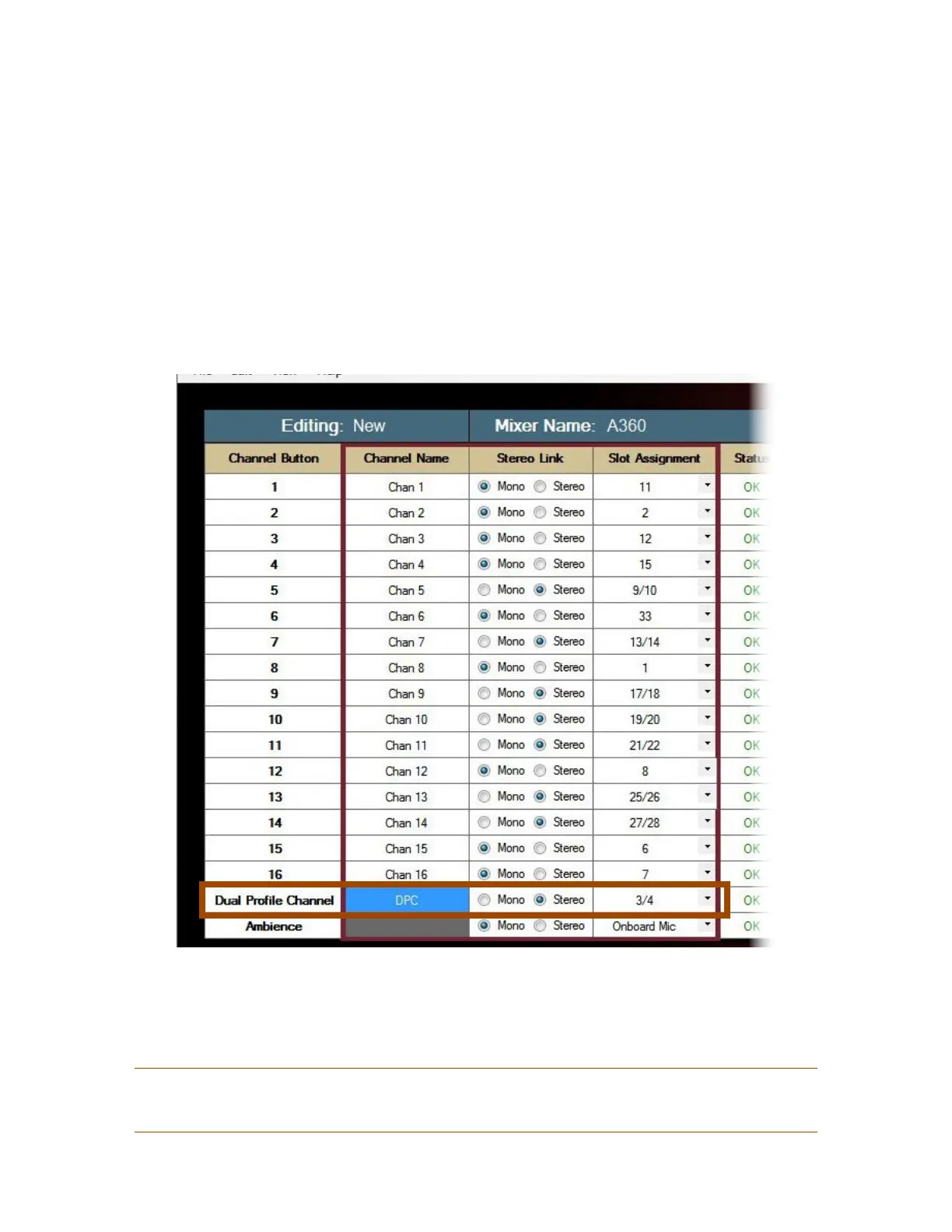
A custom channel configuration created using the A360 Channel Manager software can include the
mapping of a network slot to the Dual Profile Channel. Once this configuration is loaded into the A360 and
the A360 rear-panel mode switch is set to CuStom, the Dual Profile Channel functions as a very powerful
and flexible 17th mix channel.
The Dual Prole Channel is using custom channel mapping as seen in the A360 Channel Manager software.
When a network slot has been assigned to the Dual Profile Channel as additional mix content and the rear-
panel mode switch is set to CuStom, you cannot use the channel mirror feature described previously.
P
Note: Every A360 Personal Mixer in the personal mixing system can have a different network slot
assigned to its Dual Profile Channel.



 To Next Page