OXYGEN 1000 & OXYGEN 2000 · User Manual · ENG
SURFACE |TALKBOX CONNECTIONS
3.2.3 MONITORS SECTION
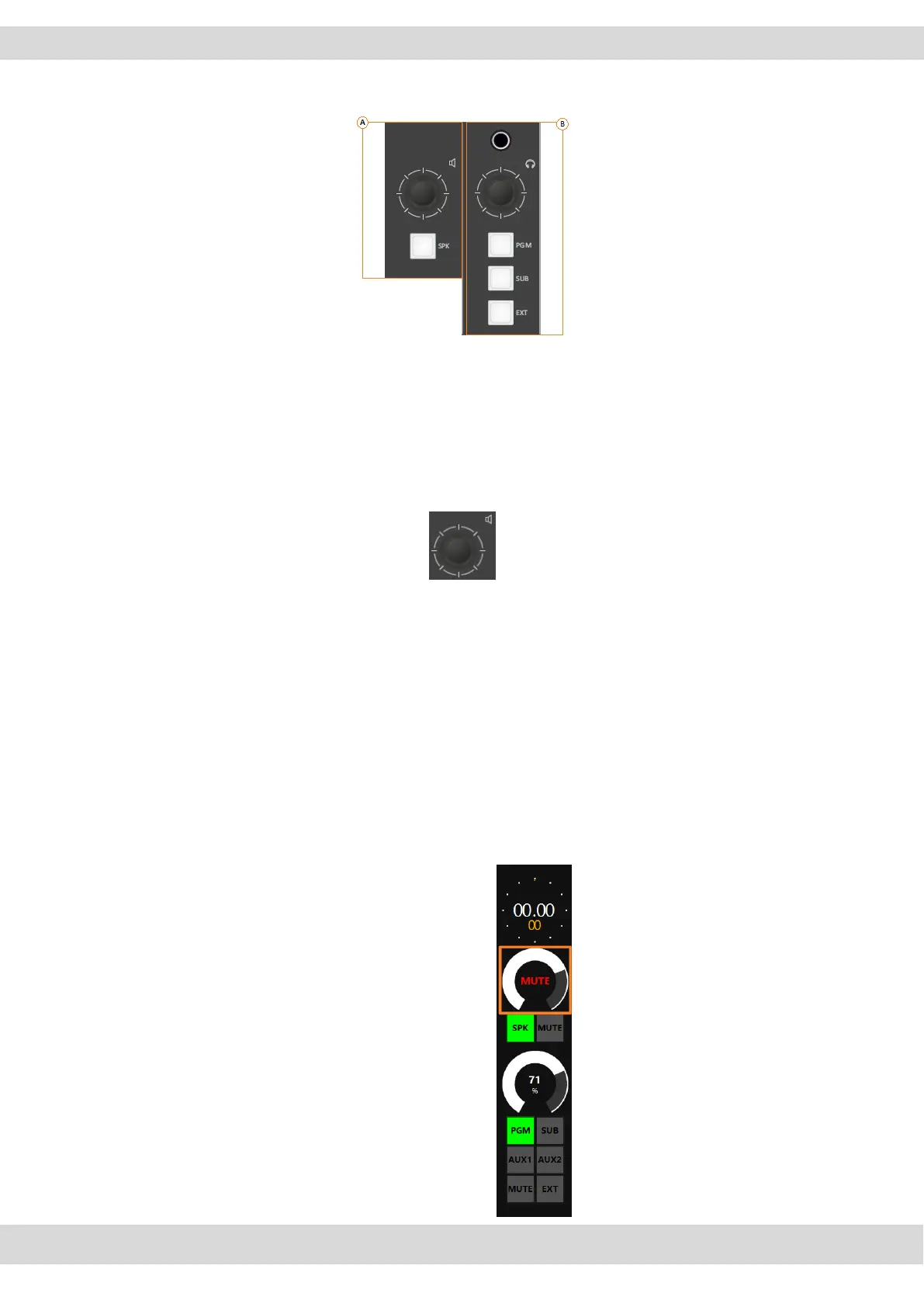
A. CONTROL ROOM SPEAKER SECTION
By this Speaker Monitor section you can:
adjust the output audio of the Control Room Speakers
This section is used for the management of the Control Room Speakers, by
default set on ANALOG-OUT-2.
The rotary control knobs allow you to amplify/attenuate the audio level.
The loudspeakers audio level goes from 0 to 99 is the maximum allowed level.
Can set the maximum level by going to this page:
SETUP / AUDIO / OUTPUTS / MONITOR / SPEAKER / SPK-CRM
The step of the loudspeaker adjustment is 1 dB and the level goes from -80 dB
to the maximum of +19 dB.
By pressing the knob, you can mute 🔇 or unmute the Control Room Speakers
if it is already muted.
When the Control Room Speakers are on mute, by Oxygen Remoter side you
will see the following squared signalling:



 To Next Page