SURFACE|TALKBOX CONNECTIONS
OXYGEN 1000 & OXYGEN 2000 · User Manual · ENG
3.2.4 MONITOR HEADPHONES CONTROLS
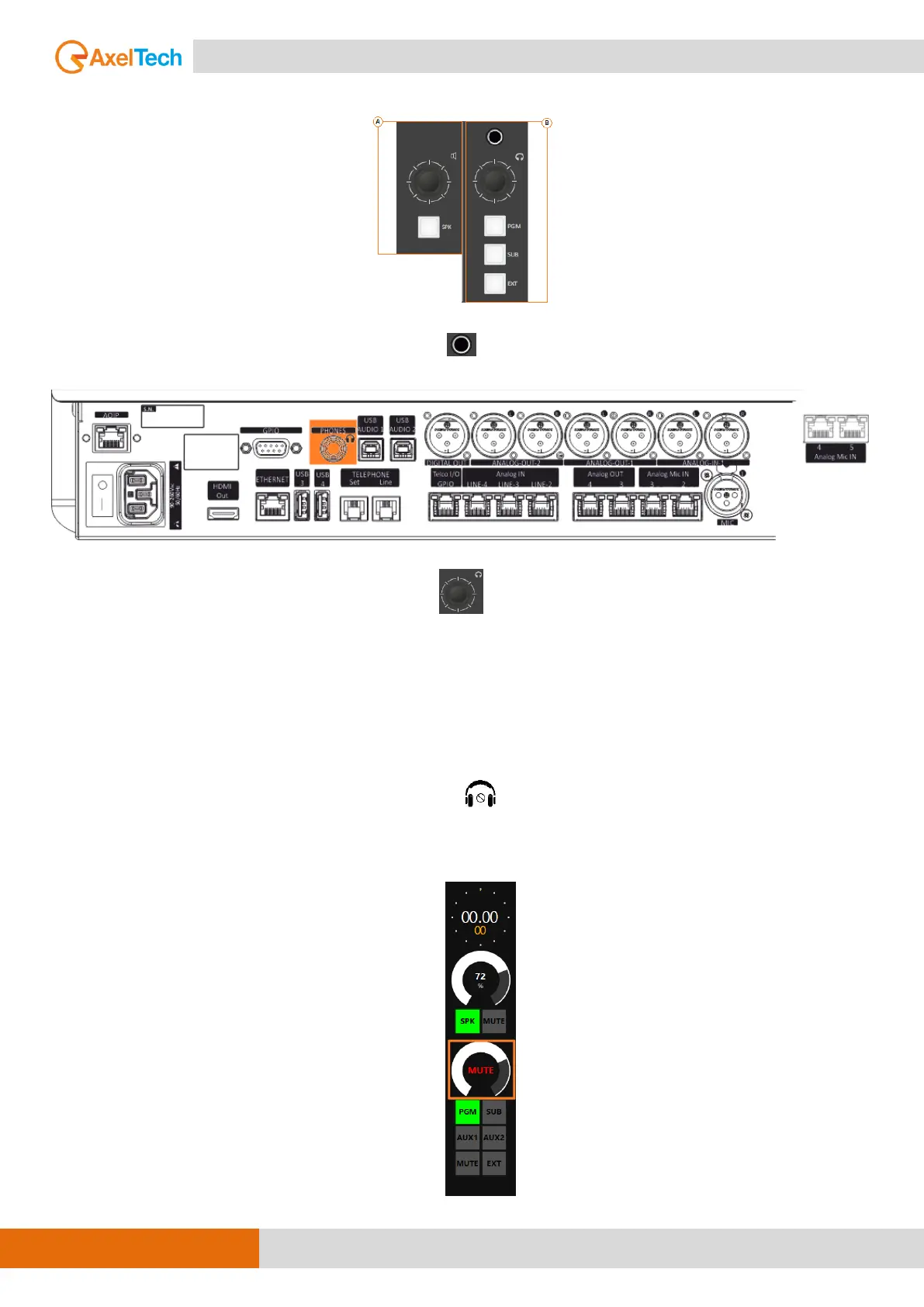
Connect the Control Room Headphones in the female Jack 6,5 mm connector below:
The connector is in parallel with the following one in the back panel:
Adjust the Control Room Heaphones by the following knob controller.
This section is used for the management of the Control Room Headphones.
The rotary control knobs allow you to amplify/attenuate the audio level.
The loudspeakers audio level goes from 0 to 99 is the maximum allowed level.
Can set the maximum level by going to this Oxygen Remoter menu:
SETUP / AUDIO / OUTPUTS / MONITOR / HEADPHONES / HDP-CRM
The step of the headset adjustment is 1 dB and the level goes from -80 dB to
the maximum of +19 dB.
By pressing the knob, you can mute or unmute the Control Room
Headphones if it is already muted.
When the Control Room Headphones are on mute, by Oxygen Remoter side
you will see the following squared signalling:



 To Next Page