OXYGEN REMOTER - SETTINGS|MONITORS SECTION
OXYGEN 1000 & OXYGEN 2000 · User Manual · ENG
E. TALKBACK – FROM CONTROL ROOM TO THE STUDIO
TALKBACK
SETUP / AUDIO / OUTPUTS / MONITOR / SPEAKER / SPK-CRM / TALK BACK (OFF, ON)
Here you can disable/enable the TALKBACK communications in control room speakers. Normally the
talkback is used to communicate between the mixer man and the people in the studio via
headphones. This option gives you the possibility to hear the people talking in TALKBACK from the
studio via the CR (Control Room loudspeakers).
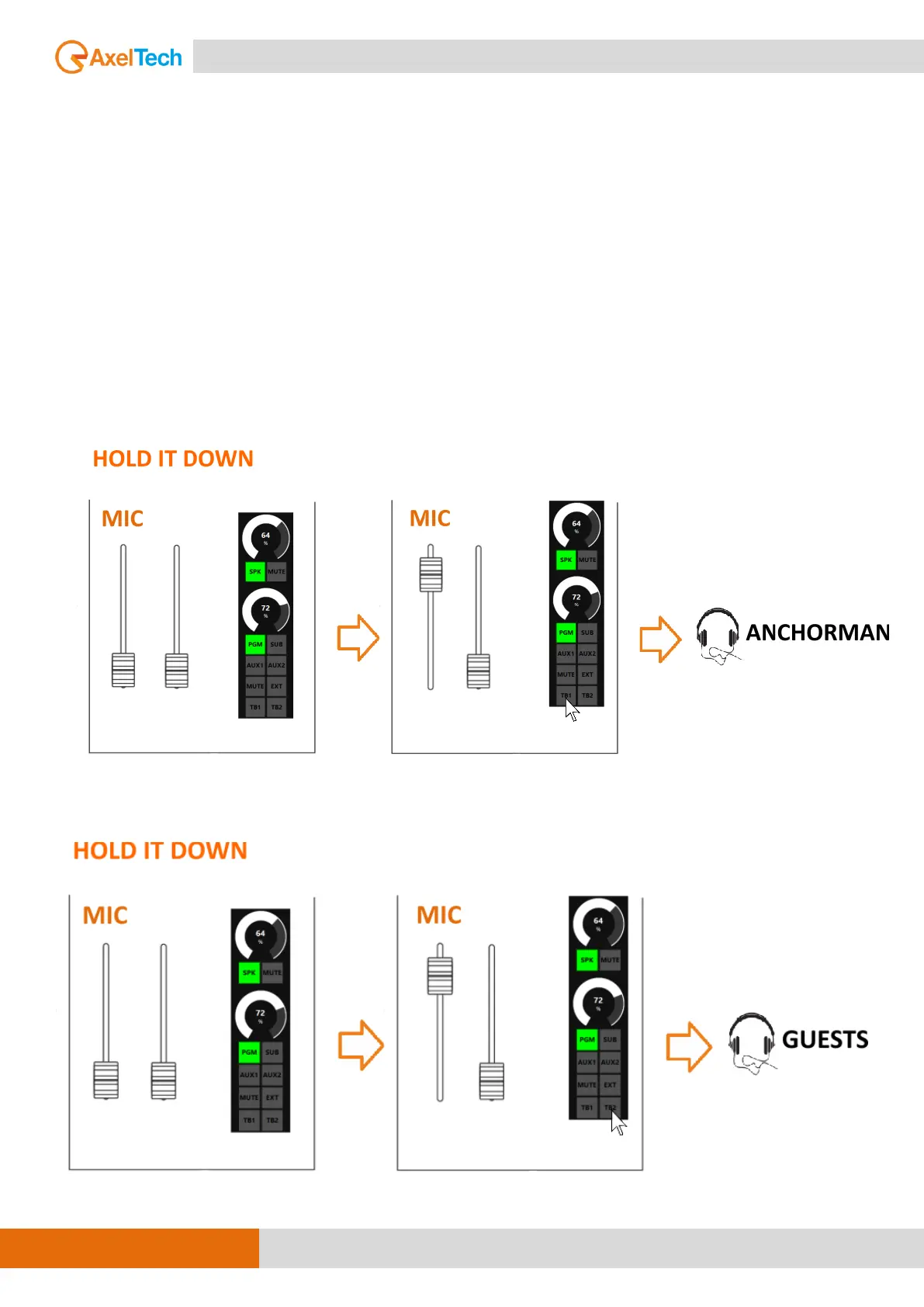
The following section is used for the management of the TB
“TALKBACK” from the CONTROL ROOM to the Studio. By pressing TB1
it’s possible to speak with the anchorman in the STUDIO from the
CONTROL ROOM.
By pressing TB2 it’s possible to speak with the GUESTS in STUDIO.


 To Next Page