AXISP3364-LVENetworkCamera
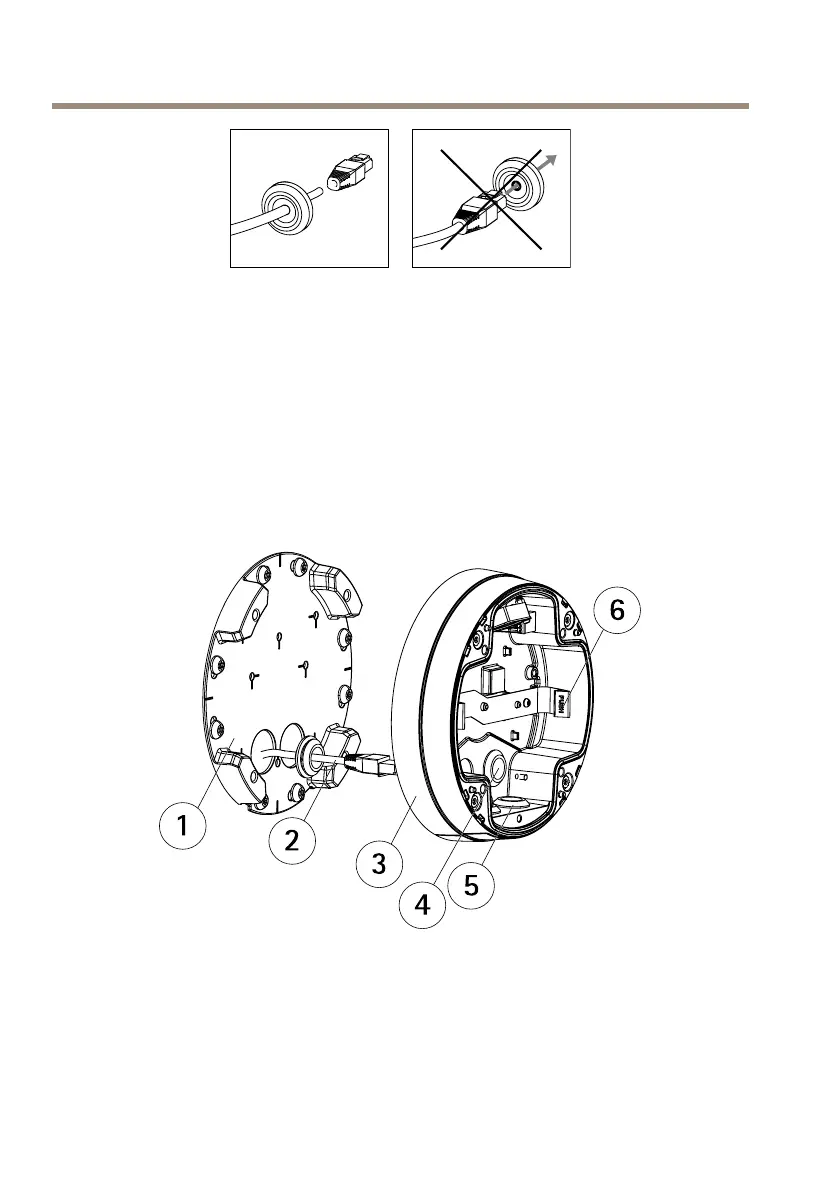
Ifacableotherthantheprovidedcableisused,youneedtoprepareanetworkcablewithagasket.
Gentlypushthecablethroughthegasketprovidedandattachanetworkconnector.Itmaybe
necessarytopierceaholeinthegasketwiththeresitorxscrewdriver.
RoutetheCables
Thecablescanberoutedinthefollowingways:
•Throughthewall,seeRoutetheCablesthroughtheWallonpage19
•Alongthewall,seePreparetheUnitCasingonpage19andpageRoutetheCablesalong
theWallonpage20.
1
Mountingbracket
2
Networkcablewithgasket
3
Unitcasing
4
Wallgasket
5
Bottomgasket
6
Spring
18



 To Next Page