EasyManua.ls Logo

Badger Meter ER-9 - User Manual

Badger Meter ER-9
16 pages
Print Icon
To Next Page IconTo Next Page
Loading...
REG-UM-00836-EN-12 (August 2018)
User Manual
Industrial Registers
Model ER-9 Digital Resettable Totalizer and
Rate of Flow Indicator, Plus Pulse Output
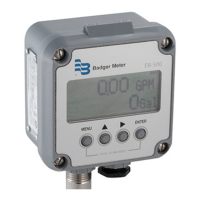
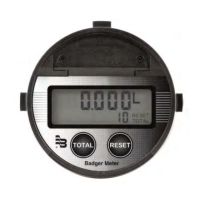
ER-9 Indicator
ER-9 Register
For Portable Large Meter Tester

Other manuals for Badger Meter ER-9

Questions and Answers

  • D
    David CaseAug 16, 2025
    Why will my Badger Meter Measuring Instruments not count in totalizer mode?
    • C
      courtneyhartmanAug 16, 2025
      If your Badger Meter Measuring Instruments won't count in totalizer mode, there are several potential causes: * It might be improperly programmed, so check the programming. * There could be broken or defective wiring, so inspect the wiring. * It might be improperly connected, so verify the connections. * The transmitter could be defective, requiring repair or replacement.
  • A
    Andrew JohnsonAug 19, 2025
    Why are my Badger Meter ER-9 giving erroneous readings?
    • Y
      ynewmanSep 12, 2025
      Erroneous readings from your Badger Meter Measuring Instruments can stem from a couple of issues. First, the device might be improperly programmed, so check the programming. Second, the transmitter could be defective, in which case you should repair or replace it.
  • J
    jamesmooreAug 22, 2025
    What to do if my Badger Meter ER-9 will not indicate rate of flow?
    • Y
      Yvette JamesAug 22, 2025
      If your Badger Meter Measuring Instruments isn't showing the rate of flow, the issue could be due to a few reasons: * Improper programming: check the programming. * Improper connections: check the connections. * A defective transmitter: consider repairing or replacing the transmitter.
  • B
    badkinsAug 26, 2025
    What to do if there is no pulse output from my Badger Meter Measuring Instruments?
    • D
      Derek DeanAug 26, 2025
      If there is no pulse output from your Badger Meter Measuring Instruments, it could be due to a defective output transistor, in which case you should replace ER-9. Another cause could be improper wiring, so check the connections.
  • R
    Rick FullerAug 28, 2025
    What to do if my Badger Meter Measuring Instruments have no pulse output?
    • J
      Jesse SchwartzAug 28, 2025
      If your Badger Meter Measuring Instruments have no pulse output, it may be due to a defective output transistor. Replace ER-9 to resolve this. Another possible cause is improper wiring, so check the connections.
  • M
    Matthew BurchAug 31, 2025
    What to do if my Badger Meter ER-9 Measuring Instruments screen is blank?
    • J
      John BlackAug 31, 2025
      If the screen of your Badger Meter Measuring Instruments is blank, it's likely due to a dead battery. Replace the battery to resolve this issue.
  • D
    Derek GloverSep 3, 2025
    What to do if my Badger Meter Measuring Instruments will not count in totalizer mode?
    • J
      Jordan JohnsonSep 3, 2025
      If your Badger Meter Measuring Instruments won't count in totalizer mode, there might be several causes. The programming could be incorrect, so check the programming. The wiring could be broken or defective, so check the wiring. The connections might be improperly connected, so check the connections. The transmitter may be defective, so repair or replace the transmitter.
  • M
    Margaret SmithSep 6, 2025
    Why will my Badger Meter ER-9 Measuring Instruments not indicate rate of flow?
    • J
      Juan RichardsonSep 6, 2025
      If your Badger Meter Measuring Instruments do not indicate the rate of flow, the programming may be incorrect, so you should check the programming. It could also be due to improper connections, so check the connections. Another possibility is a defective transmitter, which would need to be repaired or replaced.
  • A
    Aaron RobbinsSep 9, 2025
    How to fix a blank screen on Badger Meter ER-9?
    • K
      Krista SandovalSep 9, 2025
      If your Badger Meter Measuring Instruments screen is blank, the battery is likely dead. Replace the battery to resolve this.
  • R
    Rick ChenSep 12, 2025
    Why can't I program my Badger Meter ER-9 Measuring Instruments?
    • E
      elizabeth63Sep 12, 2025
      If you cannot program your Badger Meter Measuring Instruments, the program enable jumper is likely not installed or installed improperly. Install the jumper to solve this.

Summary

About This Manual

Product Description

Display Types

Details the supertwist LCD display, including total and rate displays.

Control Keys

Explains the function of the Down Arrow and Reset keys for operation and programming.

Installation

Panel Installation

Instructions for mounting the ER-9 unit into a panel using the included gasket and bracket.

Battery Installation;Replacement

Guidance on installing and replacing the unit's 3V lithium batteries.

Wiring Instructions

Wiring Terminals

Details the function of each terminal on the ER-9 unit.

Transmitter Connections

Provides guidance for connecting generic reed switches and NPN transmitters.

Operation

Display Types

Details the supertwist LCD display, including total and rate displays.

Control Keys

Explains the function of the Down Arrow and Reset keys for operation and programming.

Programming

Totalizer Programming

How to program the Totalizer Scaler and Decimal Point for accurate total flow readings.

Rate of Flow Programming

How to program the Rate Scale Factor and Decimal Point for flow rate indication.

Pulse Output Programming

How to program the Pulse Output Scale Factor for re-transmitting input pulses.

Troubleshooting

Common Problems and Solutions

Lists common issues like blank screen, no counting, or programming errors with remedies.

Field Calibration

Calibration Procedure

Steps to determine exact transmitter pulse output per unit for accurate calibration.

Replacing the Meters Sensor Pickup

Industrial Turbo Meter Pickup Replacement

Step-by-step guide for replacing the sensor pickup on an industrial turbo meter.

Disc Meter Pickup Replacement

Steps for replacing the reed switch pickup assembly on a disc meter.

Oscillating Piston Meter Pickup Replacement

Instructions for replacing the pickup assembly on an oscillating piston meter.

Specifications

Count Input Specifications

Details count input types, speed, logic levels, minimum pulse width, and impedance.

Front Panel Program Enable

Specifies the type and maximum input for the front panel program enable function.

Remote Reset Input

Details the type, frequency response, and maximum input for the remote reset.

Output Specifications

Provides load rating and transition time for the isolated Photomos relay output.

Operating Temperature

Specifies the operating temperature range for the ER-9 indicator.

Power Source Specifications

Details battery type, replacement part, battery life expectancy, and low power indicator.

Display Specifications

Describes the display type, number of digits, and backlighting features.

Physical Specifications

Covers dimensions, mounting details, connections, and weight of the unit.

Badger Meter ER-9 Specifications

General IconGeneral
Product TypeElectromagnetic Flow Meter
ModelER-9
Flow Tube MaterialStainless Steel
Liner MaterialPTFE
Fluid Conductivity≥ 5 μS/cm
Outputs4-20 mA, pulse, frequency
CommunicationHART
Enclosure RatingNEMA 4X
Ambient Temperature Range-40°F to 140°F (-40°C to 60°C)

Related product manuals