EasyManua.ls Logo

Badger Meter M Series - User Manual

Badger Meter M Series
56 pages
Print Icon
To Next Page IconTo Next Page
Loading...
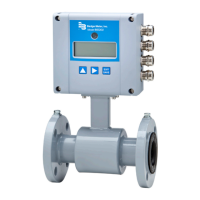
M-Series® Mag Meter
Model M-2000
Installation & Operation Manual
IOM-175-03 (4-11)
PN: 53400-190 Rev 3
IMPORTANT:
This manual contains important information.
READ AND KEEP FOR REFERENCE.

Table of Contents

Other manuals for Badger Meter M Series

Questions and Answers

  • S
    Sheri TaylorAug 17, 2025
    Why is the flow rate indication unstable on my Badger Meter M Series?
    • F
      fwarnerAug 17, 2025
      Unstable flow rate indication can stem from several factors: * A cable issue: Ensure the cable is shielded and not vibrating. * A grounding issue: Verify the meter is properly grounded to a good earth ground. * A partially full pipe: Ensure the pipe is full of fluid. * Air in the pipe: Make sure the fluid does not contain air bubbles. * Amplifier location: Ensure the amplifier is not too close to sources of electrical interference. * Invalid fluid conductivity.
  • K
    kathy18Aug 20, 2025
    What to do if my Badger Meter M Series Measuring Instruments give inaccurate measuring?
    • D
      Douglas LynchAug 20, 2025
      Inaccurate measuring can be caused by several issues. You can try the following: * Restore calibration defaults. * Check the parameters (detector factor and size) according to the supplied data sheet. * Check if the meter is completely filled with fluid. * Purge the line to eliminate air bubbles. * Improper calibration. * Wrong calibration parameter. * Pipe not fully filled, or air in pipe. * Invalid fluid conductivity. * Invalid fluid mixture.
  • J
    Jorge NguyenAug 22, 2025
    What to do if my Badger Meter M Series display shows "0" even when flow is present?
    • A
      Albert GrahamAug 22, 2025
      If flow is present but the display reads "0", consider the following: * Check the signal cable. * Turn the detector by 180° or switch terminal E1 and E2 or reprogram to bidirectional mode. * Check cable connections for cross wiring. * Verify digital input configuration. * Replace configuration defaults. This can happen because digital input is holding flow, the signal cable is disconnected, the detector is mounted opposite of the main flow direction, coil or electrode cables are exchanged, or there's an improper low flow cutoff or full-scale flow setting.
  • J
    Joseph DoughertyAug 26, 2025
    Why is the flow rate value known to be wrong on my Badger Meter M Series Measuring Instruments?
    • C
      Caitlin PatrickAug 26, 2025
      If the flow rate value is wrong, check the value on the label for the detector factor. Also, inspect and remove any deposits on the electrodes and/or liner. Finally, check the programmed pipe size to ensure it is correct. The issue may be caused by the detector factor, deposits on electrodes and/or liner, or an incorrectly programmed pipe size.
  • B
    Bobby JonesAug 28, 2025
    What to do if my Badger Meter M Series Measuring Instruments show no display?
    • J
      Jennifer BaxterAug 28, 2025
      If there is no display, here are some things to check: * Apply power to the device. * Check the power value to ensure it is correct. * Replace the fuse with a 2 amp, 250 VAC, slow blow (5 x 20 mm) fuse. * Check the display ribbon cable.
  • D
    Dawn LopezAug 31, 2025
    How to fix Err: Full scale error on Badger Meter Measuring Instruments?
    • K
      Kevin ConleyAug 31, 2025
      To resolve an "Err: Full scale" error, reduce the flow rate or increase the programmed full-scale value by more than 5%. This error occurs when the actual flow rate exceeds the programmed flow.
  • V
    victoriawoodsSep 2, 2025
    How to clear Err: Rollover on Badger Meter Measuring Instruments?
    • M
      Matthew ButlerSep 2, 2025
      To clear an "Err: Rollover" error, clear all totalizers. This error indicates that rollover counters have exceeded their limit.
  • N
    Nicholas MartinSep 5, 2025
    What does Err: Empty pipe mean on my Badger Meter Measuring Instruments and how to fix it?
    • J
      Jennifer SchultzSep 5, 2025
      The "Err: Empty pipe" error indicates that the pipe may not be full. To resolve this, ensure all trapped air is out of the system. If fluid or fluid conductivity is a factor, recalibrate the parameter.
  • L
    longjonathanSep 8, 2025
    How to resolve Err: AD-Range error on Badger Meter Measuring Instruments?
    • D
      dale88Sep 8, 2025
      To resolve an "Err: AD-Range" error, check the grounding scheme of the meter installation, referring to the grounding section in this manual. Also, verify the pipe is not empty. This error indicates that the AD-Converter is exceeding signal limits.
  • A
    Amy HarrisSep 12, 2025
    How to fix Err: Rollover Status on Badger Meter Measuring Instruments?
    • M
      michael12Sep 12, 2025
      To fix an "Err: Rollover Status" error, reload the totalizer and then clear all totalizers. This error indicates that a totalizer rollover has occurred.

Summary

Safety Precautions and Instructions

System Description

Provides an overview of the M-2000 flow meter's intended use and basic components.

Meter Location, Orientation and Applications

Meter Location and Orientation

Details on selecting appropriate sites and aligning the meter for optimal performance.

Pipelines and Fluid Flow

Precautions for installing the meter in various piping configurations and fluid conditions.

Straight Pipe Requirements

Pipe Reducer Requirements

Meter Gaskets and Grounding

Wiring

Wiring Safety

Critical safety guidelines for electrical connections to prevent hazards and damage.

Power Connections

Configuring Input;Output (I;O)

Analog Output

Details on setting up analog signal outputs for flow rate and other parameters.

Digital Input;Output

Procedures for configuring digital inputs and outputs for various functions.

Programming the M-2000

Displays

Explains the different display types and how to navigate menus for programming.

Security

Setting the Administration PIN

Instructions for setting administration, service, and user personal identification numbers.

Quick Setup Utility

Flow Unit

Guide to configuring flow rate units for measurement.

Totalizer Unit

Guide to configuring totalizer units for measurement.

Main Menu Programming Options

Meter Setup

Overview of main menu options for meter configuration and calibration.

Measurements

Low Flow Cutoff

Setting the threshold below which flow measurement is forced to zero.

Flow Direction

Configuring the meter for uni-directional or bi-directional flow measurement.

Inputs;Outputs

Analog Output Settings

Parameters for configuring the analog output range and alarm modes.

Digital Input Settings

Configuration options for digital inputs and various digital output functions.

Clear Totals

Communication Port Settings

Advanced Settings

Unit Multiplier

Settings for totalizer display updates.

Backlight Control

Settings for backlight behavior.

Analog Calibrate

Empty Pipe Calibration

Info;Help

Error Counts

Explanation of various system counters used for performance diagnostics.

Maintenance

Flow Tube and Electrode Cleaning

Instructions for cleaning the flow tube and electrodes based on fluid contact.

Troubleshooting

Common Measurement Issues

Guidance on diagnosing and resolving common display and measurement inaccuracies.

Configuration Error Codes

Display Error Messages

Appendix: Detector Specifications

Appendix: Amplifier Specifications

Badger Meter M Series Specifications

General IconGeneral
Sizes2"
Maximum Continuous Flow RateVaries by size
Flow RangeVaries by size
OutputPulse
CommunicationAMR/AMI (optional)

Related product manuals