EasyManua.ls Logo

Badger Meter M5000 - User Manual

Badger Meter M5000
32 pages
Print Icon
To Next Page IconTo Next Page
Loading...
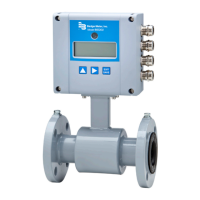
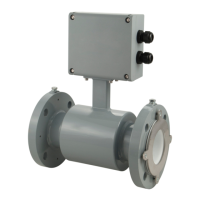
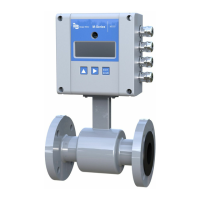
M-Series® M5000
Electromagnetic Flow Meter
User Manual
MAG-UM-00219-EN-02 (September 2013)
| sales@mvandc.com | Phone: 877.566.3837 | Fax: 925.407.2903

Questions and Answers

  • A
    Angela CarterJul 31, 2025
    Why is the flow rate indication unstable on my Badger Meter Measuring Instruments?
    • A
      angela28Jul 31, 2025
      Unstable flow rate indications in Badger Meter Measuring Instruments can stem from several causes: a cable issue (ensure the cable is shielded and not vibrating), a grounding issue (ensure the meter is properly grounded to a good earth ground), a partially full pipe (ensure the pipe is full of fluid), air in the pipe (ensure the fluid does not contain air bubbles), or invalid fluid conductivity (make sure the amplifier is not too close to sources of electrical interference).
  • P
    Paul WilliamsAug 5, 2025
    What to do if flow is present but the display is "0" on my Badger Meter Measuring Instruments?
    • J
      Jessica PhillipsAug 5, 2025
      If flow is present but the display reads "0" on your Badger Meter Measuring Instruments, consider these possibilities: a disconnected signal cable (check the signal cable), the detector being mounted opposite the main flow direction (turn the detector 180° or switch terminal E1 and E2 or reprogram to bidirectional mode), coil or electrode cables exchanged (check cable connections for cross wiring), or an improper low flow cutoff or full scale flow (replace configuration defaults).
  • S
    Stacy FrenchAug 8, 2025
    Why is my Badger Meter M5000 Measuring Instruments giving an inaccurate measuring?
    • B
      barbara21Aug 8, 2025
      Inaccurate measurements from your Badger Meter Measuring Instruments can occur due to improper calibration (check the parameters - detector factor and size - according to the supplied data sheet), the pipe not being fully filled or air in the pipe (check if the meter is completely filled with fluid), or invalid fluid conductivity (purge the line to eliminate air bubbles).
  • J
    James GriffinAug 13, 2025
    What to do if my Badger Meter Measuring Instruments shows COMMON_MODE_VOLTAGE_ OVERLOAD?
    • G
      Gregory BarreraAug 13, 2025
      A COMMON_MODE_VOLTAGE_ OVERLOAD error on your Badger Meter Measuring Instruments indicates that the common mode voltage is smaller than –2.0V or larger than +4.1V (make sure the meter is properly grounded), that the detector is empty (switch Empty Pipe detection ON), or that the electrodes are dirty (clean the electrodes).
  • M
    matthew52Aug 17, 2025
    What should I do if my Badger Meter M5000 Measuring Instruments flow rate value is known to be wrong?
    • R
      Robert ReevesAug 17, 2025
      If the flow rate value is known to be wrong on your Badger Meter Measuring Instruments, check the detector factor value on the label, inspect and remove any deposits on the electrodes and/or liner, and verify that the correct pipe size is programmed.
  • M
    michael25Aug 22, 2025
    What does EMPTY_PIPE_WARNING mean on my Badger Meter M5000, and how do I fix it?
    • J
      Jason BrownAug 22, 2025
      An EMPTY_PIPE_WARNING on your Badger Meter Measuring Instruments means that the measured impedance between the Empty Pipe electrode and the Ground exceeded the set value. To resolve this: * Make sure the pipe is filled. * Check the Empty Pipe threshold; it should be 60000 ? (which corresponds with 20 µS/cm).
  • T
    thomas11Aug 26, 2025
    Why is the display blank on my Badger Meter Measuring Instruments?
    • E
      emily55Aug 26, 2025
      A blank display on your Badger Meter Measuring Instruments is likely due to a dead battery. Replace the battery.

Summary

Safety Precautions and Instructions

System Description

Overview of the M-Series M5000 flow meter and its components.

Meter Location, Orientation and Applications

Straight Pipe Requirements

Required straight pipe lengths before and after the meter for accuracy.

Meter Gaskets and Grounding

Meter Grounding

Importance and methods of grounding the meter for accuracy and safety.

Wiring

Wiring Safety

Critical safety requirements for electrical wiring connections.

Battery

Battery Replacement

Detailed procedure for replacing the meter's battery.

Configuring Input;Output (I;O)

Programming the M5000

M5000 Main Menu Programming Options

Security

Setting a PIN

Step-by-step guide to setting up Personal Identification Numbers (PINs).

Meter Setup Menu

Measure Menu

Inputs;Outputs Menu

Communication Menu

PIN Menu

Maintenance

Cleaning the Flow Tube and Electrode

Procedure for cleaning the flow tube and electrodes.

Troubleshooting

Inaccurate Measuring

Causes and solutions for inaccurate measurement readings.

Errors & Warnings

Badger Meter M5000 Specifications

General IconGeneral
TypeElectromagnetic Flow Meter
Outputs4-20 mA, Pulse, Frequency, Alarm
EnclosureNEMA 4X (IP66)
Measurement PrincipleFaraday's Law of Electromagnetic Induction
Pipe Size Range1/2" to 12"
Operating Temperature-4°F to 140°F (-20°C to 60°C)
Process ConnectionFlanged, Wafer
Power Supply100-240 VAC, 24 VDC
CommunicationHART, Modbus RTU
Flow Rate Range0.1 to 33 ft/s (0.03 to 10 m/s)
Accuracy±0.5%

Related product manuals