11
DISPLAY DP C11.CAN
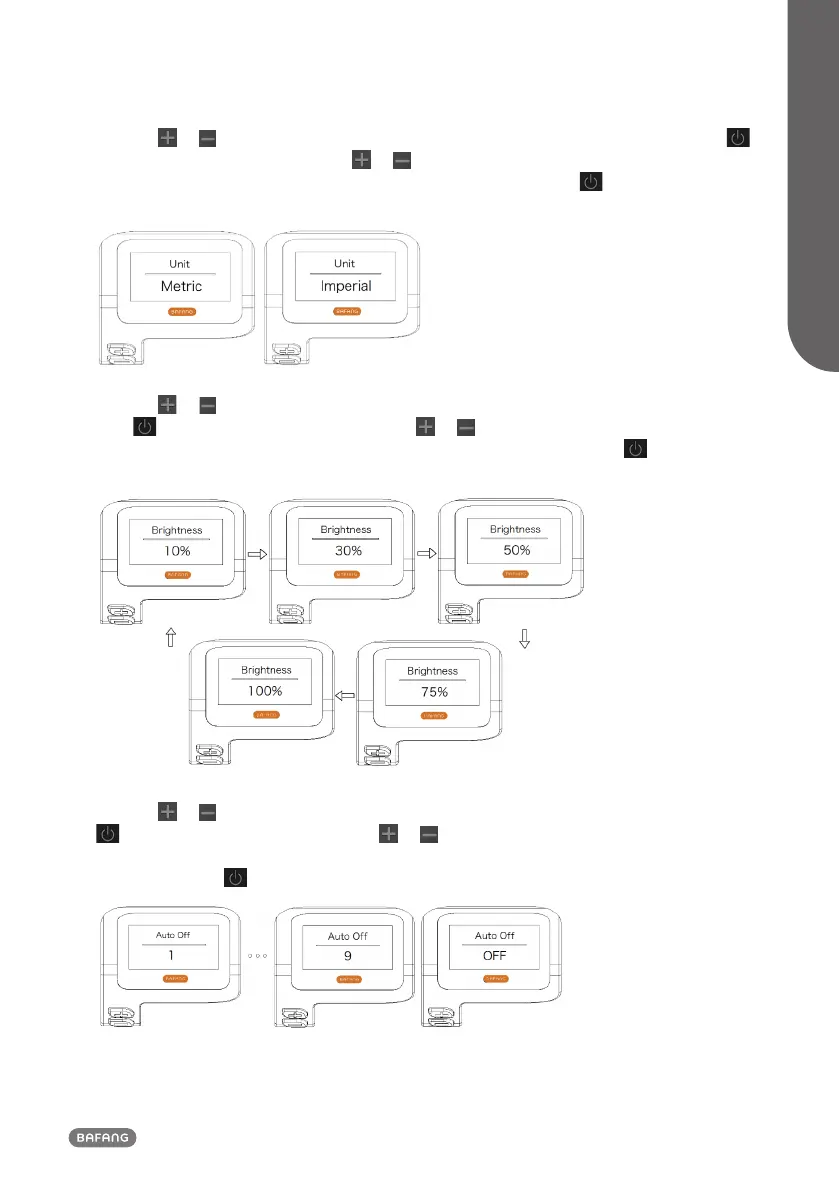
1.7.1.2 "Unit" Selections in km/Miles
Press the or button (<0.5S) to highlight “Unit” in the Display setting menu, and then press
button (<0.5S) to select. Then with the or button choose between “Metric” (kilometer) or
“Imperial” (Miles). Once you have chosen your desired selection, press the button (<0.5S) to save
and exit to the "Display setting".
1.7.1.3 "Brightness" Display brightness
Press the or button (<0.5S) to highlight “Brightness” in the Display setting menu, and then
press button (<0.5S) to select. Then with the or button choose between "100%" / "75%"
/ "50%" /" 30%"/"10%". Once you have chosen your desired selection, press the button (<0.5S)
to save and exit to the "Display setting".
1.7.1.4 "Auto Off" Set Automatic system switch off time
Press the or button (<0.5S) to highlight “Auto Off” in the Display setting menu, and then press
button (<0.5S) to select. Then with the or button choose between “OFF”, "9"/"8"/"7"/"6"/
"5"/ "4"/"3"/"2"/"1", (The numbers are measured in minutes). Once you have chosen your desired
selection, press the button (<0.5S) to save and exit to the "Display setting".



 To Next Page