30
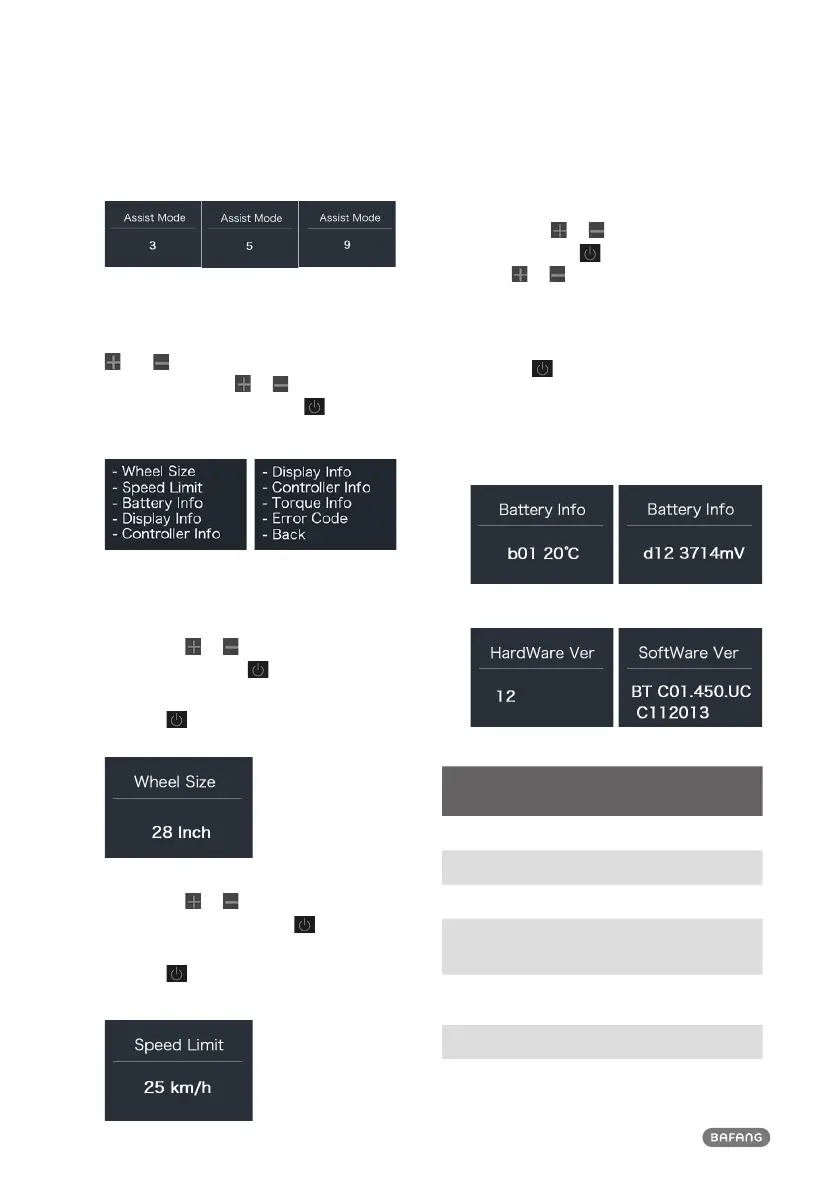
2.7.2 "Information"
After the HMI powered on, press and hold
and to enter into the setting function.
Briefly press (<0.5S) or to select "Infor-
mation" and then briefly press (<0.5S) to
confirm.
Note: All information here cannot be changed, it is
to be viewed only.
2.7.2.1 “Wheel Size”
Briefly press or to select ” Wheel Size”,
and then briefly press to view the wheel
size default.
Press the
button (<0.5S) to exit back to
the "Information" interface.
2.7.2.2 “Speed Limit”
Briefly press or to select ” Speed
Limit”, and then briefly press to view the
speed limit default.
Press the
button (<0.5S) to exit back to
the "Information" interface.
2.7.2.3 “Battery Info”
Briefly press or to select “Battery Info”,
and briefly press to enter, then briefly
press or to view the battery data (b01
→ b04 → b06 → b07 → b08 → b09 → b10 →
b11 → b12 → b13 → d00 → d01 → d02 → …
→ dn → Hardware Ver → Software Ver).
Press the
button (<0.5S) to exit back to
the "Information" interface.
Notice: If the battery doesn't have commu-
nication function, you won’t see any data
from battery.
View the battery information
View the hardware and software version of battery
Code Code Definition Unit
b01 Current temperature
℃
b04 Battery voltage mV
b06 Current mA
b07
Remaining battery
capacity
mAh
b08
Battery capacity of
Full charged
mAh
b09 Relative SOC %
b10 Absolute SOC %



 To Next Page