7
DISPLAY DP C11.CAN
1.6 NORMAL OPERATION
1.6.1 Switching the System ON/OFF
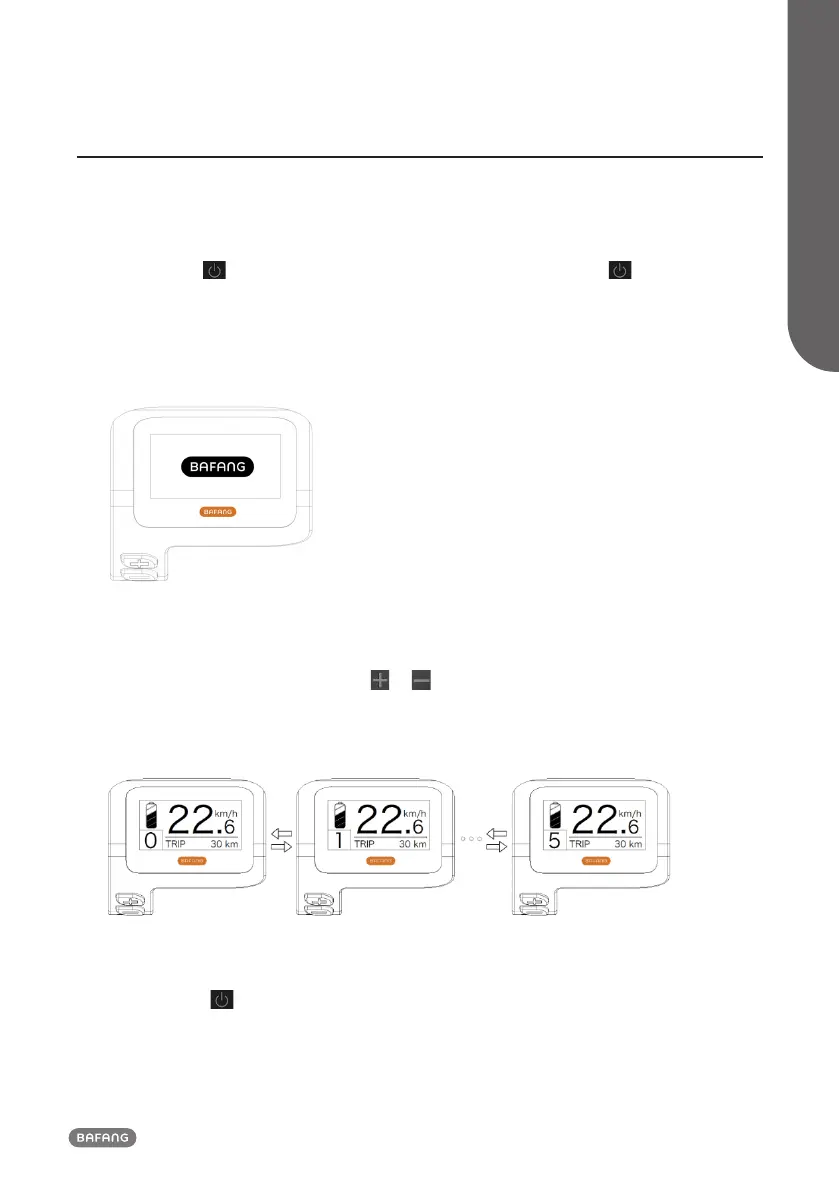
Press and hold (>2S) on the display to turn on the system. Press and hold (>2S) again to turn
off the system.
If the "automatic shutdown time" is set to 5 minutes (it can be reset with the "Auto Off" function,
See "Auto Off"), the display will automatically be turned off within the desired time when it is not
in operation.If the password function is enabled, you must enter the correct password to use the
system.
1.6.2 Selection of Support Levels
When the display is turned on, press the or button (<0.5S) to switch to the support level, the
lowest level is 0, the highest level is 5. When the system is switched on, the support level starts in
level 1. There is no support at level 0.
For different assist levels please see part "Assist Mode".
1.6.3 Selection mode
Briefly press the button (<0.5s) to see the different trip modes.
Trip: daily kilometers (TRIP) - total kilometers (ODO) - Maximum speed (MAX) - Average speed (AVG)
- Rremaining distance (RANGE) - Energy consumption (CALORIES) - Output power (POWER) - Travel
time (TIME).



 To Next Page