10
1.7 SETTINGS
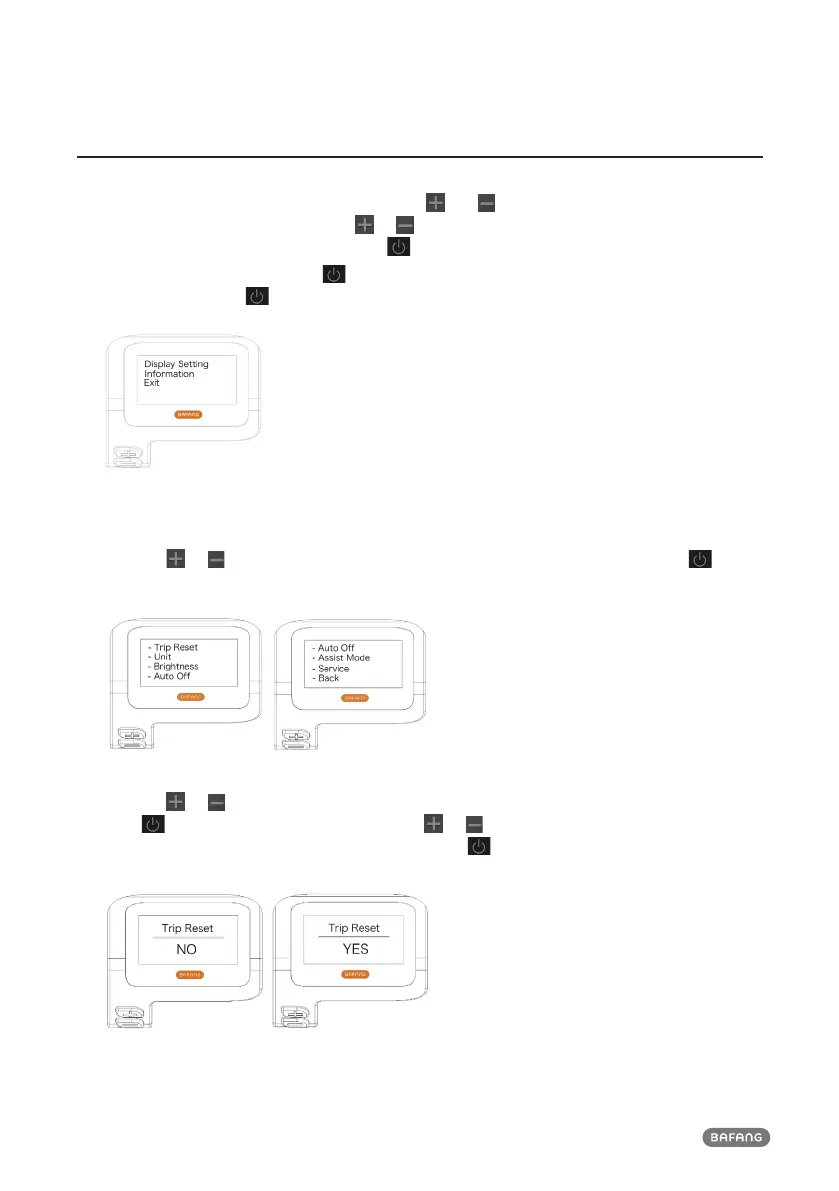
After the display is turned on, press and hold the and buttons (at the same time) to enter
into the setting menu, By pressing the or button (<0.5S), you can highlight and select Display
Setting, Information or Exit. Then press the button (<0.5S) to confirm your selected option.
Or highlight "EXIT" and press the
button (<0.5S) to return to the main menu, or highlight "BACK"
and press (<0.5S) the button (<0.5S) to return to the Settings interface.
1.7.1 "Display Setting"
Press the
or button (<0.5S) and highlight Display Setting, and then briefly press the button
(<0.5S) to access the following selections.
1.7.1.1 "TRIP Reset" Reset mileage
Press the or button (<0.5S) to highlight “Trip Reset” in the Display setting menu, and then
press button (<0.5S) to select. Then with the or button choose between “YES” or “NO”.
Once you have chosen your desired selection, press the button (<0.5S) to save and exit to the
"Display setting".



 To Next Page