28
2.7 SETTINGS
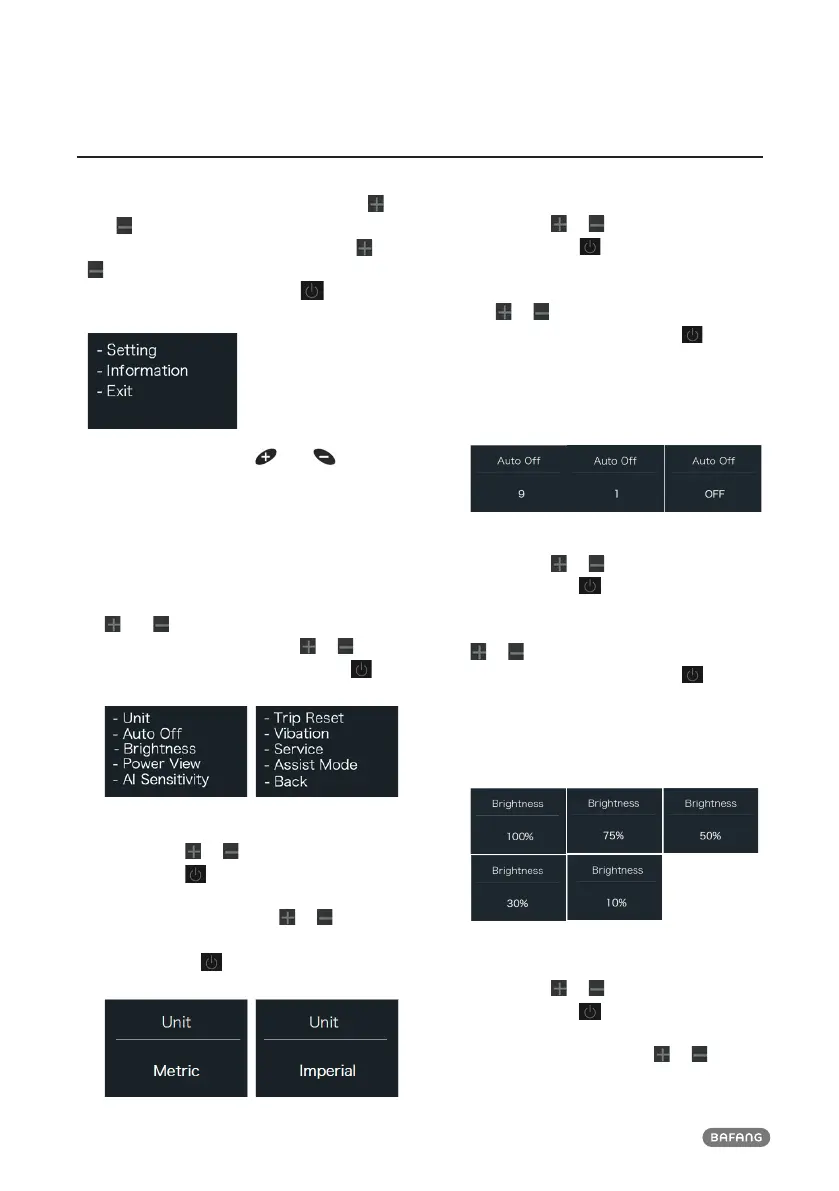
After the HMI powered on, press and hold
and button (at the same time) to enter into
the setting interface. Briefl y press (<0.5S) or
button to select “Setting”,“Information” or
“Exit” , then briefl y press (<0.5S) button to
confi rm.
You can press and hold
and button
at any time, to return to the main screen.
2.7.1 “Setting” interface
After the HMI powered on, press and hold
and button to enter into the setting
interface. Briefl y press (<0.5S) or to
select "Setting" and then briefl y press
(<0.5S) to confi rm.
2.7.1.1 “Unit” Selections in km/Miles
Briefl y press or to select “Unit”, and
briefl y press to enter into the item. Then
choose between “Metric” (kilometer) or
“Imperial” (Miles) with the or button.
Once you have chosen your desired selec-
tion, press the button (<0.5S) to save
and exit back to the "Setting" interface.
2.7.1.2 “Auto Off” Set automatic Off time
Briefl y press or to select “Auto Off”,
and briefl y press to enter into the item.
Then select the automatic Off time as “OFF
”/“9”/“8”/“7”/“6”/“5”/“4”/“3”/“2”/“1” with
the or button. Once you have chosen
your desired selection, press the button
(<0.5S) to save and exit back to the "Setting"
interface.
Notice: “OFF” means this function is off, the
unit is minute.
2.7.1.3 “Brightness” Display brightness
Briefl y press or to select “Brightness”,
and briefl y press to enter into the item.
Then select the percentage as “100%” /
“75%” / “50%” / “30%” / “10%” with the
or button. Once you have chosen
your desired selection, press the button
(<0.5S) to save and exit back to the "Setting"
interface.
Notice: “10%” is the weakest brightness and
100%” is the strongest brightness.
2.7.1.4 “Power View” Set output display
mode
Briefl y press or to select “Power View”,
and briefl y press to enter into the item.
Then select the output display mode as
“Power”/“Current” with the or button.



 To Next Page