EasyManua.ls Logo

B&G Network DEPTH - Setting the Timers and Lap Timer

B&G Network DEPTH
36 pages
Print Icon
To Next Page IconTo Next Page
To Previous Page IconTo Previous Page
Loading...
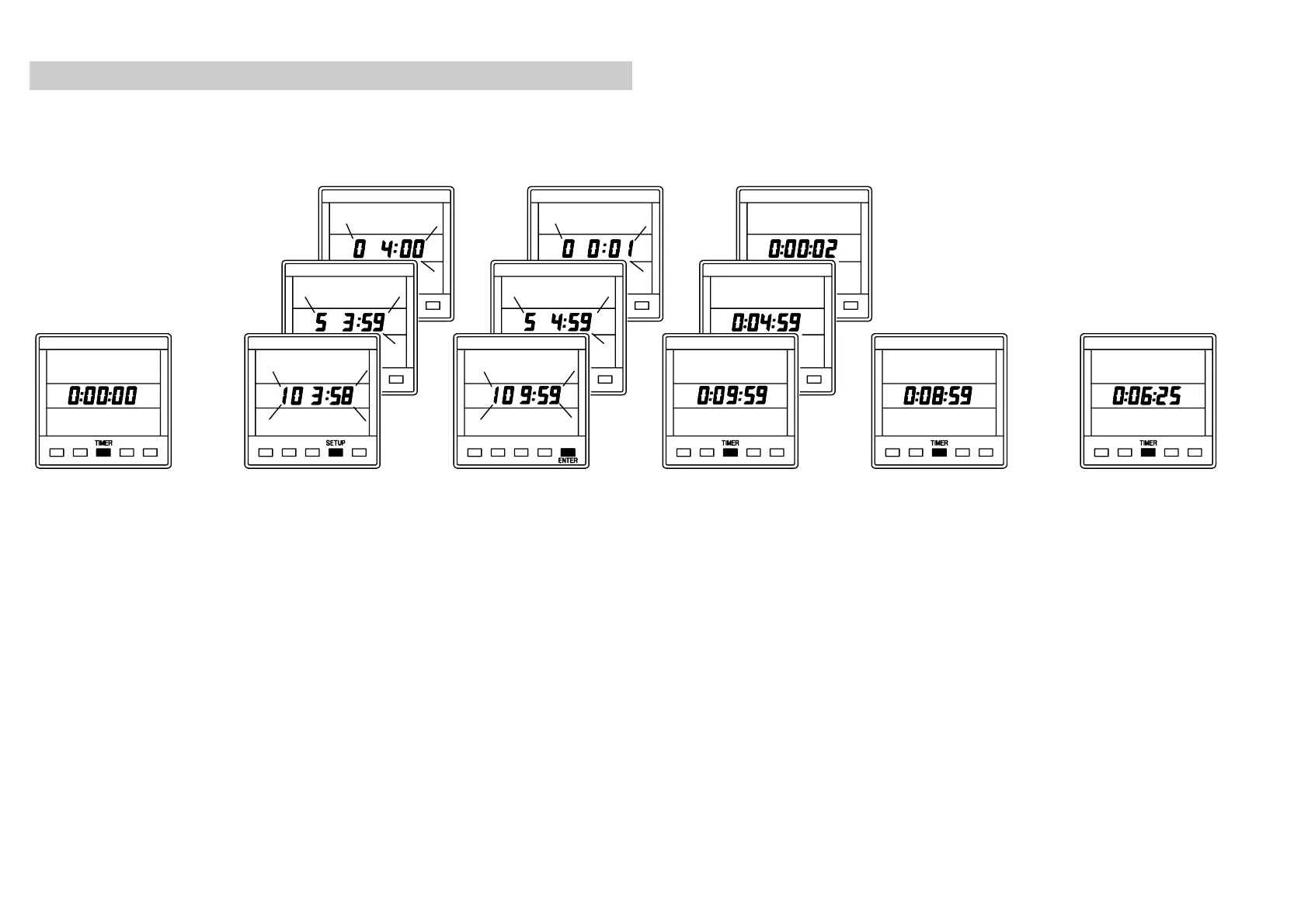
SETTING THE TIMERS AND LAP TIMER
The Lap Timer can be used to `freeze' the displayed time
w th any of the three Timers.
Press the
TIMER
key to display the
timers.
Press SETUP key
1
10 min.
2
5 min.
3
Count-up
The display will
flash.
Press
ENTER
key, the display is
set to the
selected starting
value. The timer
starts to count.
Press
TIMER
key,
the display stops
flashing and the
timer is running.
Press
TIMER
key
to freeze the
displayed time.
The timer is still
counting but not
displayed
Press
TIMER
key
4 times to display
the timer again.
i
610-HB-0503-05
28
www.bandgservice.co.uk

Other manuals for B&G Network DEPTH

Related product manuals