aAOFENE
www.baofengradio.us http://www.baofengradio.us
www.foscam.us
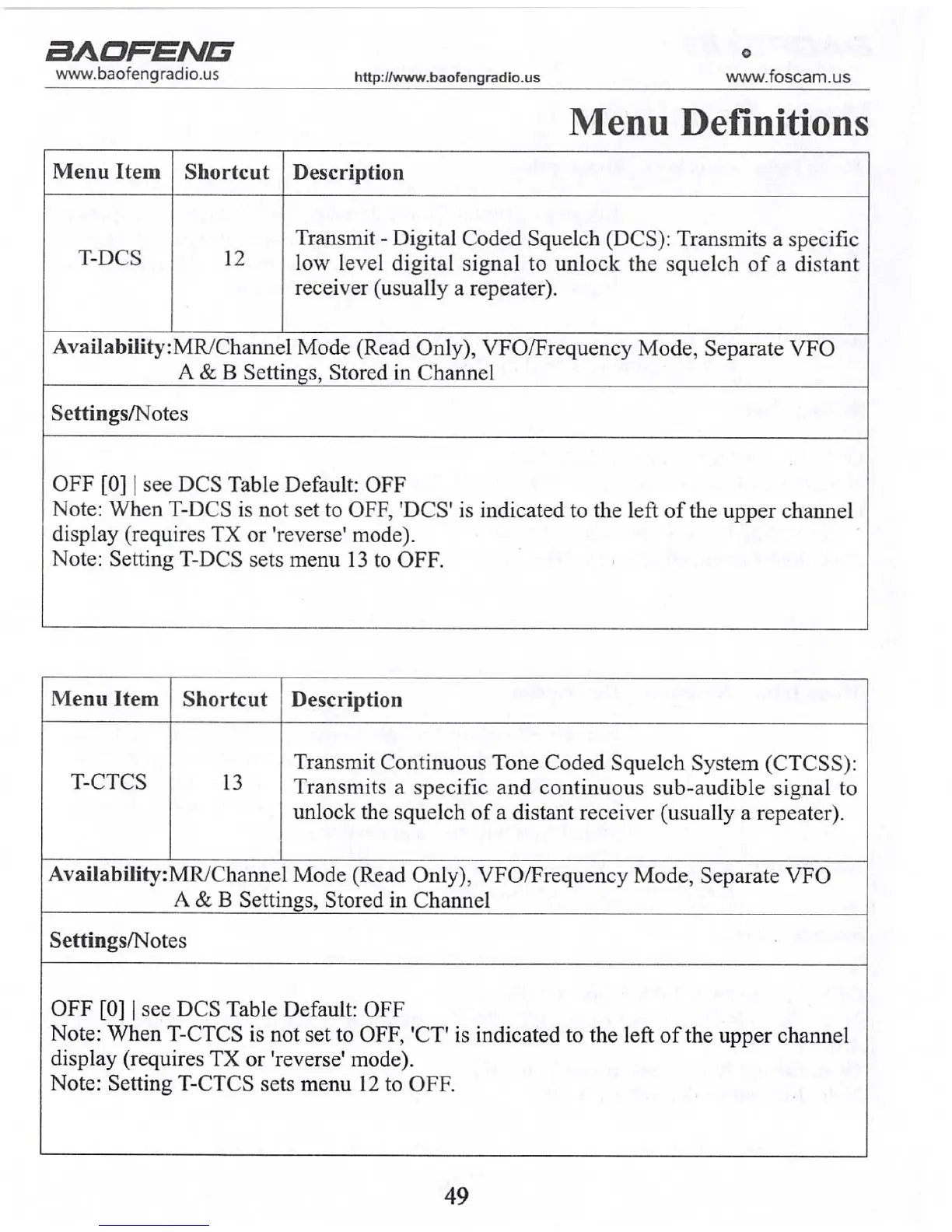
Menu Definitions
Menu Item Shortcut
Description
T-DCS
12
Transmit - Digital Coded Squelch (DCS): Transmits a specific
low level digital signal to unlock the squelch of a distant
receiver (usually a repeater).
AvaiIability:MR/Channel Mode (Read Only), VFO/Frequency Mode, Separate VFO
A & B Settings, Stored in Channel
Settings/Notes
OFF [0] | see DCS Table Default: OFF
Note: When T-DCS is not set to OFF, 'DCS' is indicated to the left of the upper channel
display (requires TX or 'reverse' mode).
Note: Setting T-DCS sets menu 13 to OFF.
Menu Item Shortcut
Description
T-CTCS 13
Transmit Continuous Tone Coded Squelch System (CTCSS):
Transmits a specific and continuous sub-audible signal to
unlock the squelch of a distant receiver (usually a repeater).
Availability: MR/Channel Mode (Read Only), VFO/Frequency Mode, Separate VFO
A & B Settings, Stored in Channel
Settings/Notes
OFF [0] | see DCS Table Default: OFF
Note: When T-CTCS is not set to OFF, 'CT' is indicated to the left of the upper channel
display (requires TX or 'reverse' mode).
Note: Setting T-CTCS sets menu 12 to OFF.
49
aAORENE
www.baofengradio.us
http://www.baofengradio.us
www.foscam.us
Advanced Topics
For a complete reference on menu items, see section IV: Menu Definitions.
Note: For radios set to Memory Mode (MR) the following menu items will not take
effect: STEP, TXP, W/N, CTCSS, DCS, S-CODE, PTT-ID, BCL, SFT-D, OFFSET,
MEM-CH, BAND.
Using the Menu System Basic Use
Procedure: Using the Menu with Arrow Buttons
1. Press the [MENU] button to enter the menu.
2. Use the [UP] and [DOWN] to navigate between menu items.
3. Once the desired menu item is found, press [MENU] again to select that menu
item.
4. Use the [UP] and [DOWN] buttons to select the desired parameter.
5. When the parameter is selected you want to set for a given menu item, you can
press the [MENU] button to confirm the setting or press the [EXIT] button to
reset that menu item and exit the menu system.
6. To exit out of the menu at any time, press the [EXIT] button.
Using Shortcuts
Every menu item has a numerical value associated with it, and these numbers can
be used for direct access of any given menu item. To see which numerical value is
associated with each menu item, go to Section IV: Menu Definitions. The top ten most
common features are also the top menu functions, and these are printed on the keypad
for easy reference.
Procedure: Using the Menu with Shortcuts
1. Press the [MENU] button to enter the menu.
2. Use the numerical keypad to enter the number of the menu item.
3. To enter the menu item, press the [MENU] button.
4. For entering the desired parameter, the arrow buttons can be used to scroll through
options, or use the numerical shortcuts to access specific menu items.
5. When the parameter you want to set for a given menu item is selected, the
[MENU] button can be pressed to confirm the setting or press the [EXIT] button
to reset that menu item and exit the menu system.
6. To exit out of the menu at any time, press the [EXIT] button.
22



 To Next Page