aAOFENE
www.baofengradio.us
http://www.baofengradio.us
www.foscam.us
Menu Definitions
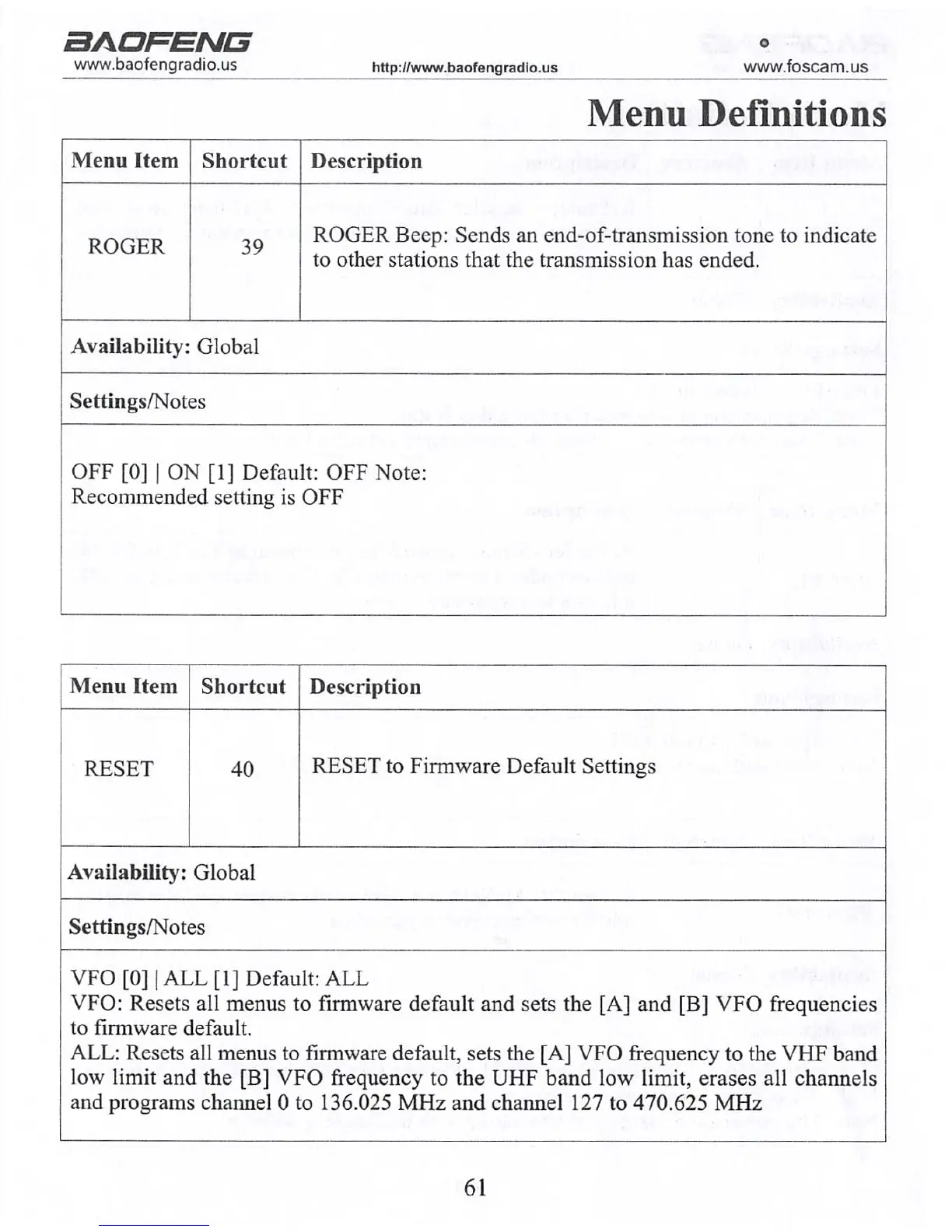
Menu Item Shortcut
Description
ROGER
39
ROGER Beep: Sends an end-of-transmission tone to indicate
to other stations that the transmission has ended.
Availability: Global
Settings/Notes
OFF [0] | ON [1] Default: OFF Note:
Recommended setting is OFF
Menu Item
Shortcut
Description
RESET 40
RESET to Firmware Default Settings
Availability: Global
Settings/Notes
VFO [0] | ALL [1] Default: ALL
VFO: Resets all menus to firmware default and sets the [A] and [B] VFO frequencies
to firmware default.
ALL: Resets all menus to firmware default, sets the [A] VFO frequency to the VHF band
low limit and the [B] VFO frequency to the UHF band low limit, erases all channels
and programs channel 0 to 136.025 MHz and channel 127 to 470.625 MHz
61
aAOPENG
www.baofengradio.us http://www.baofengradio.us
www.foscam.us
Assembly
Antenna
This device is fitted with a Male SMA connector. To
mount the antenna (Female SMA Connector), align
the two connectors and mm the antenna clockwise until
it stops.
•When installing the antenna, install it by holding the
base and turning.
•If an external antenna is used, ensure that the *SWR*
is about 1.5:1 or less to avoid damage to the transceiver's
transistors.
•Holding the antenna with your hand or wrapping the
outside may cause subpar operation of the transceiver.
• Never transmit from the device without an antenna.
Belt Clip
On the back of the radio, above the battery, there are
two parallel screws. Remove these and align them so
that they go through the holes on the belt clip as they
are screwed back into the radio body to securely affix
the belt clip.
Install the belt clip at the rear of the battery compartment
cover as shown in the figure to the right.
Do not use glue to affix the screws onto the battery
clip. Application of glue may cause damage to the
casing of the battery.
10



 To Next Page