a/s.ai=ENE3
www.baofengradio.us http://www.baofengradio.us
www.foscam.us
Getting Started
Battery
Before attaching or removing the battery make sure
the radio is turned off by turning the power/volume
knob all the way counter-clockwise.
Installation
To attach the battery, ensure the battery is parallel and
in good contact with the aluminum chassis. The battery
bottom is about 1 to 2 centimeters below the bottom
of the radio's body.
Align the battery with the guide rails on the radio
chassis and slide it upwards until it clicks into place.
The battery latch at the bottom locks the battery in
place.
Removal
Ensure the radio is off before removing the battery.
To remove the battery, press the battery release above
the battery pack and slide the battery downward.
After sliding the battery down a few centimeters, the
battery can be removed from the radio body.
External Headset
Plug the external micro-headset connector into the jack
of "SP & MIC" of the transceiver as shown in the
figure on the right.
11
aA.ar=ENC3
www.baofengradio.us http://www.baofengradio.us
www.foscam.us
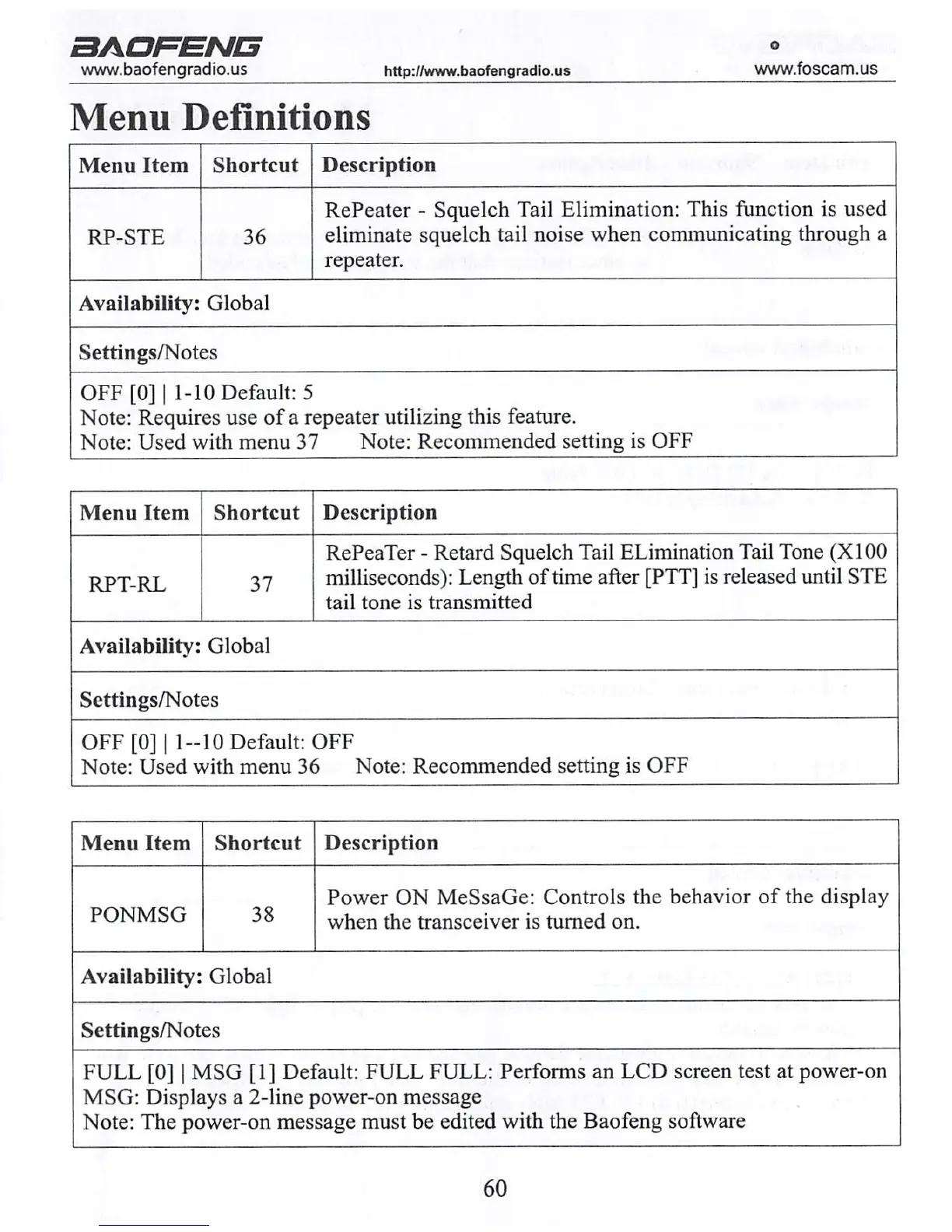
Menu Definitions
Menu Item Shortcut
Description
RP-STE 36
RePeater - Squelch Tail Elimination: This function is used
eliminate squelch tail noise when communicating through a
repeater.
Availability: Global
Settings/Notes
OFF[0]| 1-10 Default: 5
Note: Requires use of a repeater utilizing this feature.
Note: Used with menu 37 Note: Recommended setting is OFF
Menu Item Shortcut
Description
RPT-RL 37
RePeaTer - Retard Squelch Tail ELimination Tail Tone (X100
milliseconds): Length of time after [PTT] is released until STE
tail tone is transmitted
Availability: Global
Settings/Notes
OFF[0]| 1 — 10 Default: OFF
Note: Used with menu 36 Note: Recommended setting is OFF
Menu Item Shortcut
Description
PONMSG
38
Power ON MeSsaGe: Controls the behavior of the display
when the transceiver is turned on.
Availability: Global
Settings/Notes
FULL [0] | MSG [1] Default: FULL FULL: Performs an LCD screen test at power-on
MSG: Displays a 2-line power-on message
Note: The power-on message must be edited with the Baofeng software
60



 To Next Page