Familiar with this machine
Status indication
Basic Operation
Menu operation
Menu seting
Appendix
01~07
08~10
11~28
29~69
70~93
94~99
Contents
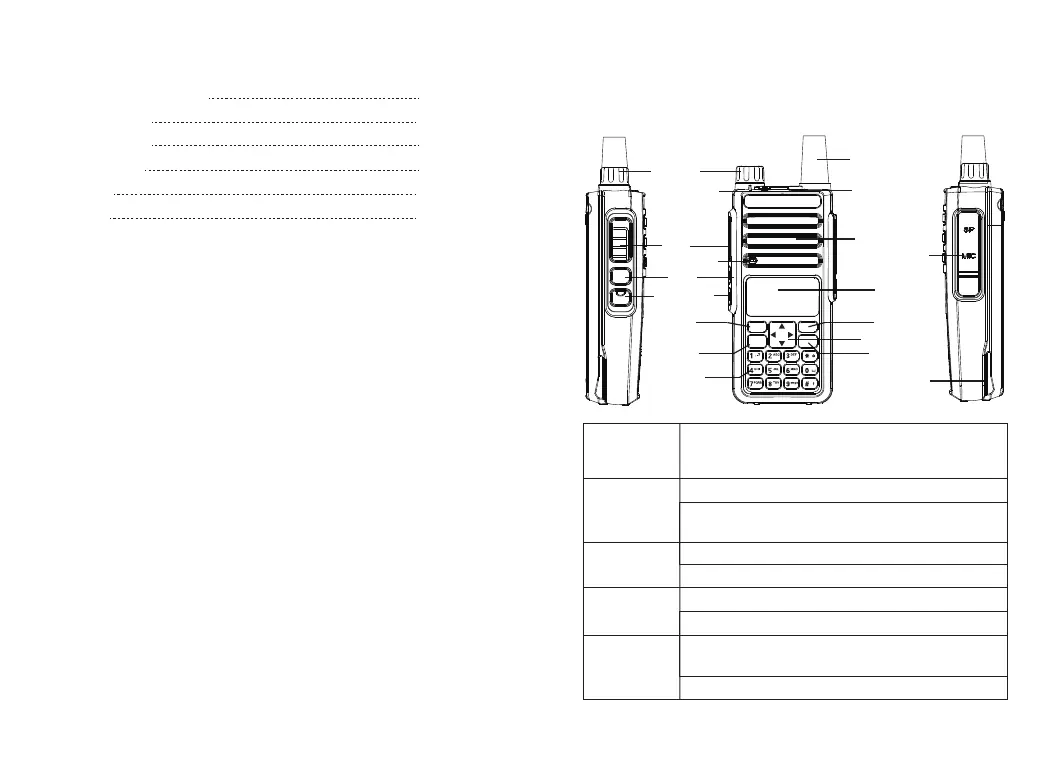
Familiar with this Product
PTT
Moni
VFO/MR
Direction Key
MENU
MENU
Mic/Spk/Write
Frequency Port
P2 Key
Battery Pack
Antenna
BACK
BACK
01
Keypoard
Low/High
Power Switch
LED Indicator
LED
Loudspeaker
Microphone
Switch between transmission and reception; when transmitting,
press this button and speak to the microphone; release the
button to receive
Short press to check the battery voltage
Press and hold it to turn on the monitor function (only support
analog channels)
Short press to switch high and low power
Press and hold it to turn on the VOX
Press and hold it to enter the alarm mode
Short press and loosen to exit alarm mode
Press it to activate the menu mode, enter the menu and press
this button to select menu items
Press and hold it to enter the radio settings
[PTT]Transmit
button
Side button 1
* Defaults to
[Moni] button
Side button 2
* Defaults to
[POWER] button
* Defaults to
[SOS] button
[MENU] button
You can familiarize yourself with the external structure and the functions
of programmable buttons of this product in this section.
VFO/MR
A/B
State indicator
lamp














 To Next Page