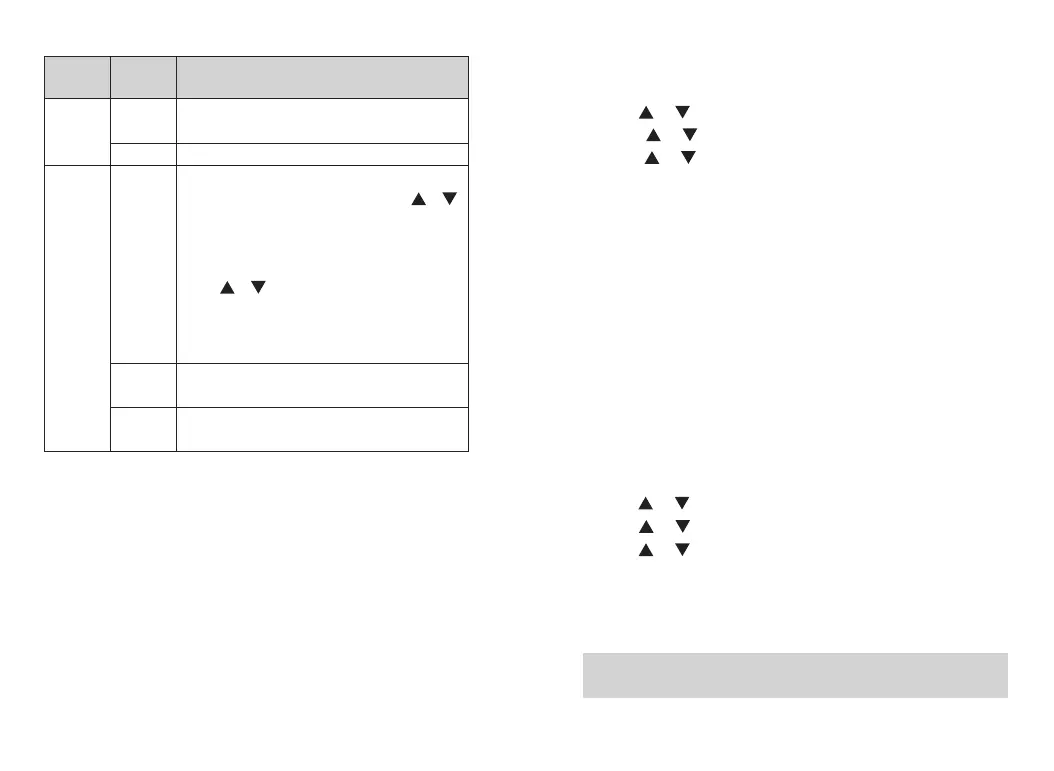
English version, including menu, call tips, call logs and
all other interfaces
Simplified Chinese
Change the encoding and decoding of CTCSS/DCS.
Press [A/B] to selec “CTCSS/DCS” , press [ ]/[ ]
to select CTCSS/DCS code, press # to switch the
positive phase (N) and negative phase (I).
● Press [A/B] to select “CTCSS/DCS codec OFF” ,
press [ ]/[ ] to select analog CTCSS/DCS
frequency.
● You can also enter CTCSS/DCS with keypad, press the
[MENU] button to confirm, and press [BACK]to return.
Change the decoding of CTCSS/DCS. Setting method is
same as above
Change the coding of CTCSS/DCS. Setting method is
same as above
Squelch
You can adjust the squelch level of walkie talkie, filters unusable calls of
low signal strength or channels of background noise that higher than
normal value.
Normally it is default value (that is regular filtering); strictly filter unwanted
calls or background noise, in the same time, calls from remote locations
can also be filtered out.
Press preprogrammed strict/normal squelch key to switch the squelch
level between normal and strict.
The menu functions as follows:
8.Press [MENU] to enter menu mode.
9.Press [ ]/ [ ] o set, then press [MENU] to select.
10.Press [ ]/ [ ] to the radio setting, then press [MENU] to select.
11.Press [ ]/ [ ] to “squelch” , then press [MENU] to select.
12.Choose “strict” or “norma” l, then press [MENU] to select.
13.Press[BACK]return to the home screen.
TX Power
This function can achieve quick switch of high/medium/low power. When
communication distance meets your requirements, low power can be
selected to save power. When low power does not enable you to
communicate with other walkie-talkies away from distance, and then
please choose high power.
According to the preprogrammed [Power Level Adjustment] shortcut keys,
switch transmitting power of the current channel between high, medium
and low. You can set the transmitting power level of each channel to be
high or low. The menu functions as follows:
1.Press [MENU] to enter menu mode.
2.Press [ ]/ [ ] to set, then press [MENU] to select.
3.Press [ ]/ [ ] to the radio setting, then press [MENU] to select.
4.Press [ ]/ [ ] to “TX power” , then press [MENU] to select.
5.Follow the screen prompt to change the current Settings.
6.Press [MENU] to select new power level.
7.Return to the previous menu.Press [BACK] return to the home screen,
and screen displays the power level icon
Note: An H above the screen indicates the current high power; M
indicates the current medium power; L indicates the current low power.
73 74
English
Chinese
C CTC/DCS
R CTC/DCS
T CTC/DCS
17.Lan-
guage
18.CTCSS/
DCS
Setting
options
Options
and Range
Description of operation














 To Next Page