R5910888 /00 G60 35
Hot-Key Settings
Assign a specific function to the “Hot Key” button on the remote control. It allows you to use the function easily
without going through the OSD menus. The available functions for “Hot Key“ button are Blank Screen, Aspect
Ratio, Freeze Screen, and Projector Info.
Reset to Default
Reset all settings to the factory default values.
Service
The service menu is only available to Barco qualified service technitians.
4.5 Light Source Menu
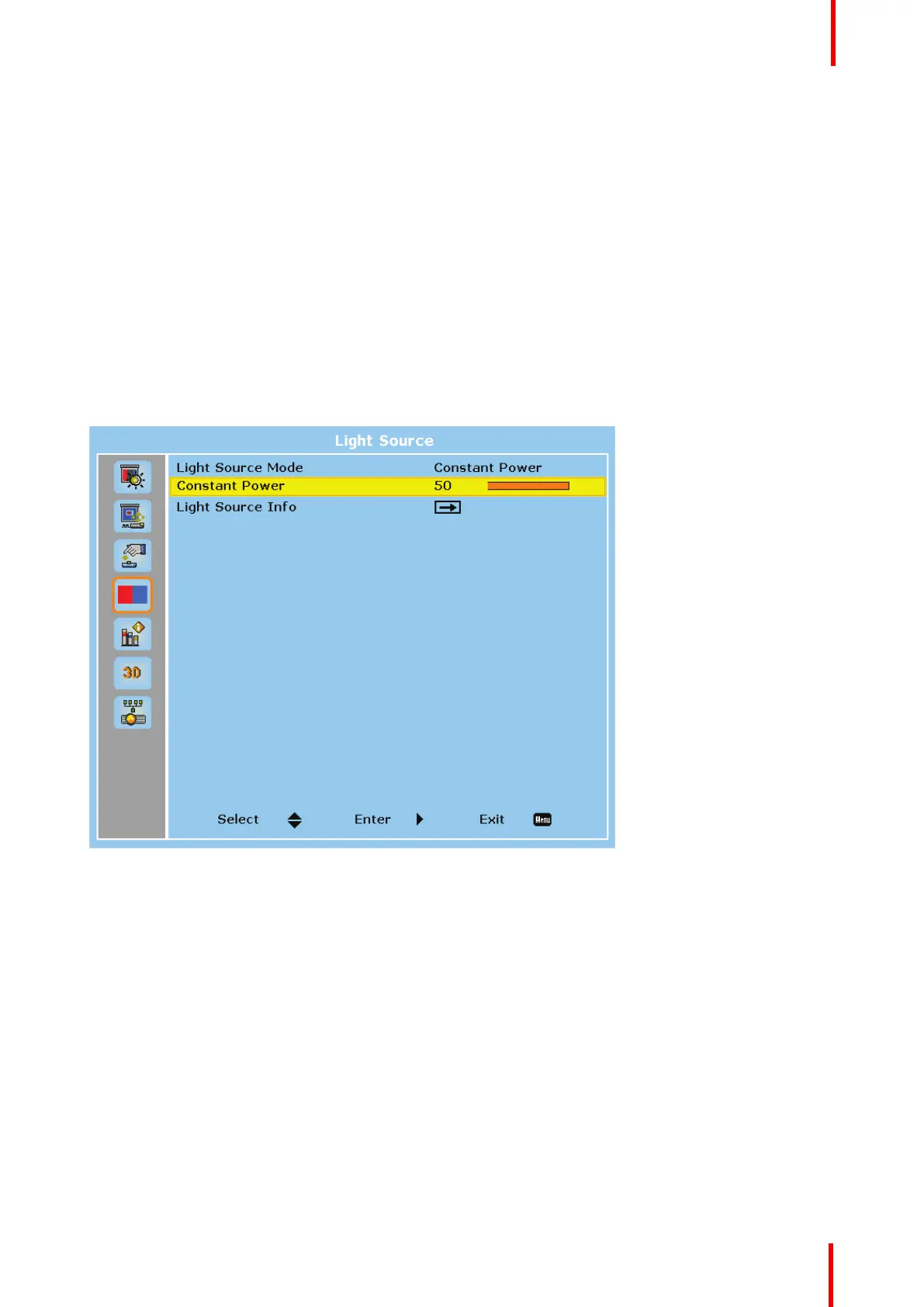
Overview
Image 4-12
Light Source Mode
Set up the light source mode depending on the installations.
• Constant Power : Enable the Constant Power to meet different installation requirements.
• Constant Intensity : Select to maintain the current constant brightness and color settings. It is used after
the Constant Power is enabled.
• ECO : Set the projector to 50% constant brightness and color settings.
Constant Power
Select a value for the laser diode power. The value ranges from 0 to 99, which covers the power level from
30% to 100%. The power level can be managed to obtain the brightest image or longest service life.
Light Source Info
Display the total used hours of the laser diode and information on light sensor calibration
User controls


 To Next Page