EasyManua.ls Logo

Barco G60 - LED Indication Chart

Barco G60
64 pages
Print Icon
To Next Page IconTo Next Page
To Previous Page IconTo Previous Page
Loading...
R5910888 /00 G6042
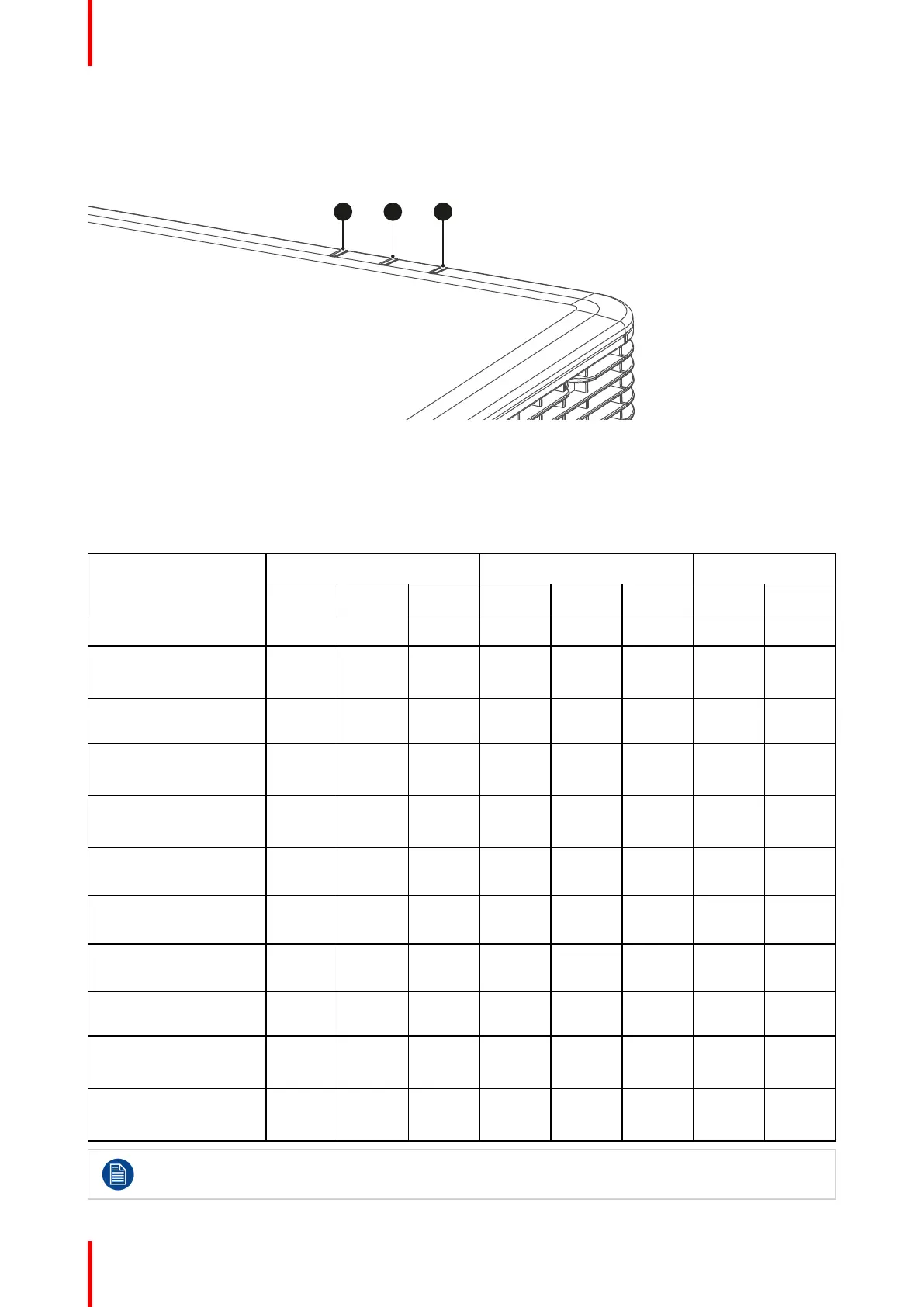
5.1 LED indication chart
Overview
1 2 3
Image 5-1
1 Light LED
2 Status LED
3 AV Mute LED
Explanation
Message
Light LED
Status LED AV Mute LED
Green
Orange
Red Green
Orange
Red Green
Orange
Standby State
Power on
(Warm up)
Flash-
ing
Power on & Laser
diode on
Steady Steady Steady
AV mute is off
(Image is displayed)
Steady Steady Steady
AV mute is on
(Image is black)
Steady Steady Steady
Projector
communication
Steady Flash-
ing
Steady
Firmware upgrade Flash-
ing
Flash-
ing
Laser diode time has
expired
Steady
Unit loses over 60%
initial luminance
Error
(Over temperature)
Steady
Error
(Fan failure)
Flash-
ing
Power key of the keypad is in steady red light when the projector enters standby mode.
Troubleshooting