16
Site~Rite
*
6 Ultrasound System
3 Site~Rite
*
6 Ultrasound System Information
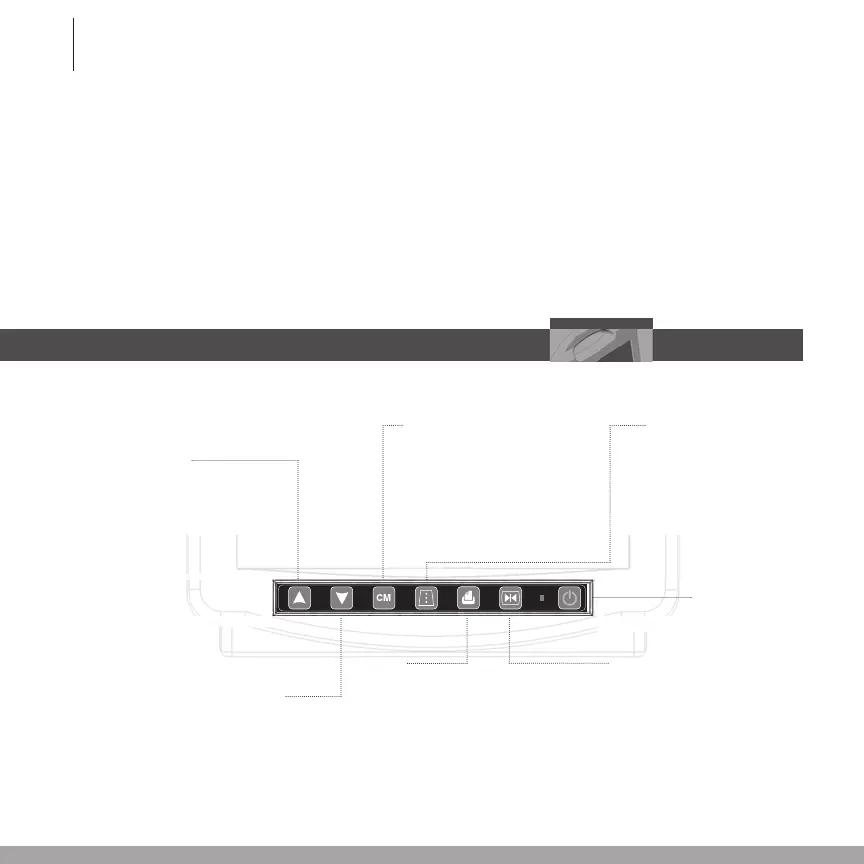
3.1 Front Panel Controls
Freeze Image
(In Time Set mode, this button
sets the internal clock to the
displayed values and returns
the system to Run mode.)
Increase Gain
(In Time Set mode,
this button increases or
toggles the selected fi eld.)
Decrease Gain
(In Time Set
mode, this button
decreases or toggles
the selected fi eld.)
Depth
(In Freeze mode, if this but-
ton is held for more than 5
seconds, the system enters
the Time Set mode. In
Time Set mode, this button
selectsthenextfield.)
Depth Markers
Toggles between depth mark-
ers, gridlines and off. Hold
for more than 5 seconds to
toggle between the low and
high contrast image.
Print
Sends the current image to the
printer if connected. If a USB
storage device is connected to
the system, this button will also
save the current screen image to
the storage device.
2.6 Resetting the Site~Rite
*
6 Ultrasound System
Shouldthescannerdisplayeverappearblankorshowanexclamationmark(!), the system may
need to be reset.
To reset the system:
1. Depress and release the power button located on the front of the Site~Rite* 6 Ultrasound
System scanner.
2. Waitapproximately60secondsfortheunittoresetitself.
3. Powertheunitbackonperinstructionsinsection2.5.
On/Off/Reset








 To Next Page