EasyManua.ls Logo

Bard Site-Rite 6 - Display Screen Elements

Bard Site-Rite 6
44 pages
Print Icon
To Next Page IconTo Next Page
To Previous Page IconTo Previous Page
Loading...
18
Site~Rite
*
6 Ultrasound System
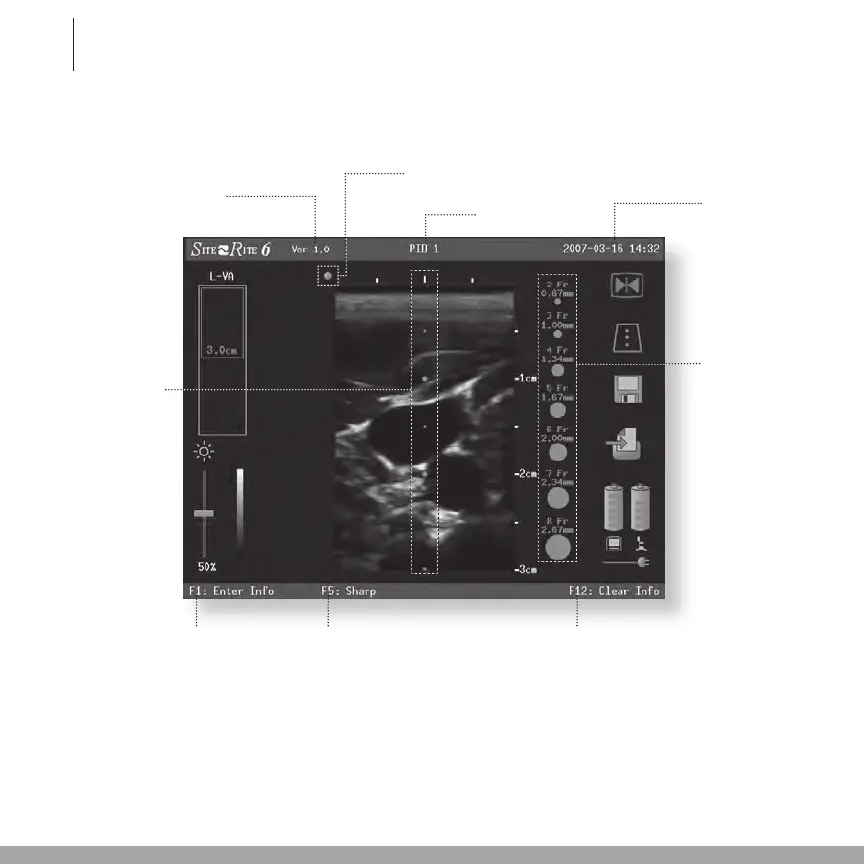
3.3 Display Screen Information
Probe Orientation Marker
Time and Date
The time is shown
in 24 hour “00:00”
format and the date
is displayed in YYYY-
MM-DD format.
Catheter Size Icons
Displayed in proportion
to the vessel image
at a selected depth.
Icons assist clinicians
in determining the ap-
propriate catheter size
for the vessel being
imaged.
F9 toggles Catheter
Size icons on and off.
Image Depth Markers
When enabled, the depth
markers are shown as
green dots superimposed
on the image at 1.0 cm
pitch with smaller dash
marks at 0.5 cm.
Software Version Number
Patient ID 1 Display
Smooth/Sharp
Image
F5 on the keyboard
toggles between
smooth and sharp
imaging fi lters
Enter Patient
Information
F1 on the keyboard
opens the patient
information screen
Erase Patient
Information
F12 on the keyboard
erases patient
information

Related product manuals