20
Site~Rite
*
6 Ultrasound System
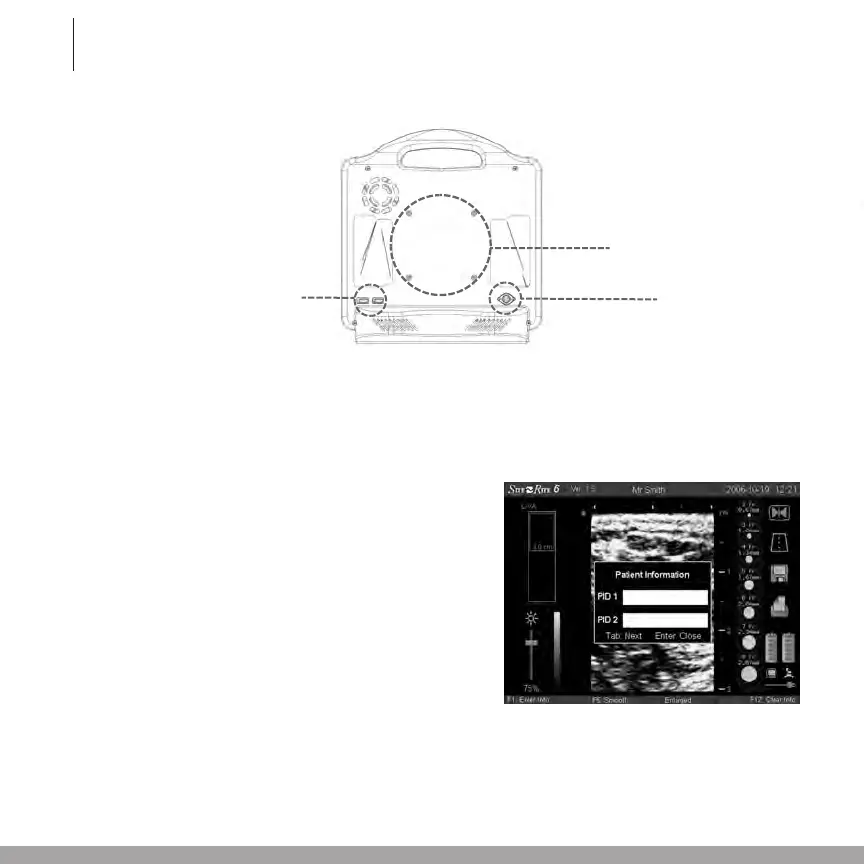
3.4 Back Panel
3.5 Entering Patient Information
Patient identification (PID) information can be entered for each ultrasound image. PID information
could include patient name, patient chart number, or other identification information.
To enter PID information:
1. Press F1 on the keyboard to display the Patient
Information window shown in the figure.
2. Enter PID information in the PID 1 and PID 2 fields by
usingthekeyboard.Amaximumofseventeencharac-
ters can be entered in each PID field, including
A-Z,a-z,0-9and"space".
3. TotogglebetweenthePID1and
PID 2 fields, press the tab key.
4. To close the Patient Information window, press the
enter key.
Note: The information in the PID 1 field will be displayed
in the title bar above the image.
5. To clear PID information, press the F12 key.
Note: The patient information will be lost when the system is powered off. To avoid information loss, save or
print the image before powering off the system.
Note: When the image is saved or printed, both PID 1 and PID 2 will appear on the image copy.
Note: When saving an image to a USB flash drive, the file name will appear as follows: PID1-Date-Time.jpg
VESA Mount
USB Connectors
Power Inlet








 To Next Page