16
Adjust handle bars of Batavus Ergo Matic Plus stem6.3
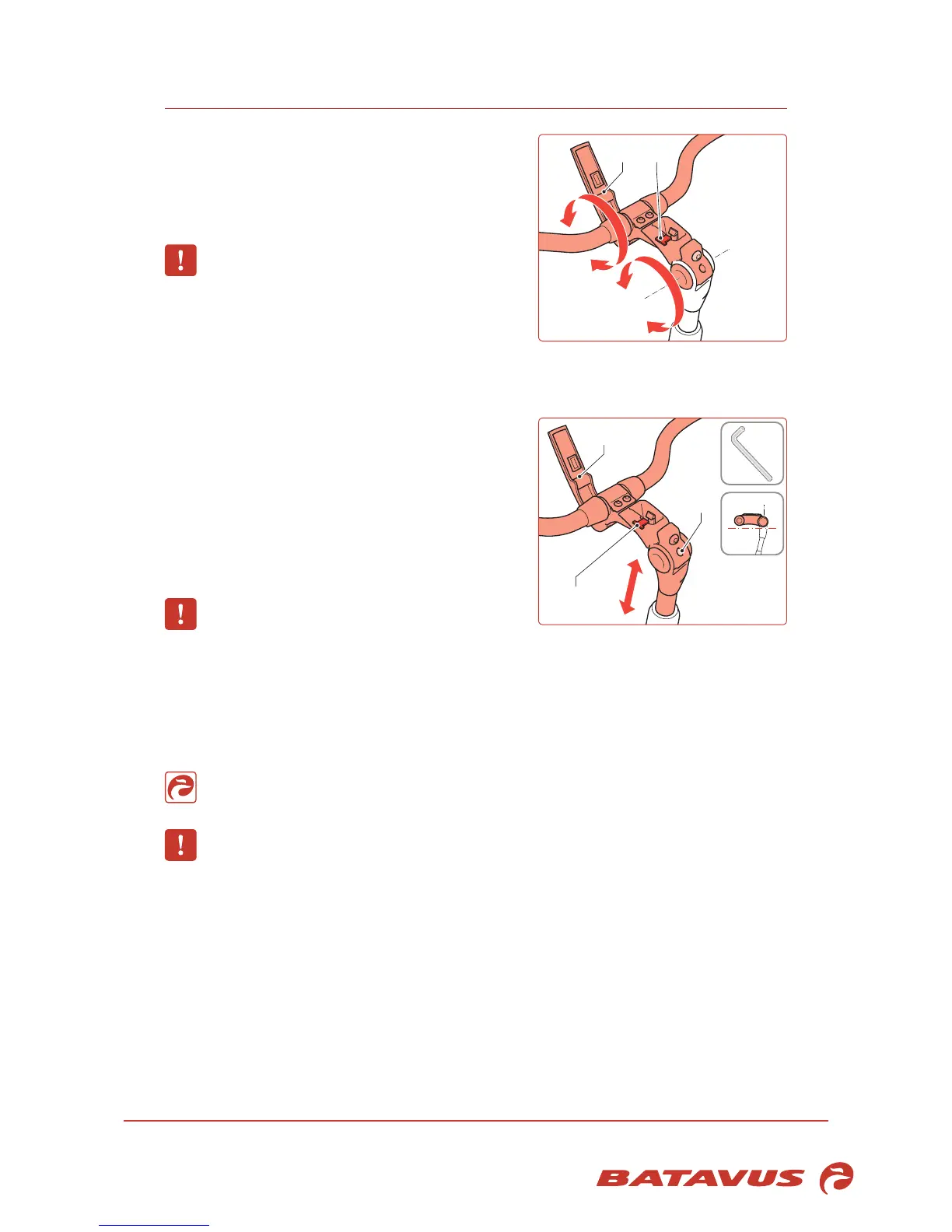
Tilting of the stem/handle bars
1. Press the safely lock (A) and open the handle (B)
by moving it up.
Now both the tilting of the stem and the handle
bars can be adjusted in one operation.
Make sure that the handle bars are exactly in
the middle.
2. After having made the adjustment, close the
handle (B) until you hear a click.
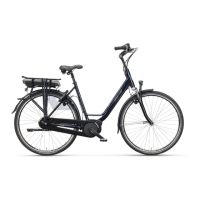
Height of the stem
1. Press the safely lock (A) and open the handle (B)
by moving it up.
2. Tilt the stem in a horizontal position.
3. Loosen the expander bolt (C). Use a socket head
wrench with a long handle for this.
4. Tap the expander bolt down and loose with a
plastic-headed hammer.
5. Set the height of the stem.
Watch the max. mark on the stem.
6. Tighten the expander bolt.
7. After having made the adjustment, close the handle (B) until you hear a click.
Set the clamping force of the handle
Caution:consultthedealerwhenyounoticeanymovementinthehandlebarswhenget-
ting on or off the bicycle. The dealer can adjust the clamping force.
You can add a bicycle computer to this model. Contact your Batavus dealer for this.


 To Next Page