RS485 Star Card Manual V14 4Feb04.doc Page 6/29
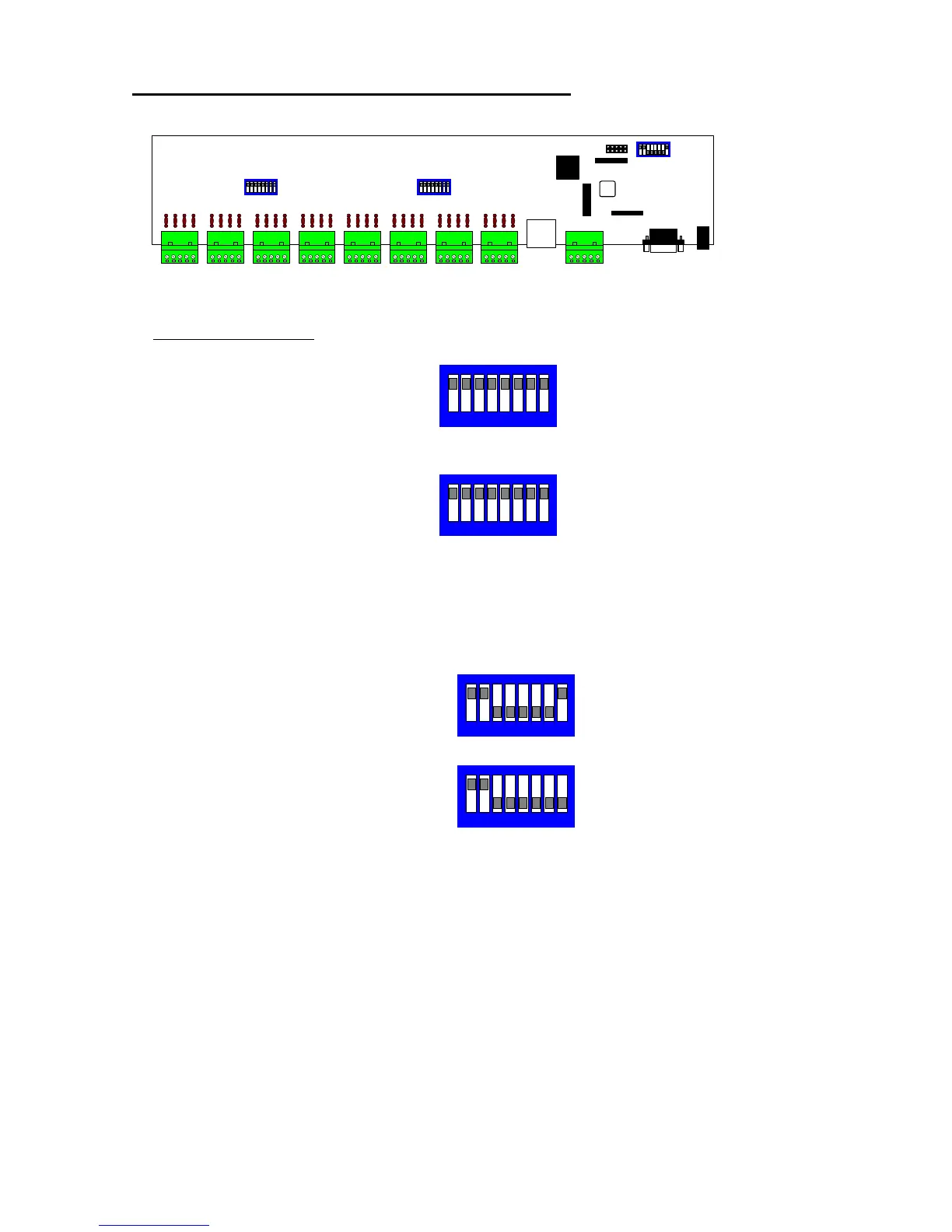
Internal view of starcard showing switch settings
Starcard PCB Switches
SW1 - RS485 line termination for outputs 1 - 4 ON = termination ON (Default)
SW1/1 & 1/2 = Output 1 termination
SW1/3 & 1/4 = Output 2 termination
SW1/5 & 1/6 = Output 3 termination
SW1/7 & 1/8 = Output 4 termination
SW2 - RS485 line termination for outptus 5 - 8 ON = termination ON (Default)
SW2/1 & 2/2 = Output 5 termination
SW2/3 & 2/4 = Output 6 termination
SW2/5 & 2/6 = Output 7 termination
SW2/7 & 2/8 = Output 8 termination
SW3 - Option selection.
SW3/1 and SW3/2 - RS485 input line termination ON = termination ON (Default)
SW3/3-7 MUST BE OFF
SW3/8 - 2 or 4 wire selection. ON = 2 WIRE, OFF = 4 WIRE
SW3
SW1
SW2
SW3 setting showing 2 wire mode selected
and RS485 input termination ON
1 2 3 4 5 6 7 8
SW3 setting showing 4 wire mode selected
and RS485 input termination ON
1 2 3 4 5 6 7 8
1 2 3 4 5 6 7 8
1 2 3 4 5 6 7 8
SW1 setting showing termination ON
SW2 setting showing termination ON
00007-3
J22
J15
J14
J16


 To Next Page