RS485 Star Card Manual V14 4Feb04.doc Page 8/29
R
B
R
A
T
R
B
T
R
A
G
N
D
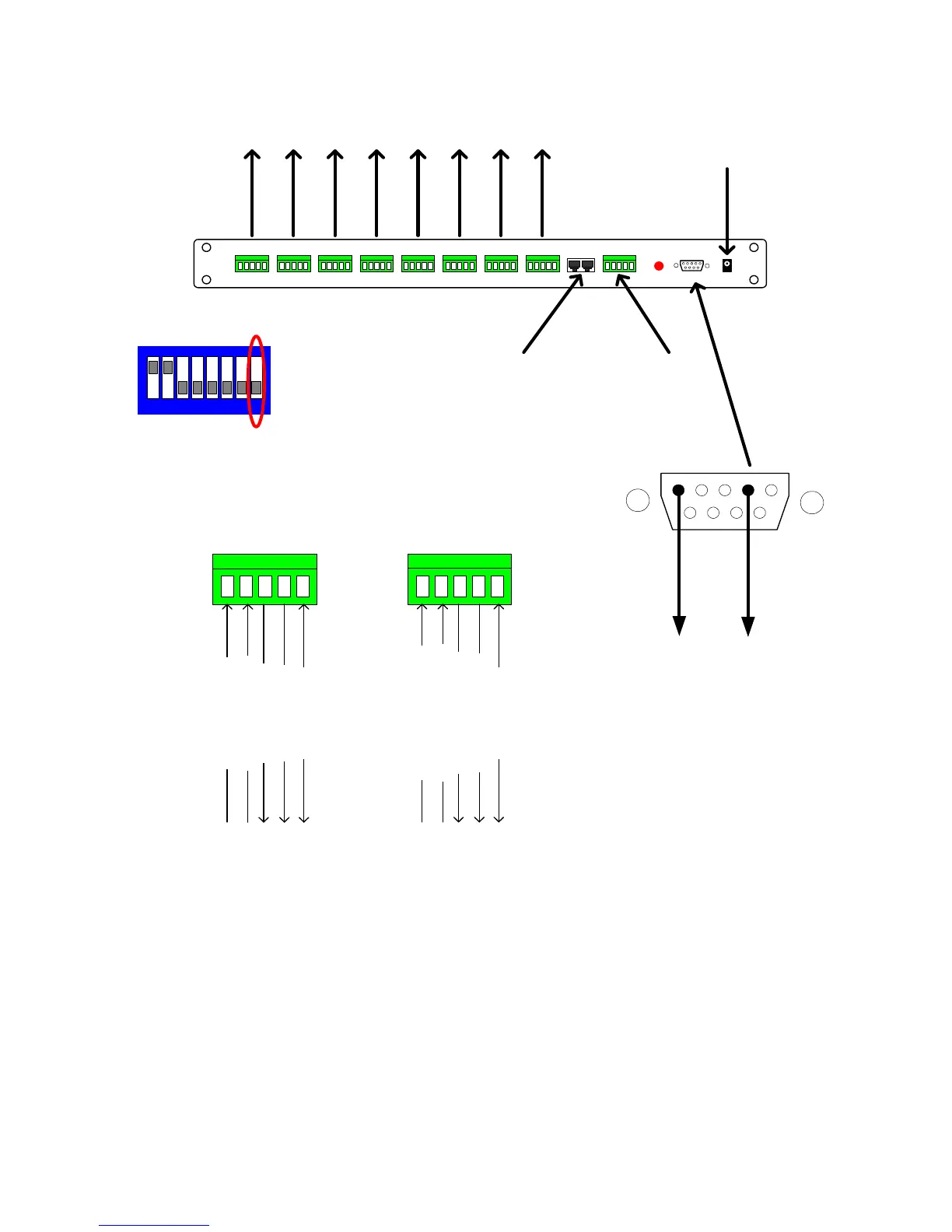
To dome RA(+)
To dome RB(-)
Frame ground
From dome TB(-)
From dome TA(+)
Star n
4 wire full-duplex mode
Close up view showing RS422 connection into and out of the Star Card.
RS422 network length maximum
1200M per output.
Please remember to terminate
the last dome of each output.
R
B
R
A
T
R
B
T
R
A
G
N
D
To controller RB(-)
Frame ground
From controller TB(-)
From controller TA(+)
To controller RA(+)
MASTER
4 wire RS422 notes.
1. Ensure that the dome/receiver is set for 4 wire telemetry, full-duplex.
2. The controller must be set for 4 wire using either a rear panel switch or menu access. Full duplex must be
selected from within the setup menu.
3. Baud rates for the controller and dome/receivers must be the same. It is advisable to use 9600 baud to reduce
the possibility of corrupted data causing intermittent control.
Panasonic Specific Notes:
FS616 - A single RS485 output is available. Connect the RS485 output to the star card as shown.
SX350 - Not compatible with 4 wire telemetry.
SX550/850 - Not required as each matrix RS485 output card has eight individual outputs.
Star 8Star 7Star 6Star 5Star 4Star 3Star 2Star 1
BBV Starcard
RS232 monitor
8 * RS422 OUT
Supply
9Vdc 500mA
Master
RS422 INBBV RS422 or
1 2 3 4 5 6 7 8
SW3 must be configured for 4 Wire
as below: SWITCH 8 OFF
5 4 3 2 1
9 8 7 6
GND to
PC pin 5
TX to
PC pin 2
The RS232 output can be taken into
a PC/laptop to allow the Starcard
output to be displayed using
Hyperterminal, Telix or other comms
program.
The baud and parity settings should
match the values chosen with SW2.


 To Next Page