BD FACSPresto Near-Patient CD4 Counter Instructions For Use20
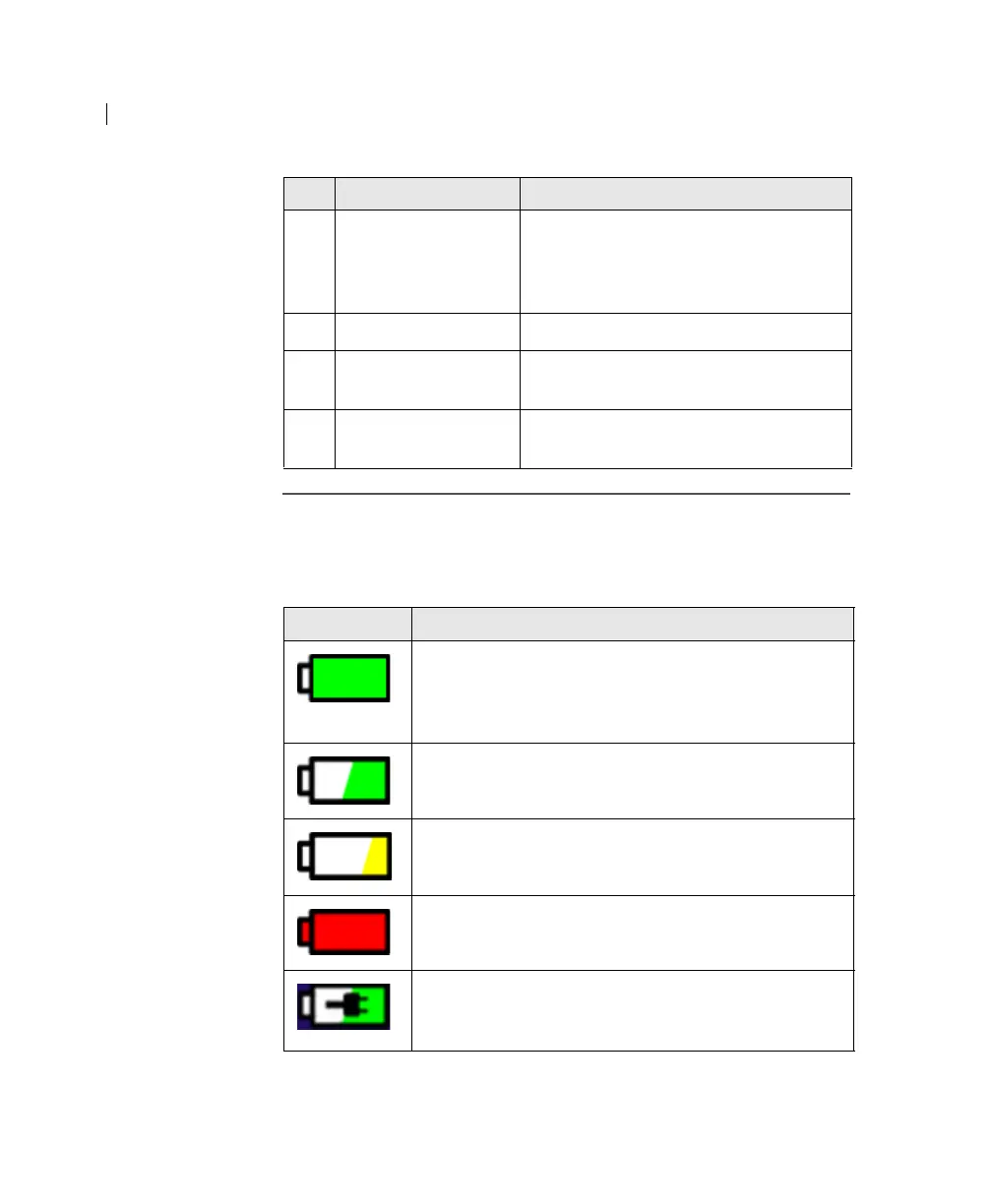
Battery charge
indicator
The following table describes the battery charge indicator on the
upper right of the screen. The fill and color of the indicator show
the remaining battery power.
5 Settings Use to set the date, time, display
brightness, volume, Hb units, lab name,
operator names, and process control
information.
6 Help Use to view instructional videos.
7 Battery charge
indicator
Icon that shows the remaining battery
power.
8 Time and date Shows the time and date as specified in
the Settings tab.
No. Tab name or Icon Description
Icon Description
The fill is completely green when the battery is fully
charged. On a fully charged battery, the instrument can
run for up to 6
hours without being plugged into an
electric source.
The fill is green when there is more than 25% battery
power remaining.
The fill is yellow when there is less than 25% battery
power remaining.
The fill is red when there is not enough power to
complete a sample run.
The fill is green and a plug icon indicates that the
battery is charging when the instrument is connected to
an AC power source.











 To Next Page