1705Router Web Configuration Manual
of computer. If you download something by BT, the value is more. There are
200 PC in one net-bar, about 600 is enough.)
Max-entries(per host): It is used to set max-entries for each IP.
Address Mapping Setting:
The configuration make all users in LAN share one public IP address. They can
browse Internet at one time, but the users which are in Internet can’t call users in
LAN.
There are three steps to configure router in this setting.
First:
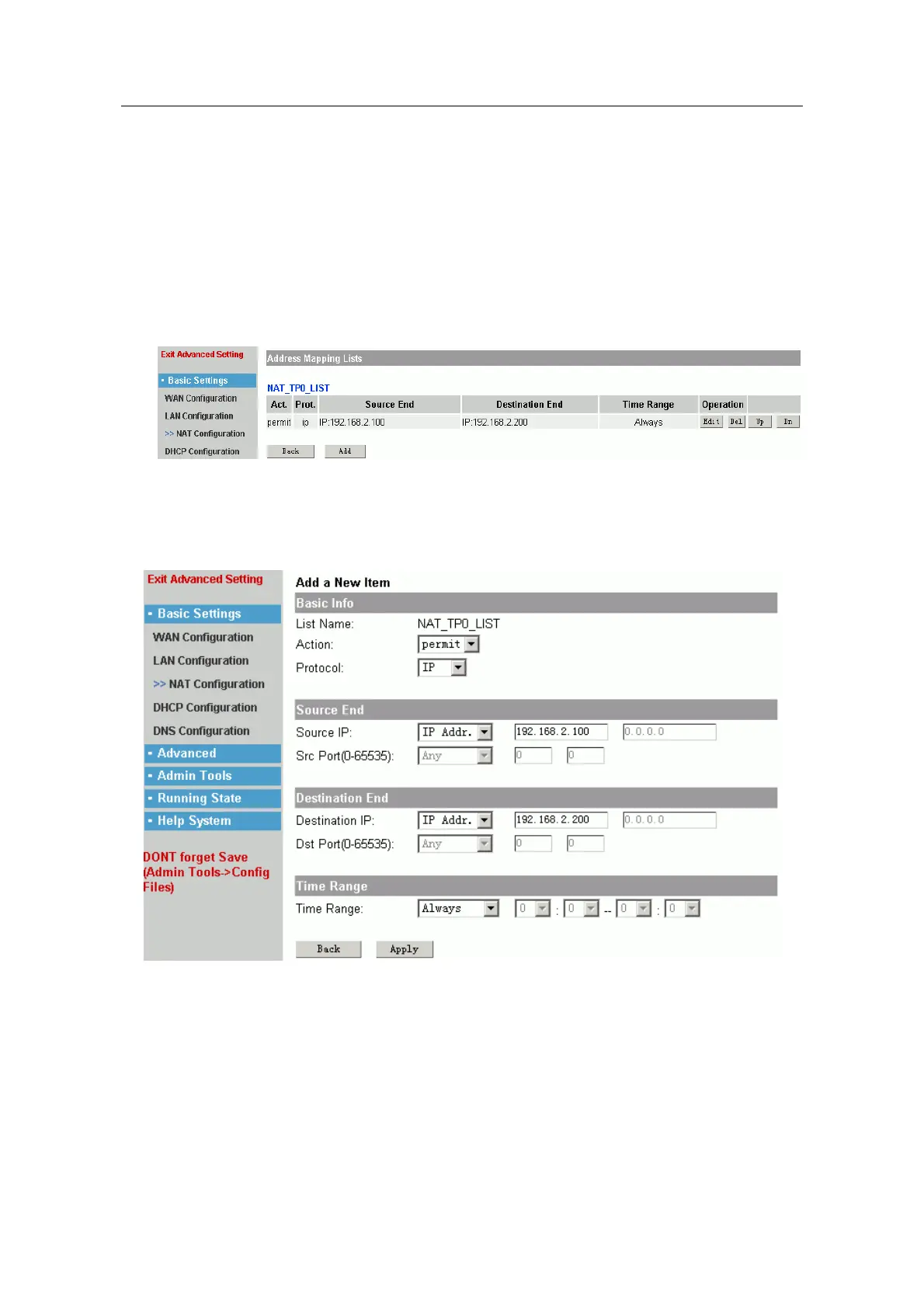
Ensure the port of LAN, click links of access list to enter configuration page
layout:
It shows the final configuration result. Click “add” to add new list, “Edit” is used to
edit the current list. “Del” is used to delete list. If there are some lists, you can
click “Up” and “Dn” to move.
Second:
add a new item to address mapping lists. Click “add” button.
The above figure shows page layout of adding item, it contains many contents,
but typical setting includes the following:
Action: permit or deny; usually you can choose permit.
Protocol: usually you can choose IP protocol.
Source IP:
any
――
all IP address.
IP Addr.
――
single IP address.
IP Range
――
range of IP address.
- 12 -



 To Next Page