1705Router Web Configuration Manual
IP Subnet
――
one IP address and one subnet mask.
Src port: it is only used in TCP or UDP protocol.
Any
——
all ports.
=,>,<,!=(unequal to )
——
limit the value of some port.
Range
——
range of one section port.
Typically you should select IP range in source IP to fill in PC IP of LAN, or select
IP Subnet to fill in the net-segment of LAN.
Destination IP: idem.
Destination Port: idem.
Typically the destination IP should select Any.
Time Range: Choose the efficient time range of this list. Usually we choose
always.
Click “apply” to make the configuration effective, “back” is cancel.
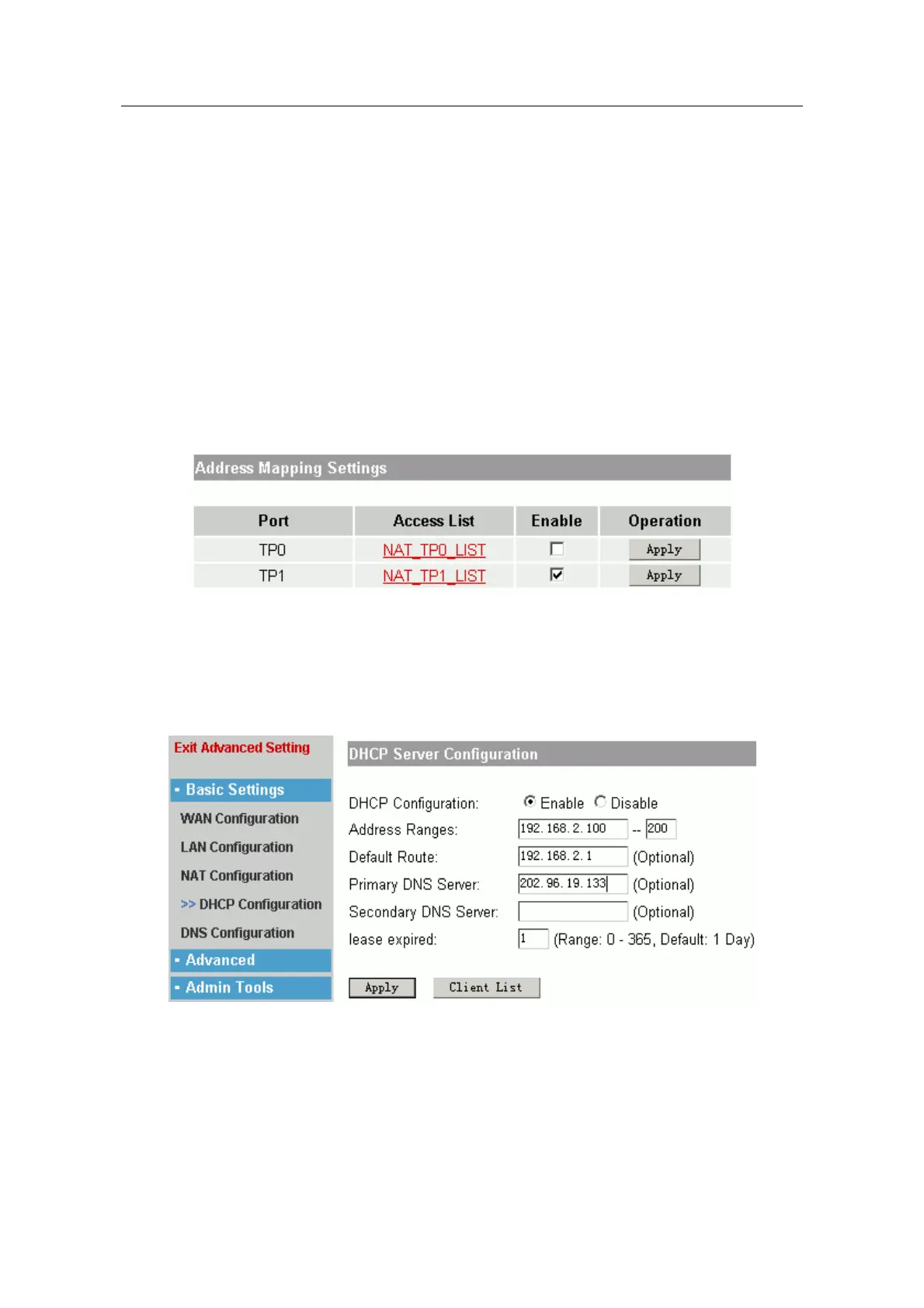
Third: Enable NAT function.
In the following page layout:
Select “Enable” and click “Apply” to make the list effective.
1.4.4 DHCP server configuration
This function is used to configure router as DHCP server, in order to distribute IP
address automatically for PC of LAN.
DHCP configuration: Enable or Disable.
Address range: fill in a IP address range for PC of LAN. ( The default subnet mask is
255.255.255.0).
Default Route: fill in the default router for PC in LAN, usually it is the IP address of port
that is connected LAN.
Primary or Secondary DNS server: fill in the IP address of DNS server for PC in LAN.
- 13 -



 To Next Page