1705Router Web Configuration Manual
1.5.1 Multiplex Line
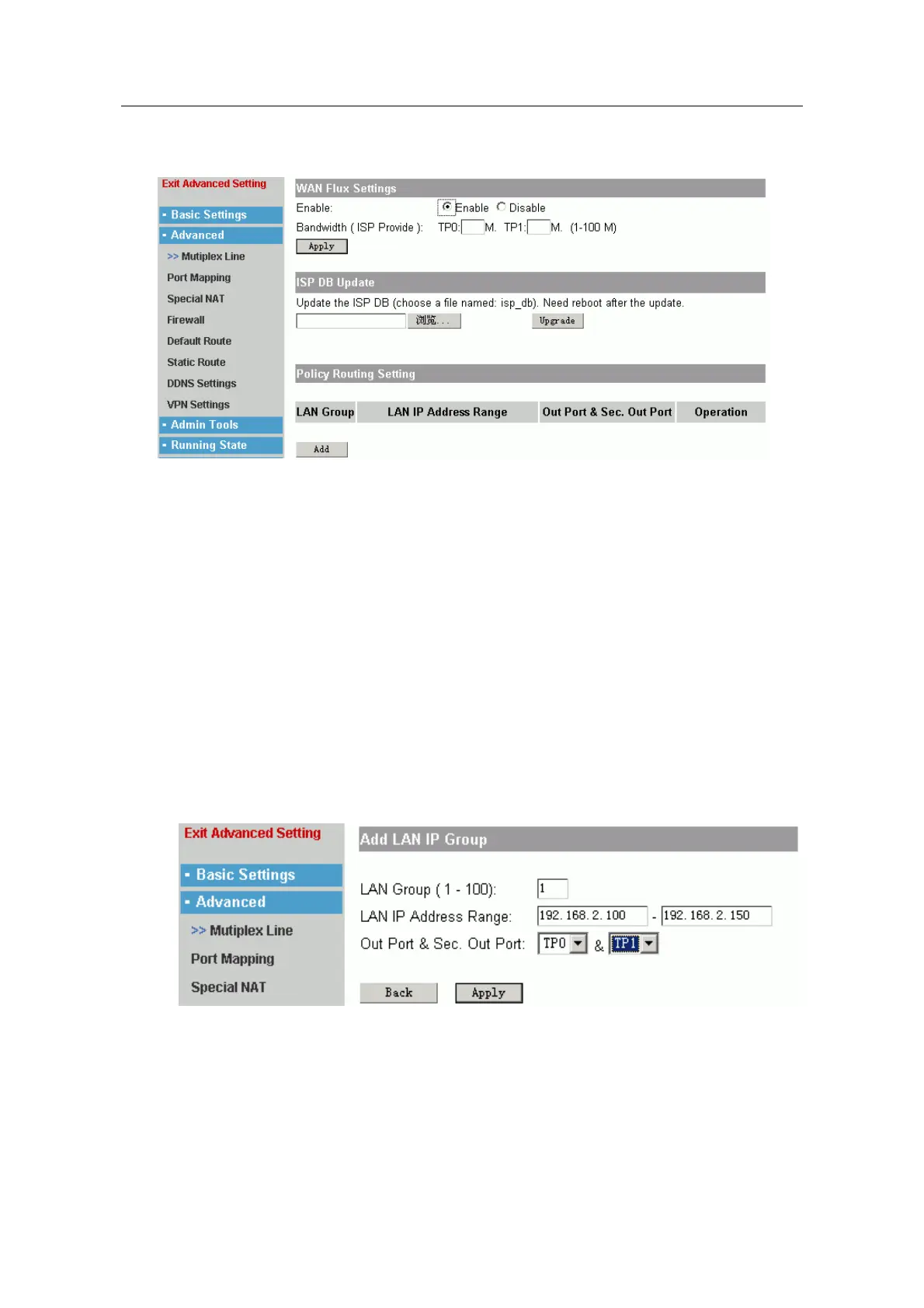
A. There are more WAN ports in router, and they can connect Internet at one time.
You could design the flux control of port according to bandwidth of every line.
You can use “ WAN Flux Setting” to achieve the control.
Enable: Enable or Disable.
Bandwidth: fill in the bandwidth provided by ISP.
Click “Apply” to make the configuration effective.
B. ISP DB Update. When system is warning that there is no file named “isp_db”, you
should click ”browse” to find this file, then click “Upgrade”, and reboot the router to
make the file effective.
C. “Policy Route Setting” is used to separate LAN into several parts, in order to make
every WAN port communicate with Internet normally.
For example: TP0 and TP1 are WAN ports, the address range of LAN is
192.168.2.100~192.168.2.200. We hope that separate LAN into two part:
192.168.2.100~192.168.2.150 browse Internet through TP0, and
192.168.2.151~192.168.2.200 browse Internet through TP1. Click “add” button:
LAN Group: fill in one number to mark different LAN net-segment.
LAN IP Address Range: fill in the address range in LAN.
Out Port & Sec. Out Port: select the WAN port to transmit the LAN's packets. (Also
can select another port as backup).
- 15 -



 To Next Page