1705Router Web Configuration Manual
1.5.2 Port Mapping
Port mapping is one of NAT. It is used to mapping the IP address in LAN or TCP/UDP
port of one IP address to public net, so that the users in public net could call some host
computer or serve that are in LAN.
Note:
They only call some service, but not all LAN.
For example: 192.168.2.10 and 192.168.2.11 are IP address in LAN, 202.192.2.10 and
202.192.2.11 are the rightful IP address. When 192.168.2.10 communicates with
Internet, the router will transform the source IP address of packet to 202.192.2.10, and
transmit this packet. When router receive a packet which destination IP address is
202.192.2.10, router will transform the destination IP address to 192.168.2.10 and
transmit it to host computer in LAN.
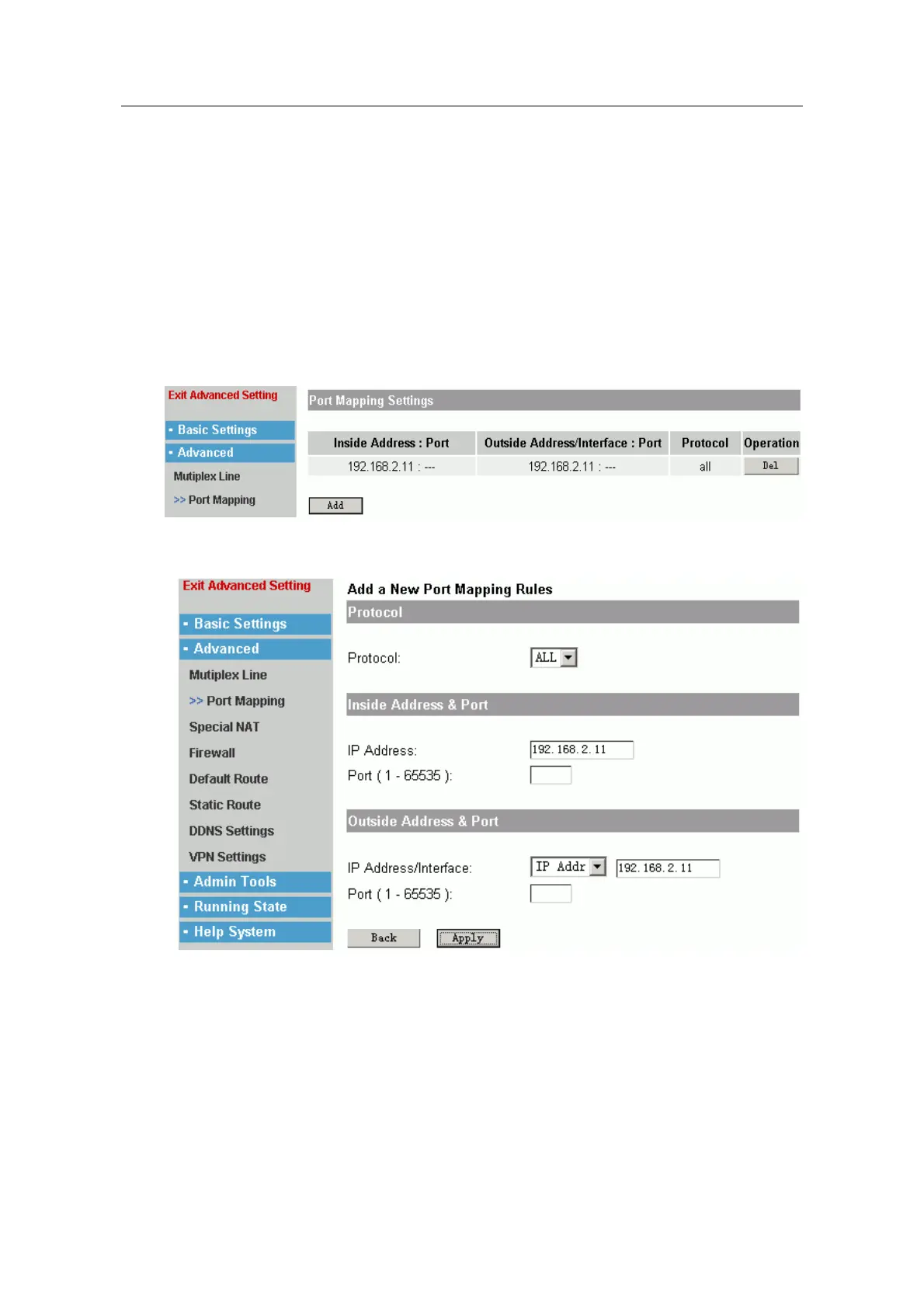
Click “add” to add the list.
Protocol: You can choose TCP, UDP or ALL. When you choose ALL, you will not design
port number.
Inside Address: It is a private address typical, that is address of host computer in LAN.
Inside port: Users could design port when inner host computer communicate with
outside.
Outside Address: It is a rightful IP address.
Outside Port: Design a external port number.
Click “Apply” to make the configuration effective, “Back” is cancel.
- 16 -



 To Next Page